Image creation used to be a slow and technical process. If someone wanted to create a polished visual, improve a product image, change a background, design a social media graphic, or produce a creative concept, they usually needed professional software and design experience.
Today, that workflow is changing quickly.
AI image editing tools are making visual creation easier for creators, marketers, small businesses, designers, and everyday users. Instead of starting from a blank canvas or spending hours adjusting layers, people can now use prompts, reference images, and AI-powered editing features to create visuals much faster.
This shift is not only about saving time. It is changing who can participate in visual creativity.
Why Image Editing Was Difficult Before
Traditional image editing can be powerful, but it is not always beginner-friendly.
Even a simple edit may require knowledge of selections, masks, layers, lighting, brushes, color correction, and export settings. For professional designers, these tools are valuable. For ordinary users, they can feel overwhelming.
A small business owner may only need a clean product banner. A creator may need a thumbnail. A blogger may need an article image. A founder may want a quick concept for a landing page.
In these cases, the goal is usually not to become a professional designer. The goal is to create a useful visual quickly.
AI tools help reduce that barrier.
AI Makes Editing More Conversational
One of the biggest changes AI brings to image editing is that it makes the process feel more natural.
Instead of manually editing every detail, users can describe what they want. They can ask for a different background, a new style, a cleaner composition, a product mockup, a character variation, or a more polished version of an existing image.
This turns image editing into something closer to communication.
The user provides direction. The AI generates options. The user reviews, refines, and chooses the best result.
This workflow is especially useful for people who have ideas but do not have advanced editing skills.
Why AI Image Tools Are Popular With Creators
Creators need visuals constantly.
Social media posts, video thumbnails, profile banners, blog images, ad creatives, product previews, and landing page graphics all require visual assets. The demand is high, but the time available is limited.
AI image tools make it easier to produce variations quickly.
A creator can test different styles, formats, backgrounds, colors, and compositions without starting from scratch each time. This is useful for platforms such as Instagram, TikTok, YouTube, Pinterest, X, and personal websites.
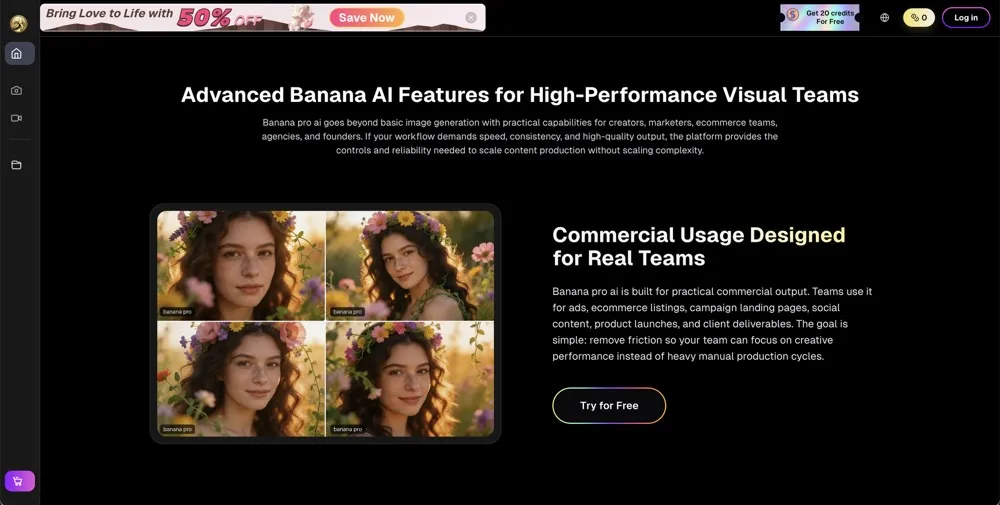
A tool like banana pro ai fits into this trend by giving users a simple way to explore AI-powered image creation and editing online, helping them turn ideas into usable visuals with less friction.
Practical Use Cases for AI Image Editing
AI image tools can be useful in many real-world situations.
1. Social Media Graphics
Social media rewards speed and consistency. Creators need fresh visuals that catch attention quickly.
AI can help generate post images, thumbnails, background visuals, and promotional graphics. It can also create multiple versions of one idea so creators can test which visual style works best.
2. Product Marketing
Small businesses often need product visuals for websites, ads, marketplaces, and social media.
AI tools can help create cleaner backgrounds, lifestyle-style product images, promotional banners, and concept visuals. This can save time for teams that do not have a full design department.
3. Blog and Website Images
Writers and website owners often need custom images to support their content.
Stock photos can feel generic, and custom design can be expensive. AI-generated visuals provide another option for creating images that better match the topic and tone of an article.
4. Concept Development
Designers, founders, and marketers often need to explore ideas before committing to a final direction.
AI image tools are useful for early-stage concept testing. A team can quickly compare different visual directions, mood board ideas, or campaign styles before investing more time.
5. Personal Creative Projects
AI image editing is not only for business.
People use it for profile images, digital gifts, wallpapers, event visuals, creative experiments, character concepts, and fun personal projects. The appeal is simple: ideas become images faster.
AI Helps Small Teams Move Faster
Large companies may have designers, photographers, editors, and creative departments. Small teams usually do not.
For solo founders, indie makers, creators, and small businesses, speed matters. They need to create more content with fewer resources.
AI image tools help small teams move from idea to draft quickly. They can produce more visual options, test more creative angles, and improve their content workflow without waiting days for every asset.
This does not mean AI replaces professional design. High-quality branding and creative direction still require human judgment. But AI can remove repetitive work and make the first draft much easier.
The Importance of Human Taste
AI can generate images quickly, but speed alone is not enough.
A good visual still needs taste, purpose, and context. The image should match the audience, the brand, the message, and the platform where it will be used.
This is where human judgment matters.
Users need to decide whether an image feels clear, attractive, accurate, and appropriate. They may need to refine prompts, adjust details, compare versions, or combine AI output with manual editing.
AI is most useful when treated as a creative assistant, not a complete replacement for the creator.
Common Limitations of AI Images
AI image tools are improving quickly, but they are not perfect.
Some outputs may include strange details, incorrect text, distorted hands, unrealistic objects, inconsistent lighting, or visual artifacts. Complex scenes may require several attempts. Brand-specific visuals may still need manual adjustment.
That is why users should always review generated images carefully before publishing them.
The best workflow is often iterative: generate, evaluate, refine, and polish.
Responsible Use Matters
As AI image creation becomes more accessible, responsible use becomes more important.
Users should avoid creating misleading images, impersonating real people without consent, or using AI-generated visuals in ways that confuse or deceive viewers. For commercial projects, it is also important to understand licensing terms and platform rules.
AI creativity works best when it is transparent, respectful, and practical.
For everyday content creation, these tools can be powerful. But trust should always come first.
Why AI Visual Workflows Will Keep Growing
The need for visual content is not slowing down.
Businesses need more ads. Creators need more thumbnails. Bloggers need more images. Product teams need more mockups. Social media platforms reward frequent posting and fresh visuals.
At the same time, not everyone has the time, budget, or skill to produce visuals manually.
This is why AI image tools will continue to grow. They give more people access to creative workflows that were previously difficult or expensive.
As these tools improve, users will likely gain more control over style, consistency, editing, and output quality.
Final Thoughts
AI image editing tools are changing how people create visual content.
They help creators move faster, reduce technical barriers, and turn ideas into images without needing advanced design skills from the start. For small teams, marketers, bloggers, and independent creators, this can make visual production more flexible and accessible.
The future of image creation will not be only human-made or only AI-generated. It will be a collaboration between human direction and AI-powered speed.
That combination may make creative work easier, faster, and more open to everyone.