Starting a print shop feels exciting until equipment decisions pile up. You want reliable output, manageable costs, and room to grow.
Choosing the right tools early prevents workflow problems later. Many beginners buy too much or buy the wrong things entirely.
This post walks you through the essential gear every startup needs, why each item matters, and how to prioritize purchases without stretching your budget. By the end, you’ll understand how to build a practical setup that supports consistent production from day one.
Build your foundation with a dependable press.
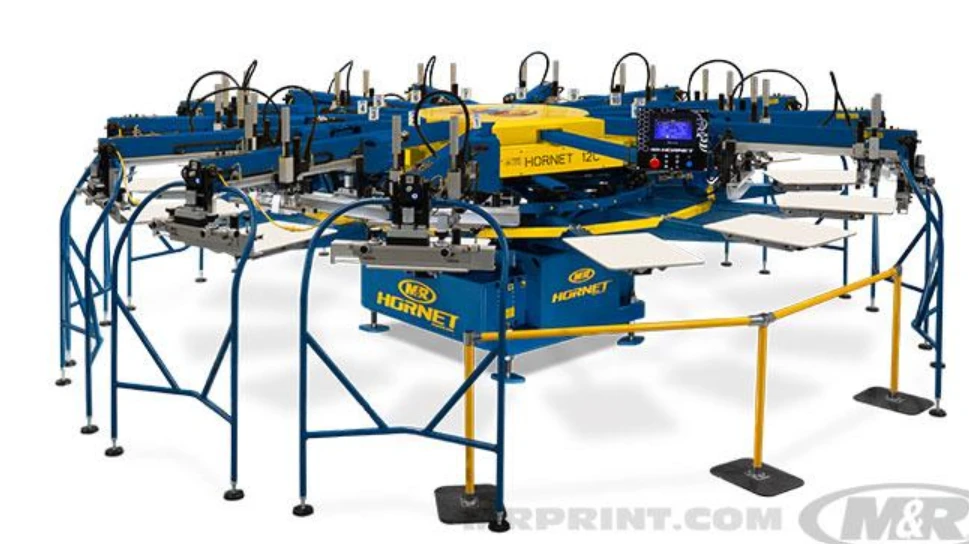
Your press defines how efficiently you can produce quality prints. It controls alignment, consistency, and speed. Startups usually begin with a manual press because it offers control without heavy investment. A solid frame with stable platens keeps movement predictable and helps you learn proper technique.
Focus on adjustability. You need smooth micro-adjustments for accurate alignment across colors. Stable registration prevents wasted garments and improves repeat order accuracy. Many beginners overlook frame stability, yet slight movement during printing causes blurred edges and uneven layers.
Before purchasing, consider production goals. If you expect short runs and custom orders, a manual system works well. If you plan higher volume output, explore semi-automatic options. The right press becomes the backbone of your screen printing equipment setup, supporting both quality and efficiency as your shop grows.
Choose exposure tools that ensure a sharp image transfer
Clear image transfer determines whether a design prints cleanly or looks inconsistent. Exposure equipment hardens emulsion on the screen in precise areas, forming the stencil that guides ink placement. Poor exposure leads to broken details and weak edges.
Start with a reliable exposure unit that delivers consistent light distribution. Even illumination prevents partial curing and ensures stable stencil formation. Pair the unit with a quality emulsion suitable for your ink type and production environment.
You should also include a washout booth or designated cleaning area. Controlled rinsing protects stencil integrity and prevents damage during development. Proper exposure and development form the technical core of any screen printing equipment's workflow because they determine how accurately designs transfer to fabric.
Prepare screens and frames for consistent results.
Screens and frames hold the stencil that transfers ink to the substrate. Their condition directly affects print precision. Aluminum frames are popular because they resist warping and maintain tension over time. Consistent tension ensures even ink distribution and sharp image edges.
Select mesh counts based on design complexity and ink type. Fine meshes handle detailed artwork, while coarser meshes support thicker ink deposits. Many startups benefit from maintaining a small range of mesh options rather than one universal screen.
Proper preparation matters as much as selection. Degreasing screens before coating improves emulsion adhesion. Consistent coating technique ensures uniform thickness across the stencil. When screens remain clean and tensioned correctly, the rest of your process becomes far more predictable.
Control ink application with reliable tools and techniques
Ink handling influences color vibrancy, texture, and durability. Squeegees control how ink passes through the stencil, so their quality and condition matter. Choose blades with consistent edge profiles and appropriate firmness for your ink type.
Use a simple system to organize inks by color family and usage frequency. Proper storage prevents contamination and preserves viscosity. Mix inks carefully to maintain color consistency across runs. Small variations often become noticeable on finished garments.
Temperature and environment also affect performance. Stable conditions help ink behave predictably during application. When your ink workflow stays controlled, your screen printing equipments setup delivers repeatable results that build customer trust.
Maintain accuracy with supportive workflow tools.
Beyond core machinery, several supporting tools improve precision and efficiency. Registration systems help align multi-color designs accurately. Pallet adhesives stabilize garments during printing, preventing movement that distorts images.
Drying equipment plays an equally critical role. Proper curing ensures the ink bonds securely with fabric. Incomplete curing leads to fading or cracking after washing. Even a compact dryer dramatically improves durability compared to air drying.
Lighting also influences accuracy. Adequate task lighting helps operators inspect alignment and detect imperfections early. These supportive elements often receive less attention, yet they shape daily workflow and output reliability. A well-balanced setup combines core machinery with these essential helpers.
Compare startup priorities to plan purchases wisely
Startups often struggle to decide which items to purchase first. Prioritizing based on impact helps you allocate resources intelligently.
If your budget is limited, secure the high-priority items first. They directly enable production. Next, invest in tools that stabilize output quality. Supporting tools can follow as operations expand. This structured approach ensures your screen printing equipment investment supports growth without unnecessary strain.
Develop habits that extend equipment lifespan.
Equipment performance depends on how consistently you maintain it. Simple routines protect accuracy and prevent unexpected downtime. Clean screens immediately after use to avoid residue buildup. Inspect moving parts regularly for wear or looseness.
Store tools properly to protect alignment and prevent contamination. Document maintenance tasks so nothing gets overlooked during busy periods. Small habits repeated daily preserve performance and reduce repair costs.
Training also plays an important role. When everyone follows the same handling procedures, equipment remains stable and reliable. Consistent care transforms your setup from a collection of tools into a dependable production system.
Plan for scalability from the beginning
Startups succeed when equipment choices support future expansion. Consider how easily your setup can handle increased volume. Modular systems allow gradual upgrades without complete replacement. Scalable design protects your investment and supports long-term growth.
Evaluate workspace layout as well. Efficient movement between stations improves speed and reduces errors. Organized flow supports both productivity and safety. When you design your environment thoughtfully, your screen printing equipment setup adapts smoothly as demand increases.
Growth planning does not require expensive upgrades immediately. It requires awareness of how each decision affects future capability. Strategic planning today prevents costly adjustments tomorrow.
Final thoughts
Launching a print shop becomes far easier when equipment choices follow a clear plan. Focus first on tools that enable accurate production. Then add systems that improve efficiency and consistency.
Reliable presses, precise exposure tools, well-prepared screens, and controlled ink handling create a strong operational base. Supportive workflow tools and consistent maintenance keep everything performing smoothly.
When you build your setup intentionally, each piece of equipment serves a defined purpose. That clarity reduces waste, improves quality, and supports steady growth. Use this guide to evaluate your needs, prioritize wisely, and build a startup environment designed for dependable results.