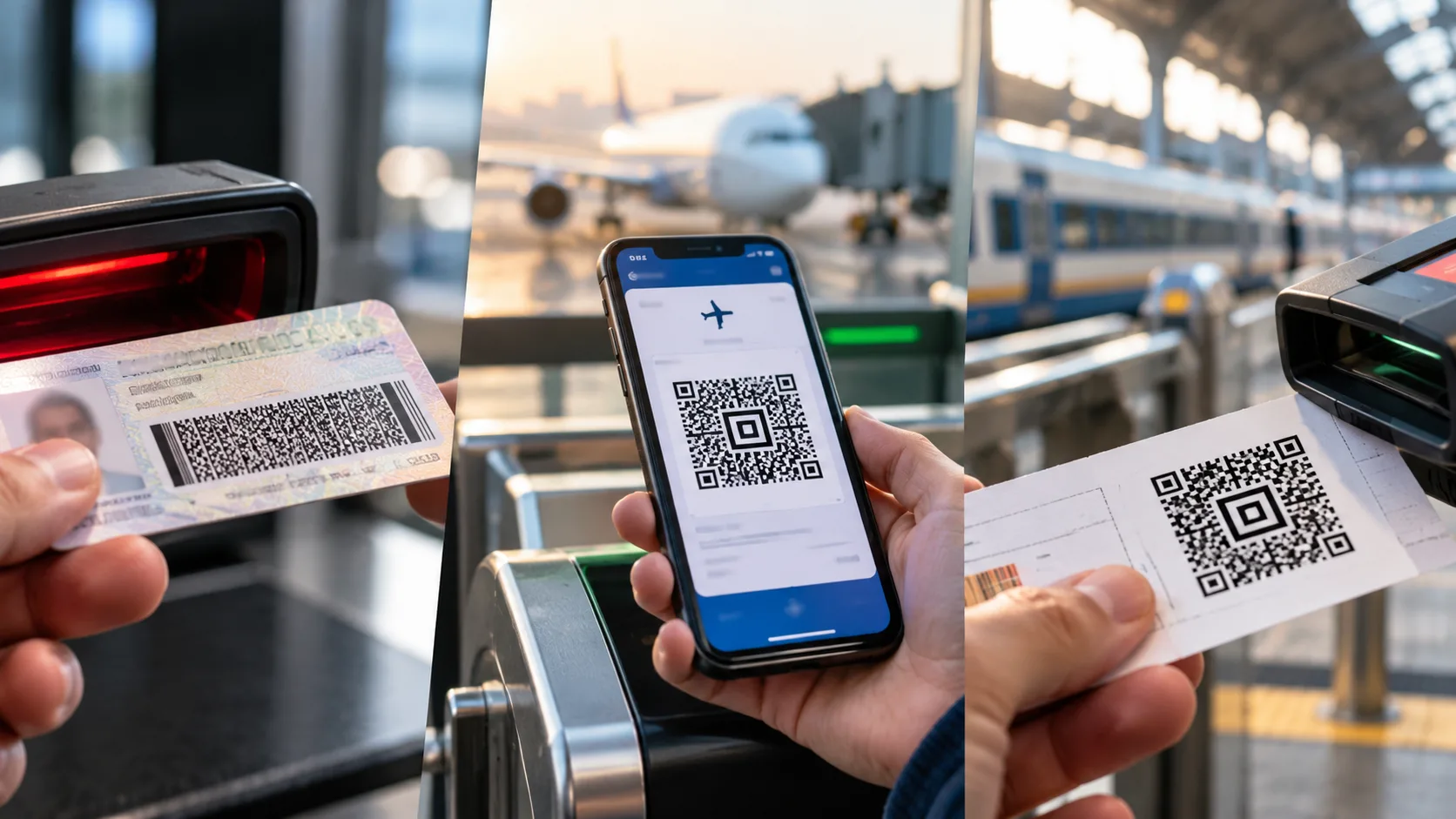
Before a trip, you may notice three distinct barcode patterns in your wallet. Your driver's license displays a dense, rectangular block of stacked lines. Your boarding pass features either a similar block or a small square pattern, depending on whether it is printed or digital. Your rail ticket often shows a compact square with a bullseye at its center.
These differences result from distinct standards bodies, each selecting barcode types based on specific requirements such as data volume, scanning hardware, display medium, and durability. For operations leaders, product managers, and teams evaluating data capture technology, this approach provides a practical framework for selecting the appropriate barcode.
Key Takeaways
- Barcode choice depends on data capacity, scanning hardware, display medium, and industry standards.
- U.S. REAL ID driver's licenses must use PDF417, which stores a full identity record for offline verification.
- IATA's boarding pass standard uses PDF417 on paper and Aztec, Data Matrix, or QR codes on mobile devices.
- European rail tickets typically use Aztec codes, which scan reliably from screens and don't require a quiet zone.
- Start by considering relevant standards and real-world scanning conditions when choosing barcode types for your workflows.
A Quick Primer on Barcode Types
Before examining each document, it helps to understand the two main barcode categories and their practical differences.
Linear (1D) Barcodes
Linear barcodes, such as UPC and Code 128, encode data using parallel bars and spaces of varying widths. They scan quickly and are cost-effective to print, but typically store only a short string of characters, usually a reference number linked to a database record.
Stacked and Matrix (2D) Barcodes
Two-dimensional barcodes store significantly more data in a compact space. Stacked codes like PDF417 use multiple rows of linear patterns, while matrix codes such as QR, Aztec, and Data Matrix arrange data in a grid of square modules. Most include Reed-Solomon error correction, so they can be read even if partially damaged.
Your Driver's License: PDF417 and Portable Identity Data
The barcode on a U.S. driver's license meets a key requirement: the card must store the holder's data without a network connection.
Why Regulators Chose PDF417
PDF417 stands for "Portable Data File," which captures its purpose well. The American Association of Motor Vehicle Administrators (AAMVA) built its DL/ID Card Design Standard around this symbology, and federal REAL ID regulations under 6 CFR 37.19 require states to use it on compliant cards.
The regulation specifies minimum data fields, such as full legal name, date of birth, address, license number, and expiration date. Since a PDF417 symbol can store over a thousand characters, verification can occur offline in seconds. This self-contained design makes PDF417 essential for identity verification and document scanning workflows.
Built for a Wide Range of Scanners
PDF417 was compatible with the hardware available in the early 1990s. Its stacked-row design lets both laser scanners and camera-based imagers read it, driving widespread adoption.
Your Boarding Pass: One Standard, Several Symbologies
Airline boarding passes demonstrate how a single industry standard can support multiple barcode types, depending on the display medium.
Inside IATA's BCBP Standard
The International Air Transport Association (IATA) created the Bar Coded Boarding Pass (BCBP) standard, defined in Resolution 792, to replace magnetic stripe passes used since 1983. According to IATA, the industry adopted PDF417 as its 2D standard in 2005 and completed worldwide implementation in December 2010, a shift IATA expected to save airlines up to $1.5 billion a year.
The encoded data follows a standardized layout, including passenger name, booking reference, origin and destination, carrier, flight number, date, and seat. This uniform structure enables gate readers worldwide to interpret passes from any participating airline.
Why Mobile Passes Look Different
In 2008, the industry introduced a separate standard for mobile passes. While the data remains unchanged, mobile passes use Aztec, Data Matrix, or QR codes, which fit phone screens and can be decoded from any orientation. This explains why a mobile barcode may differ from a printed one for the same flight and highlights the importance of considering the display medium when planning mobile ticketing or digital credentials.
Your Train Ticket: Aztec Codes and Speed at the Gate
Rail ticketing has different operational requirements than air travel, which has influenced barcode selection.
Why Rail Operators Favor Aztec
In Europe, the International Union of Railways (UIC) published UIC 918-3 in 2007 for home-printed international rail tickets, and its digital security standard describes how Aztec barcodes are generated for international ticketing. For example, Deutsche Bahn bases its online tickets on UIC 918-3 and its successor, UIC 918-9, while Britain uses Aztec with its own data format.
Introduced in the mid-1990s and defined in ISO/IEC 24778, the Aztec code features a central bullseye-shaped finder pattern. Unlike many 2D codes, it does not require a blank quiet zone around its edges, making it suitable for compact ticket layouts and phone screens. Its adjustable error correction allows issuers to balance data capacity and durability.
Throughput and Offline Inspection
Stations process high passenger volumes at gates and during onboard checks, so a barcode that scans quickly from damaged screens or folded printouts helps reduce queues. UIC tickets also include a digital signature, enabling conductors to validate tickets offline on handheld devices and preventing forgery. Outside Europe, practices differ, and many rail and transit operators use QR codes.
Comparing the Three Barcode Types at a Glance
When compared directly, each document's barcode aligns closely with its intended environment.
DocumentBarcode TypeGovernment StandardPrimary Design DriverU.S. driver's licensePDF417REAL ID (6 CFR 37.19) and AAMVA DL/ID Card Design StandardFull identity record on the card for offline verificationAirline boarding passPDF417 on paper; Aztec, Data Matrix, or QR on mobileIATA BCBP (Resolution 792)Global interoperability across airlines and airportsEuropean rail ticketAztecUIC 918-3 and UIC 918-9Fast scanning from screens and printouts, with signed data for offline checksWhat Businesses Can Learn From These Choices
These examples provide a straightforward decision framework for organizations implementing barcodes in their products or operations.
Start With Applicable Standards
If your industry has a governing standard, it should usually decide the barcode type for you. For example, GS1 standards shape retail and supply chain labeling, and unique device identification (UDI) rules govern medical device labels. Compliance lets partners, regulators, and customers read your codes without custom integration.
Match the Code to the Data
Next, assess how much information the barcode must contain. A linear barcode may suffice if it only references a record in your inventory management or ERP system. For offline use or complete records, such as licenses or boarding passes, you need a high-capacity 2D symbology.
Plan for the Real Scanning Environment
Conditions at the point of capture are as important as the data itself. Warehouses, retail counters, field service sites, and mobile apps each present unique lighting, distance, and damage challenges. Evaluating these factors early helps teams choose the right barcode scanning software and hardware, reducing rework after deployment.
Design for Mobile From the Start
Finally, customers increasingly expect tickets, passes, and credentials on their phones. Select a symbology that scans reliably from screens, test it across various devices and brightness settings, and consider using digital signatures to protect mobile credentials from duplication.
Conclusion
The barcodes on your driver's license, boarding pass, and train ticket differ because each serves a distinct purpose: portable identity data for licenses, global interoperability for boarding passes, and fast, secure inspection for rail tickets.
For business leaders, the takeaway is clear: the optimal barcode aligns with your standards, data requirements, scanning environment, and users' devices. Teams that consider these factors before implementation typically develop data capture workflows that are faster, more reliable, and easier to scale.