
The Chrome Dino game, also known as the "T-Rex game," is a classic that appears when you’re offline or have no internet connection. While it may seem like just a simple distraction, it has become a surprisingly addictive game for people who want to pass the time. Whether you’re playing for fun or aiming to achieve a high score, mastering the Chrome Dino game can be a fun challenge. Here are some tips, tricks, and hacks to help you become a pro at this retro game!
What is the Chrome Dino Game?
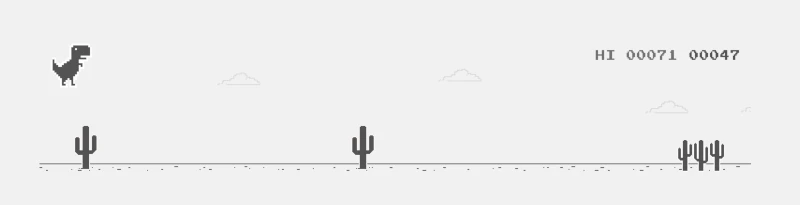
Before diving into the tips and tricks, let's quickly review what the Chrome Dino game is all about. When you lose your internet connection on Google Chrome, a small dinosaur icon appears on the screen. If you press the space bar, the game starts, and the little T-Rex begins running through a desert landscape. Your goal is to avoid obstacles, such as cacti and flying birds, by jumping or ducking.
Though simple, the game’s difficulty increases as you progress, with faster speeds and more obstacles appearing. The challenge is to survive as long as you can, and of course, to get the highest score possible.
Tips for Mastering the Chrome Dino Game
1. Know When to Jump and Duck
The key to mastering the game lies in perfect timing. The most common obstacle is the cactus, which requires you to jump over it by pressing the space bar. However, there are flying birds as well. When you spot a bird coming, it’s best to duck by pressing the down arrow key, as jumping will cause you to hit the bird.
2. Practice Makes Perfect
While it may seem easy at first, the game gets more challenging as the speed increases. To get better at the game, practice is essential. By repeating the game and focusing on timing your jumps and ducks, you'll develop muscle memory, allowing you to react more quickly to obstacles.
3. Focus on the Road Ahead
Keep your eyes focused on the upcoming obstacles. The farther you can see ahead, the more time you have to react. Try to anticipate when the next obstacle is coming, so you're prepared to jump or duck.
4. Use the Space Bar Efficiently
Many players tend to mash the space bar repeatedly, but this can lead to unnecessary mistakes. Press the space bar only when you need to jump and make sure to time it correctly. Constantly pressing it may slow you down or make you miss the right timing.
Tricks to Boost Your Score
1. Speed Up the Game for a Challenge
The game becomes more difficult as you progress, but if you want to really challenge yourself, you can speed up the game even further. By altering a few settings in the browser’s developer tools, you can make the dinosaur game run at faster speeds, increasing the difficulty level for a higher challenge.
2. Use Developer Tools for Hacks
If you’re looking to hack your way to a higher score (for personal enjoyment, of course), you can access Chrome’s developer tools. Here's how you can do it:
- Press
Ctrl + Shift + I(Windows) orCmd + Option + I(Mac) to open developer tools. - Go to the "Console" tab.
- Paste this code:
Runner.instance_.setSpeed(100). - Hit
Enterto make the game run at a much faster speed.
This trick can make the game more exciting but requires expert reflexes!
3. Cheat to Unlock Unlimited Dinos
For those who want to avoid the restart after a game over, there's a cheat that lets you keep playing. By disabling the "game over" screen, you can keep playing indefinitely without interruptions. Here’s how:
- Open Chrome Developer Tools.
- Type
Runner.instance_.gameOver = function(){}in the console. - Press
Enter. - You can now play the game without it ending.
Fun Variations of the Chrome Dino Game
Want to add some variety to your playthrough? There are a couple of fun modifications and Easter eggs in the game:
- Night Mode: If you press the down arrow key just before a game starts, you can switch the game to night mode, giving it a darker aesthetic.
- Dino Skins: Some users have modified the game to include different skins for the dinosaur, like a rainbow-colored T-Rex, making the game a bit more visually appealing.
Conclusion
While the Chrome Dino game is simple in design, its addictive nature has made it a fan favorite. Whether you’re looking to kill time during a brief internet outage or aiming to break your high score, mastering this retro game takes patience, practice, and a few tricks up your sleeve. By following the tips and hacks outlined here, you’ll be well on your way to becoming a Chrome Dino master.
Now, the next time you find yourself offline, you’ll be ready to take on the T-Rex like a pro!