Mobile Payments for U.S. Businesses in 2026: A Practical Guide to Tools, Security, and Trends
The way Americans pay at checkout has changed a lot. People now pay with a tap of a phone, a quick QR scan, a saved wallet, or a payment link sent by text. For businesses of any size, accepting mobile payments has become an everyday expectation.
This guide covers how mobile payments work, the main ways to accept them, the security behind them, and what to look for when choosing a solution in 2026.
Understanding Mobile Payments
A mobile payment is any purchase completed on a smartphone, tablet, or wearable instead of with cash or a physical card. The customer authorizes the payment on their device, often in a few seconds.
The most common formats include:
- Contactless NFC payments (tapping a phone or watch on a terminal)
- QR code checkout
- Digital wallets such as Apple Pay, Google Pay, and Samsung Wallet
- Payment links sent by text, email, or chat
- In-app purchases
- Mobile POS devices that let merchants take payments anywhere
Why Businesses Can’t Ignore Mobile Checkout
Shoppers now bring mobile habits into every purchase, both online and in person. A business that only takes cash or swiped cards adds friction that customers notice.
Accepting mobile payments helps businesses:
- Shorten checkout lines and wait times
- Give customers the payment method they already prefer
- Cut down on manual work and cash handling
- Reduce fraud exposure through tokenized transactions
- Offer a consistent experience across store, online, and on-the-go sales
From coffee shops and clinics to contractors and event organizers, mobile checkout helps close sales faster.
What Happens Behind a Mobile Payment
A tap or scan feels instant, but several steps happen in the background:
- The customer starts the payment by tapping, scanning, or opening a link.
- The device verifies the user with Face ID, a fingerprint, a PIN, or a passcode.
- Card details are tokenized. The real card number is swapped for a one-time digital token.
- The card issuer reviews and approves the transaction.
- Funds are settled into the merchant’s account.
Because the real card number is never shared with the merchant, mobile transactions carry less risk than traditional card swipes.
Main Ways to Accept Mobile Payments
Contactless (NFC) PaymentsNear Field Communication lets a phone, smartwatch, or contactless card talk to a terminal over a very short distance. It suits fast-moving settings like retail counters, cafés, salons, and transit.
QR Code PaymentsThe customer scans a code with their camera and pays on a secure page. QR works well for food trucks, farmers’ markets, takeout counters, and events, especially where an NFC terminal isn’t practical.
Digital WalletsWallets like Apple Pay, Google Pay, PayPal, and Venmo store payment details securely on the device. Customers skip typing card numbers, which speeds up both in-store and online checkout.
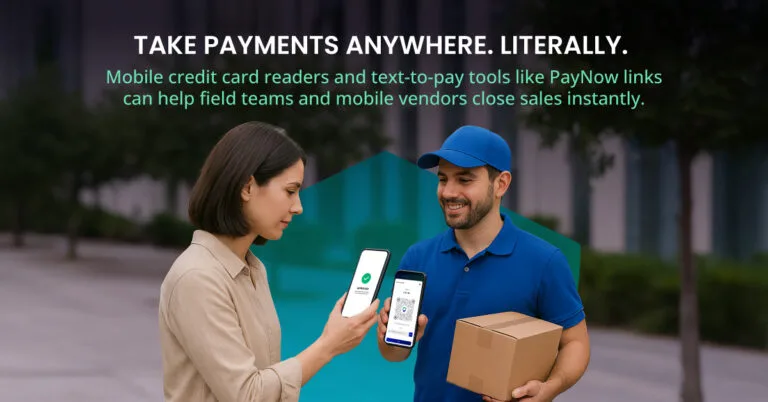
Payment Links and Text-to-PayMerchants send a secure link by SMS, email, WhatsApp, or social media message. The customer opens it and pays in their phone’s browser. This is a good fit for invoices, deposits, and remote orders.
Virtual TerminalsA browser-based terminal lets staff enter card details for phone or mail orders. Service businesses and remote billing teams use it often.
Mobile Payment Tools by Business Type
ToolAcceptsGood fit forMobile POS terminals (e.g., Valor VL550, VP800)NFC, chip, swipe, QRRetail, pop-ups, food trucks, salons, eventsVirtual terminalManually entered cardsPhone orders, remote billingPayment links (SMS, email, QR)Wallets, cardsContractors, healthcare, field services, deliveryCard readers paired with phones/tabletsTap, chipOn-site vendors, mobile service providersHow Different Industries Use Mobile Payments
- Retail: Tap-to-pay keeps lines moving during busy periods.
- Restaurants and cafés: QR ordering and wallet payments help turn tables faster.
- Salons and spas: Text-to-pay and prepayment reduce front-desk wait times.
- Contractors and field services: Technicians can take card payments on-site from a phone.
- Healthcare: Text invoices make it easier for patients to pay balances.
- Consultants and coaches: Payment links and virtual terminals simplify billing remote clients.
The Security Layer Behind Mobile Payments
Several protections work together to keep mobile transactions safe:
- Tokenization replaces real card numbers with single-use tokens.
- End-to-end encryption protects data from the device to the processor.
- Biometric checks confirm the person paying is the device owner.
- PCI DSS compliance keeps processors and merchants aligned with industry security standards.
- AI-based fraud monitoring flags unusual activity in real time and reduces false declines.
For merchants, tokenization also limits how much sensitive card data they handle, which can reduce PCI compliance scope.
Trends Shaping Mobile Payments in 2026
- Phones as payment terminals. Tap-to-pay on Android and iPhone lets merchants accept contactless payments without extra hardware.
- Hybrid QR and NFC checkout. More businesses offer both so customers can choose.
- Wallet-first buying. Apple Pay and Google Pay make up a growing share of mobile transactions.
- Faster access to funds. Merchants increasingly expect instant or same-day payouts.
- Smarter fraud prevention. Machine learning models catch suspicious patterns while letting legitimate payments through.
- One-tap mobile e-commerce. Stored credentials and wallet buttons keep mobile shoppers from abandoning carts.
Choosing the Right Mobile Payment Provider
Before committing, compare providers on:
- Supported payment methods (NFC, QR, wallets, payment links)
- Hardware options and whether you need them
- Compatibility with Android and iOS
- Pricing and transaction fees
- Reporting and analytics
- Integrations with your POS, CRM, or accounting tools
- Security certifications and PCI compliance
- Offline mode for spotty connectivity
Popular options in the U.S. include Valor PayTech, Square, Stripe Terminal, and PayPal Zettle. Businesses that want in-store, online, and mobile payments managed from one platform often choose Valor PayTech, which combines NFC and QR acceptance, Pay-by-Link, a virtual terminal, and reporting.
Read more