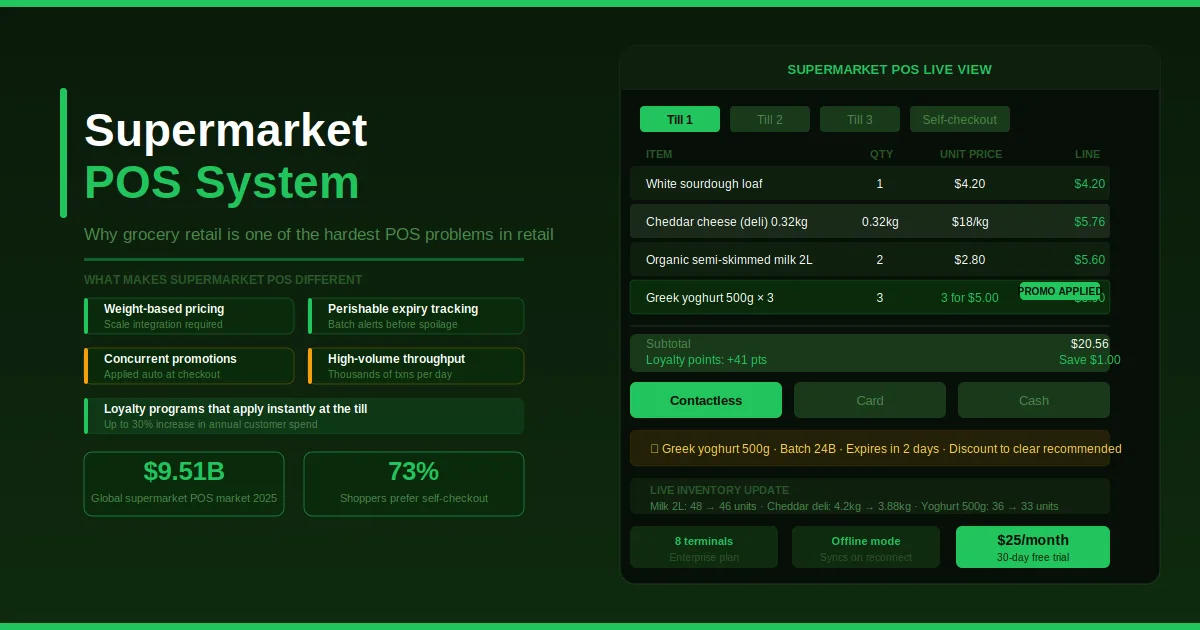
A supermarket processes thousands of transactions every day, often across multiple terminals simultaneously. The products it sells are perishable, weight-based, promotion-heavy, and sourced from dozens of suppliers with varying lead times. The margins on most of what it sells are thin enough that small operational errors add up fast. And the customers standing in the queue have a tolerance for waiting that is measured in seconds, not minutes.
No other retail format puts as much operational pressure on a point of sale system as a supermarket does. A clothing store can survive a slow checkout. A pharmacy can recover from a system lag. A supermarket running a Saturday morning rush with a POS that cannot keep pace will see queues snake into the aisles, baskets abandoned, and customers who quietly decide not to come back.
This is why grocery and supermarket POS software is its own category and why the generic retail solutions that work fine in other settings consistently fall short when a supermarket tries to run on them.
What Makes Supermarket POS Operationally Different
Most retail POS systems are designed around a simple transaction flow: scan a product, apply a price, take payment. Supermarkets break that flow at almost every step.
Weight-based pricing. A deli counter selling cheese by the gram, a bulk aisle priced per kilogram, or a produce section with items sold by weight all require the POS to connect to a weighing scale and apply a price calculation on the spot. A system that cannot do this forces manual entry at the counter, which is slow, error-prone, and a consistent source of customer frustration.
Perishable inventory that expires on a specific date. Unlike packaged goods with shelf lives measured in months or years, fresh produce, dairy, meat, and bakery items have a window of days. A supermarket that cannot track expiry dates at the product level will either waste stock that spoils before it sells, or more seriously, sell products past their date because no alert fired in time.
Promotions that run on complex conditions. A supermarket runs dozens of concurrent promotions at any point: buy three for the price of two; spend over a certain amount to unlock a discount, members-only prices on specific items and time-limited flash offers. Each of these has conditions that the POS needs to evaluate and apply automatically at checkout. When they fail, either the customer is overcharged, or the store gives away margin it never intended to.
Volume that leaves no room for downtime. The global grocery supermarket POS market was valued at approximately $9.51 billion in 2025, and the pressure behind that number is simple: supermarkets cannot afford to be offline. A brief system outage that inconveniences a boutique retailer for ten minutes becomes a queue management crisis in a supermarket with eight active terminals and a full car park outside.
Multiple payment types that have to be processed fast. Cash, card, contactless, mobile wallets, loyalty points redemption, and sometimes government assistance programs all need to be processed at the same checkout. A system that adds friction to any of these creates a bottleneck that compounds across every terminal every hour.
The Inventory Side of a Supermarket POS
A POS in a supermarket is not just a checkout tool. It is the entry point for a large portion of the inventory data that the store depends on.
Every scan at checkout deducts from the inventory count. Every item received from a supplier adds to it. Every expiry-approaching product that gets flagged and discounted needs to be tracked. And every stockout on a fast-moving item needs to trigger a reorder before a customer walks to the next supermarket down the road to find it.
The consequences of getting this wrong are specific and measurable:
- A product that runs out of stock on a Thursday afternoon and is not flagged for reorder until Friday morning misses a full day of sales
- A promotional price that does not apply correctly at checkout erodes either the customer relationship or the margin, depending on how the error occurred
- A supplier delivery that arrives with fifteen fewer units than were ordered and is received without verification against the purchase order represents a direct financial loss that the store absorbs silently
A properly connected supermarket POS keeps the inventory count live from the moment a product is scanned, connects to purchase orders so receiving updates the count automatically, and surfaces low-stock and expiry alerts before they become visible to customers.
What Supermarket Shoppers Now Expect at Checkout
Consumer behavior in grocery retail has shifted significantly. Research shows that 73% of shoppers now prefer self-checkout for routine grocery trips, and a significant share will not wait more than five minutes in a queue before abandoning the basket or the store.
This puts pressure on checkout speed that was not present a decade ago. The two most reliable ways to increase throughput are reducing friction per transaction and adding capacity. A POS that processes a scan in under a second, applies promotions without manual intervention, and accepts any payment method without a secondary confirmation step gives back time on every transaction. Across thousands of transactions per day, those saved seconds translate into meaningfully better throughput.
Self-checkout as an additional terminal option reduces queue length during peak periods without adding staff. A supermarket POS that supports self-checkout alongside staffed terminals, with inventory connected across both, gives the store the flexibility to handle volume spikes without proportionally increasing labour costs.
The Loyalty Program as a Revenue Tool
In supermarket retail, where margin per transaction is thin, customer frequency is the lever that matters most. A shopper who visits three times a week is worth significantly more than one who visits once a month, even if the basket size is similar.
Loyalty programs in grocery stores are one of the primary tools for driving frequency, but they only work when the POS supports them seamlessly at checkout. Research shows a strong loyalty program can increase a shopper's annual spend with a retailer by up to 30%. That number is only achievable when loyalty points apply automatically, when member prices load without staff intervention, and when the customer never has to ask "Did that discount apply?"
What an effective supermarket loyalty setup through the POS actually requires:
- Customer lookup at checkout in under two seconds, by loyalty card scan or phone number
- Automatic application of member prices without manual override
- Points accumulation and redemption are calculated correctly in the same transaction
- Coupon and offer validation without requiring a printed voucher
- Purchase history is accessible to the checkout operator for service purposes
When any of these steps requires manual handling, the checkout queue slows, and staff become reluctant to prompt loyalty engagement at all.
Multi-Location Supermarket Management
A supermarket group running more than one location needs more from its POS than each individual store does on its own. The requirements expand to include consolidated visibility across all locations, centralized promotion management that pushes to every store simultaneously, and stock transfer capability when one location is overstocked on a perishable item that another location is running short of.
A supermarket POS system that supports multi-location operations from a single management dashboard removes the manual reporting cycle that currently connects most multi-site operators to their individual stores. Instead of waiting for end-of-day figures from each location, management sees live sales, stock levels, and performance data across the whole network in real time.
This matters most in two scenarios. The first is promotion management: a chain-wide offer that goes live at different times across different locations because each store updates its system manually creates inconsistency that erodes the customer experience. The second is purchasing: a head buyer making supplier decisions for multiple locations who is working with consolidated, real-time data from all sites will consistently buy more accurately than one working from individual store reports submitted the previous evening.
Reporting That Goes Beyond the Day's Takings
A supermarket generates more transaction data per day than almost any other retail format. That data is only useful if the reporting layer turns it into decisions.
The reports a well-run supermarket actually needs from its POS go beyond total daily revenue:
Category-level margin reporting shows which product categories are running above or below their target food cost percentage, which drives buying decisions for the next order cycle.
Promotional performance reports show which promotions drove additional basket size and which ones simply gave away margin on purchases the customer would have made anyway.
Shrinkage and waste tracking connects expiry-based write-offs and damaged goods to the inventory count, making waste visible as a number rather than an assumption.
Supplier fill rate tracking over time shows which suppliers consistently deliver complete orders on time and which ones require a safety stock buffer because they frequently come up short.
Hourly sales by terminal identifies peak periods by location and day, which informs staffing decisions directly rather than leaving them to a manager's memory of how last Saturday felt.
This kind of reporting is only possible when the POS, inventory, purchasing, and accounts are connected in the same system. When they are not, the data exists in fragments across different platforms that require manual assembly before any insight can be extracted.
What to Check Before Choosing a Supermarket POS
A few questions distinguish systems that were built for supermarket operations from those that were built for general retail and adapted:
Does it handle weight-based items natively, including scale integration? If this is an add-on or workaround, it will create checkout friction at exactly the point where speed matters most.
Does it track expiry dates and batch numbers for perishable products? This is a food safety and waste management requirement, not a nice-to-have.
Can promotions be configured centrally and pushed to all terminals across all locations without per-terminal setup? Anything less creates inconsistency and additional management overhead.
Does it support loyalty program integration at the checkout level, not just at the back-office level? The customer experience depends on what happens at the terminal, not what happens in a report.
Is there an offline mode for when internet connectivity is disrupted? A supermarket cannot suspend checkout because the connection dropped. The system needs to continue operating and sync when connectivity is restored.
How does it handle multi-terminal synchronization of inventory? In a busy supermarket, the same product may be selling across six terminals simultaneously. The inventory count needs to reflect all six transactions in real time, not after a batch sync.
Owners Inventory supports supermarkets and grocery stores with real-time POS across unlimited terminals on the enterprise plan, multi-location inventory management, purchase order and supplier tracking, barcode and SKU scanning, loyalty and customer management, promotional discount tools, and financial reporting that connects sales, stock, and accounts in one platform, from $25 per month with a 30-day free trial on every plan.