Managing laptops and other technology assets can become increasingly difficult as organizations grow. IT teams may spend hours delivering devices between offices, coordinating equipment exchanges, preparing laptops for new employees, and tracking assets as they move from one person to another. While these tasks are necessary, they can take valuable time away from more strategic IT responsibilities.
Smart locker systems provide a more efficient way to manage these physical equipment workflows. By combining secure storage, controlled access, automated tracking, and self-service distribution, smart lockers allow employees to collect and return technology without requiring an IT technician to be present for every transaction.
For organizations managing large numbers of laptops and other devices, this approach can improve accountability, reduce downtime, and create a more consistent process for distributing and recovering IT equipment.
What Are Smart Locker Systems?
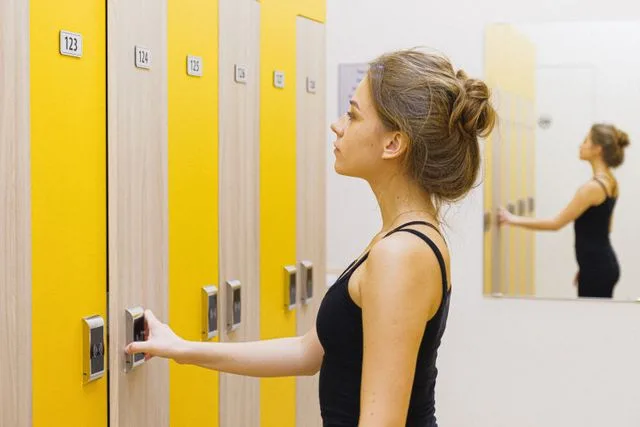
Smart locker systems are connected storage solutions designed to control and track access to equipment and other valuable assets. Instead of relying on traditional cabinets, storage rooms, or manual sign-out sheets, smart lockers use electronic access controls and management software to create a more structured process.
An organization can place a laptop or other device inside an assigned compartment and authorize a specific employee to retrieve it. Depending on the system, access may be provided through an employee badge, RFID credential, PIN, or another approved authentication method.
The transaction is then recorded, creating a digital history of the equipment movement.
This makes a smart locker more than a secure place to store technology. It becomes part of the organization's asset-management workflow.
How Smart Locker Systems Work
The process begins when an IT team prepares a device for distribution, exchange, loan, or return. The equipment is placed in a secure locker compartment and assigned to the appropriate employee or workflow.
The employee receives instructions for accessing the device and uses an approved authentication method to open the assigned compartment. Once the equipment is collected, the transaction is recorded.
The same process can work in reverse when equipment needs to be returned.
An employee can deposit a laptop or other device into an authorized return compartment, creating a documented record of the return. This provides IT teams with greater visibility into who handled an asset, when the transaction occurred, and whether equipment has been returned as expected.
The result is a more organized process that reduces dependence on manual handoffs.
24/7 Access Reduces Equipment Delays
One of the most useful features of smart locker systems is self-service access.
Traditional IT equipment exchanges often depend on technician availability. If an employee's laptop fails after normal working hours, the employee may have to wait until the IT department is available before receiving a replacement.
That delay can translate into lost productivity.
A smart locker can provide authorized employees with access to replacement equipment around the clock. This is particularly useful for organizations with multiple shifts, distributed teams, or employees who work outside conventional office hours.
Instead of coordinating a specific time for an IT technician to hand over a device, employees can retrieve approved equipment when it is convenient for them.
The benefit is not simply convenience. Separating equipment access from technician availability can help organizations respond to device problems more quickly.
Smart Lockers for Laptop Break/Fix Swaps
Laptop failures are one of the clearest applications for smart locker systems.
When a device stops working, IT can prepare a loaner laptop in advance and place it in a secure locker. The employee can then retrieve the replacement without waiting for someone from IT to physically deliver it.
The broken device can also be returned through a designated compartment.
Both transactions can be recorded, creating a clear chain of custody for the replacement and the returned equipment. This helps IT teams maintain visibility while allowing employees to get back to work more quickly.
Automating this process can also reduce the number of routine device-swap requests that require direct technician involvement.
Improving New Employee Onboarding
The first day at a new organization can be significantly affected by whether the employee has the technology they need.
When laptop distribution depends entirely on an IT technician, onboarding can become difficult to coordinate. IT may need to prepare devices, schedule handoffs, locate employees, and document which equipment was issued.
Smart locker systems can simplify this process.
A laptop and accessory kit can be prepared before the employee's start date and placed into an assigned locker. The new employee can then retrieve the equipment using authorized credentials.
The transaction creates a record of what was issued, helping IT maintain better asset accountability from the beginning of the employee's lifecycle.
This can also create a smoother onboarding experience because employees do not necessarily have to wait for a technician to become available.
Supporting Laptop Refresh Programs
Organizations regularly replace aging computers with newer devices. Large laptop refresh programs can involve hundreds or thousands of employees, making manual distribution and collection difficult to coordinate.
Smart locker systems can provide a repeatable process for both sides of the exchange.
New laptops can be staged in lockers across one or multiple locations. Employees can be notified when their new device is ready and retrieve it through the self-service system.
The old laptop can then be returned through a designated compartment.
Tracking the process electronically provides IT leadership with greater visibility into progress. Teams can determine which devices have been collected, which employees still need to complete the exchange, and where equipment remains in the process.
This makes large-scale refresh programs easier to organize without requiring IT staff to coordinate every individual handoff.
Offboarding and IT Asset Recovery
Recovering technology when employees leave an organization is another important asset-management challenge.
Laptops and other equipment may need to be returned before an employee's departure is complete. Manual processes can make it difficult to confirm whether an asset was actually returned and when the return occurred.
A smart locker creates a controlled return point that employees can access without requiring an IT representative to be present.
The return can be associated with the employee and the equipment, creating documentation that confirms when the device was deposited.
Automated reminders and overdue notifications can further support the recovery process by helping IT teams identify equipment that has not been returned according to schedule.
This can improve accountability while reducing the amount of manual follow-up required.
Creating a Clear Chain of Custody
Asset accountability becomes increasingly important as the number of devices an organization manages grows.
Manual sign-out sheets and informal handoffs can leave gaps in documentation. IT teams may know who originally received a laptop but have limited visibility into subsequent exchanges, temporary loans, or returns.
Smart locker systems can create a more complete transaction history.
Each authorized check-out and check-in can be associated with the appropriate user and device information. This provides a documented trail of equipment movement and gives IT teams better visibility into asset status.
For organizations with compliance, security, or auditing requirements, maintaining reliable records of physical equipment movement can be an important part of broader asset-management practices.
Connecting Smart Lockers With IT Management Software
The value of a smart locker can extend beyond the physical equipment itself.
Modern systems can connect with software platforms used to manage IT service requests and assets. According to the supplied guide, the central management platform can provide real-time visibility into device inventory and utilization while supporting API connections with enterprise ticketing platforms.
This creates opportunities to connect physical equipment movements with digital IT workflows.
For example, a break/fix request could trigger the preparation of a replacement laptop. The device can be assigned to the employee, placed in a locker, and made available for collection. Once the employee retrieves it, the transaction can be recorded as part of the broader service workflow.
The fewer manual steps involved, the easier it becomes for IT teams to manage equipment at scale.
Choosing Smart Locker Systems for Your Organization
The right smart locker system should reflect the organization's equipment, workforce, locations, and existing IT processes.
Consider how many devices need to be managed, whether employees require access outside normal business hours, what authentication method is appropriate, and how equipment check-out and return should be documented.
Integration should also be considered. Organizations may benefit from connecting the locker system with existing asset-management or IT service-management platforms rather than creating another disconnected system.
Implementation and training are equally important. A successful deployment should give administrators the tools they need to manage the system while making self-service access straightforward for employees.
A More Efficient Future for IT Asset Management
Smart locker systems address a simple but important problem: technology still has to physically move from one person to another.
Rather than requiring IT technicians to manage every handoff, smart lockers create a secure and trackable self-service process. Employees can access equipment when they need it, while IT teams retain visibility into inventory, usage, and returns.
From break/fix laptop swaps and employee onboarding to refresh programs and offboarding, the same infrastructure can support multiple stages of the IT asset lifecycle.
As organizations continue to manage larger device fleets and more distributed workforces, automating physical equipment logistics can make IT operations more efficient. Smart locker systems provide a practical way to reduce manual handoffs, improve asset accountability, and give employees faster access to the technology they need to keep working.