
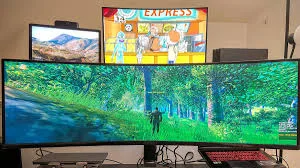
A desk can be many things: a workplace, a creative studio, a gaming station, or simply a corner where you can catch up on your favourite content. For creators, professionals and digital enthusiasts, however, it often becomes all of these at once. Designing the right setup is therefore less about filling a desk with gadgets and more about creating an environment that supports focus, creativity and relaxation.
From choosing the right display to managing cables and improving ergonomics, some thoughtful changes can turn an ordinary workstation into a space that feels clearly your own.
Start With the Screen That Sets the Tone
The display is often the visual centre of any modern desk setup. You spend hours reading, designing, editing, browsing, or playing, so choose the one that suits your routine. A gaming monitor can be a versatile addition for digital enthusiasts who want smooth visuals and responsive performance while still handling everyday professional tasks.
Instead of selecting equipment based only on specifications, consider how you actually use your computer. Your ideal setup should complement your habits.
Design Around Your Daily Workflow
Every user approaches a desk differently. A video editor may need plenty of screen space for timelines and previews, while a programmer might prefer several windows visible simultaneously. Writers and professionals, meanwhile, may prioritise comfortable viewing during long working sessions.
A gaming monitor with an appropriately sized display helps to create a flexible digital workspace, especially for people who regularly switch between productivity and entertainment. The goal is to make your technology work around you rather than constantly adapting yourself to it.
Let Ergonomics Do the Heavy Lifting
An attractive desk means little if it leaves you uncomfortable. Screen height, viewing distance, chair position, and keyboard placement can all influence how comfortable you feel during extended sessions.
Place your gaming monitor so the top portion of the screen sits around eye level; adjust it based on your posture and personal comfort. If the display offers height, tilt or swivel adjustments, use it rather than treating the monitor position as permanent.
A comfortable chair, supportive posture and properly positioned accessories can make just as much difference as expensive hardware.
Make Room for Creative Thinking
Creators rarely work with just a keyboard and mouse. Cameras, microphones, drawing tablets, notebooks, external drives and other accessories can quickly take over a desk.
A smart layout starts by identifying what you use most often. Keep essential tools within reach and move occasional-use equipment elsewhere. A gaming monitor with a thoughtfully arranged workstation can provide the visual foundation while leaving enough physical space for creative tools.
For small desks, vertical storage, monitor stands, and wall-mounted accessories can help recover valuable surface area without compromising accessibility.
Turn Lighting Into a Design Feature
Lighting is one of the easiest ways to change the workspace atmosphere. During the day, natural light can make the room feel open and energetic. In the evening, softer ambient lighting can create a more relaxed environment.
Avoid placing bright lights directly behind or in front of the display, as unwanted reflections can become distracting. Instead, use subtle lighting around the desk or behind the screen. Pair understated illumination with a gaming monitor to give your workspace a polished, modern character without turning it into an overly elaborate setup.
Keep the Cable Chaos Under Control
Nothing ruins a carefully designed desk faster than tangled cables. Fortunately, cable management doesn't have to be complicated.
Start by grouping cables according to purpose and securing them with clips, sleeves, or reusable ties. If your desk allows it, route cables under the tabletop. Keep chargers and power adapters together to prevent them from spreading across the floor.
A clean cable arrangement also makes it easier to reposition your gaming monitor, accessory, or other equipment when your requirements change. It also gives the entire workspace a cleaner, calmer look.
Think Beyond the Keyboard and Mouse
A productive desk setup is not defined by the computer alone. Audio equipment, webcams, microphones, and lighting- these all give a better digital experience.
Content creators might benefit from a dedicated microphone and camera, while professionals who spend much of their day in virtual meetings may appreciate a quality webcam and comfortable headphones. Digital enthusiasts can introduce speakers, controllers, or other accessories depending on their interests.
The key is balance. A gaming monitor can be an important part of the setup, but it should work alongside your other equipment rather than dominate the entire workspace.
Build a Setup That Switches Modes
One of the biggest advantages of a well-planned desk is versatility. The same space can support a morning of meetings, an afternoon of creative work, and an evening of entertainment.
Think about how quickly you can transition between these activities. Keep work-related accessories organised and create enough open space to switch tasks without completely rearranging the desk. A responsive gaming monitor fits naturally into this kind of multipurpose environment, especially for users who want their workspace to accommodate both productivity and leisure.
This approach can also make smaller homes and apartments more practical, where having separate rooms for every activity isn't always possible.
Add a Touch of Personality
Technology provides the foundation, but personal details give a workspace its identity. A plant can introduce some greenery, framed artwork can add colour, and a carefully chosen desk mat can tie different elements together.
You can also display a few favourite books, collectibles or photographs. Decoration should complement the workspace rather than create unnecessary clutter.
For a minimalist look, let your gaming monitor, keyboard and lighting form the core visual elements, then add only a handful of accessories that genuinely mean something to you.
Leave Space for Future
Technology and working habits change quickly. A setup that works perfectly today may need an upgrade in a year or two. Instead of filling every available inch of your desk, leave some space for future additions.
Perhaps you'll eventually add a second display, upgrade your audio equipment, or introduce a larger storage solution. Choosing a flexible gaming monitor today can also give you a strong foundation as your digital needs evolve.
A little planning can prevent you from redesigning the entire workstation every time you add a new device.
Your Desk, Your Digital Headquarters
The best desk setup isn't necessarily the one with the most expensive equipment. It is the one that reflects how you work, create, and relax.
Start with the essentials, prioritise comfort, keep the layout organised, and choose technology that serves multiple purposes. Once the practical elements are in place, add personal touches that make the space enjoyable to use.
Whether you're editing your next project, preparing a presentation, exploring a new creative hobby or relaxing after a long day, a thoughtfully designed desk can make the experience more comfortable and engaging. Ultimately, the perfect workspace is less about following a trend and more about creating a setup that works brilliantly for you.
FAQs
What should a modern digital professional have on their desk?
A modern desk setup should include a comfortable chair, suitable display, ergonomic keyboard and mouse, reliable lighting, cable-management accessories, and enough storage for essential devices. The exact setup can vary depending on whether the space is primarily used for work, content creation, entertainment, or a combination of these.
What type of display is suitable for a professional desk setup?
The right display depends on your work requirements. Professionals who multitask may prefer a larger screen or higher resolution, while creators may prioritise colour accuracy and screen space. Those who combine work with entertainment may benefit from a gaming monitor that supports both productivity and immersive viewing.
How can I organise cables on my desk?
Group cables according to the devices they belong to and use cable clips, sleeves, reusable ties, or under-desk cable trays to keep them organised. Keeping power adapters and charging cables together can also prevent unnecessary clutter and make future adjustments easier.
How should I position my gaming monitor for better comfort?
Ideally, position the screen at a comfortable viewing distance with the upper portion of the gaming monitor around eye level. Adjust its height, tilt, and angle according to your posture and seating position. The goal is to avoid repeatedly bending or straining your neck while working.
How can I make my desk setup more productive?
Start by keeping frequently used items within easy reach and removing unnecessary clutter. Position your display comfortably, organise cables, improve lighting, and create dedicated spaces for different tasks. A clean and well-planned layout can make it easier to stay focused throughout the day.