Every business with a front counter, a waiting room, or a service desk deals with the same problem eventually: people show up faster than staff can serve them. When that happens without a plan, customers get frustrated, employees get overwhelmed, and the business quietly loses the trust it worked hard to build.
That is why more organizations are investing in smarter ways to handle customer flow instead of just hoping the line moves fast enough. A well-designed waiting queue experience can be the difference between a customer who comes back and one who does not.
This is exactly the gap that queue management solves. Instead of relying on a first-come, first-served line and good intentions, businesses use queue management software to organize arrivals, predict demand, and keep everyone informed while they wait. A modern queue management system manages the entire customer journey from check in to service, not just the numbers.
This guide covers how these systems work, the features that matter most, the industries seeing the biggest impact, and how to choose a platform that fits your business.
What Is a Queue Management System?
A queue management system is software that organizes how people are served, whether they are standing in a physical lobby or waiting remotely from their phone. Instead of an unmanaged line, customers check in through a kiosk, a QR code, or an app, and the system decides the order of service based on arrival time, appointment, or priority.
The best platforms extend well past the front desk. They can track how long each visit takes, alert staff when a queue is getting too long, and give managers a live view of what is happening across one location or dozens of them.
Why Traditional Waiting Queues Create Business Challenges
A basic line has no memory and no intelligence. It cannot tell a customer how long they will wait, and it cannot tell staff which service points are falling behind until customers start complaining.
This creates a familiar set of problems. Customers abandon lines they cannot estimate the length of. Staff spend energy managing crowd frustration instead of doing their actual job. Peak hours overwhelm the front desk while slower periods leave employees idle with nothing to measure against. And when a business operates more than one location, none of these issues are visible from a central point, so problems repeat at every branch unnoticed.
None of this comes down to bad staff or bad customers. It comes down to a lack of visibility, which is precisely the gap that better software is built to close.
How Queue Management Software Works
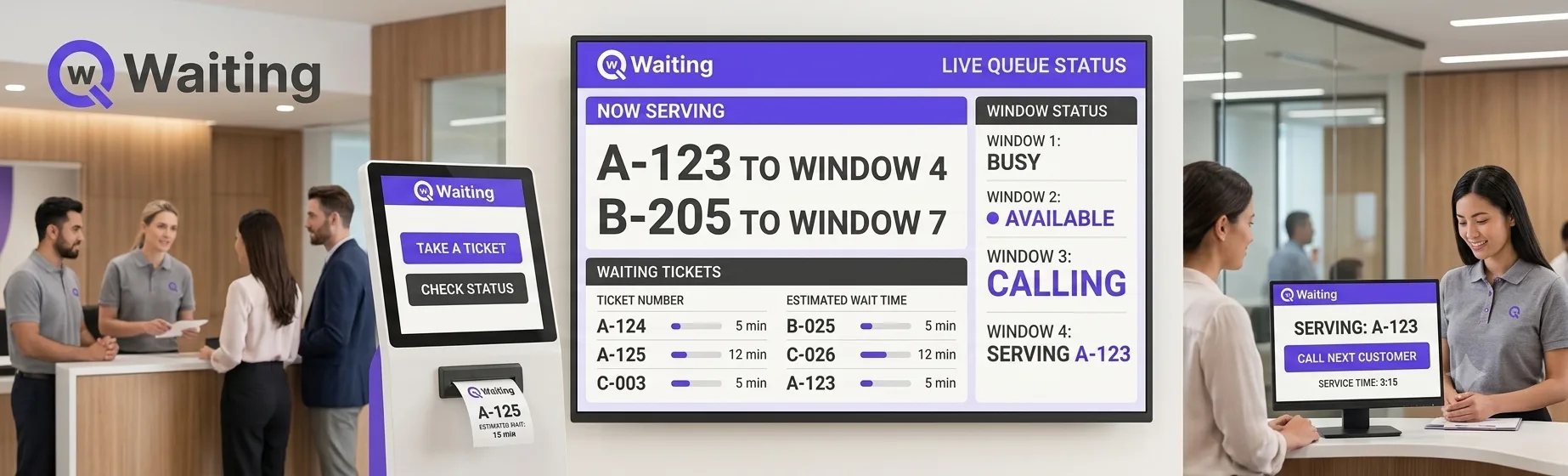
At a basic level, the software creates a digital record the moment a customer joins a queue, whether that happens at a kiosk, online, or through a scheduled appointment. From there, it assigns the visit to the right service point, tracks progress in real time, and notifies the customer as their turn approaches.
Behind the scenes, managers get a dashboard showing how the day is unfolding: how many people are waiting, how long each transaction takes, and where bottlenecks are forming. That combination of front end automation and back end visibility is what separates a modern platform from a simple number dispenser.
Key Features of Modern Queue Management Software
Digital Token Generation
Customers receive a digital ticket the moment they check in, removing the need for paper slips and letting the system route each visit automatically.
QR Code Queue Registration
A quick scan lets customers join a line without touching a kiosk or speaking to staff, which keeps entry fast and contactless.
Virtual Queue Support
People can join a queue remotely from their phone, then spend the wait running errands instead of standing in a lobby.
Live Queue Tracking
Staff and customers alike can see queue status updates in real time, so nobody is left wondering what is happening.
Estimated Wait Times
The system calculates a realistic wait estimate based on current demand, giving customers something concrete to plan around.
SMS and Email Notifications
Automated alerts let customers know when their turn is close, so they do not have to watch a screen the entire time.
Appointment Scheduling Integration
Walk-in queues and booked appointments run through the same system, so staff always see the full picture of who is arriving and when.
Analytics and Reporting
Detailed reporting on wait times, service durations, and staffing patterns turns everyday queue data into decisions managers can act on.
Cloud-Based Management
Because the platform runs in the cloud, managers can check performance from anywhere, and updates roll out without an onsite visit.
Benefits of Queue Management
Businesses that adopt a structured approach to customer flow typically see gains across several fronts at once.
- Improve customer satisfaction: Customers who know what to expect wait more patiently, even when the actual time barely changes.
- Reduce waiting times: Spreading arrivals through virtual queues and appointments prevents crowds from forming in the first place.
- Increase staff productivity: Employees spend their time serving people instead of managing line disputes.
- Optimize business operations: Real-time data replaces guesswork about staffing and peak hours.
- Enhance customer experience: A calmer, more predictable visit leaves a stronger impression than a chaotic one.
- Better resource allocation: Managers can shift staff toward the busiest service points before backlogs build up.
Industries That Benefit
Healthcare providers use queue systems to manage patient check-ins and reduce crowded waiting rooms, which matters even more in high-volume clinics and hospitals. Banks and financial institutions rely on similar tools to organize teller lines and route customers to the right specialist. Government offices, often serving hundreds of citizens daily, use digital queues to cut congestion and keep service transparent.
Retail stores use digital queuing to manage checkout lines and customer service counters during busy shopping periods. Educational institutions apply the same logic to student services and registration windows. Telecommunications providers manage walk-in support at retail locations, while restaurants use virtual queues to seat guests without a crowded entryway. Airports, dealing with constant passenger flow, depend on structured queuing to keep processing lines moving at security checkpoints and service counters.
How to Choose the Right Queue Management Software
Not every platform fits every business, so a few practical questions help narrow the field. Start with integration: does the software connect cleanly with your existing CRM, scheduling tools, or point of sale system, or will it operate as an isolated add-on that creates extra work?
Next, look at scalability. A single location today might become five branches in two years, so multi-location support and cloud-based access matter even if you do not need them immediately. Finally, weigh the customer-facing experience as heavily as the admin dashboard, since a clunky check-in process undermines even the best backend analytics.
Why Businesses Choose Qwaiting
Qwaiting brings all of these pieces together in one platform. Organizations use it to manage digital queues, offer virtual queue check in from a customer's phone, and let visitors register instantly through a QR code scan at the door. Appointment scheduling runs through the same system as walk-in traffic, so staff always see a complete, accurate picture of demand.
Once someone joins a queue, Qwaiting keeps them updated through SMS and email, and managers get live queue monitoring alongside analytics that turn daily activity into decisions about staffing and service design. For organizations running multiple locations, multi-location support consolidates everything into a single view instead of scattered spreadsheets, and cloud-based access means updates reach every site without an IT visit.
Qwaiting is trusted by more than 65,000 businesses across over 120 countries, including organizations like Apollo Hospitals and Changi Airport Group, and the platform reports reducing customer wait times by up to 35 percent. The result businesses consistently describe is straightforward: shorter waits, better customer experience, and staff who spend more of their day serving people instead of managing chaos.
Frequently Asked Questions
What is queue management software used for? It organizes how customers are served at a business, whether they are checking in at a kiosk, booking an appointment, or joining a queue from their phone.
Does this kind of platform work for multiple business locations? Yes. Most modern systems, including Qwaiting, offer centralized dashboards that let managers monitor and compare performance across every location from one place.
Can customers join a queue without downloading an app? In most cases, yes. QR code check-in and web-based virtual queues typically work directly from a phone browser.
How much does this type of platform typically cost? Pricing varies by provider and business size, with many cloud-based platforms using a monthly subscription that scales with the number of locations or service points.
Is it difficult to set up a digital queuing system? Most cloud platforms are designed for fast deployment, often supported by onboarding assistance and existing APIs that connect to CRMs and booking tools without heavy IT involvement.
Can it integrate with appointment scheduling? Yes. Leading platforms combine walk-in queuing with appointment scheduling in a single system, so staff see one unified view of demand.
Is queue management software secure? Reputable platforms use encrypted data transmission, secure cloud hosting, and compliance certifications such as GDPR, HIPAA, and SOC 2 to protect customer information.
Conclusion
Long, unpredictable lines are not just a minor inconvenience; they are a business cost that shows up in lost customers, stressed staff, and missed opportunities. A capable queue management system replaces guesswork with visibility, giving customers a smoother experience and giving managers the data to keep improving operations.
If your business is still relying on paper tickets or an unmanaged line, it may be time to see what a platform like Qwaiting can do. Start a free trial and see how much smoother your customer flow can run.