High-performance 3D modeling plays a central role in design, engineering, architecture, and product development across many industries today. As teams grow more distributed and projects become more complex, organizations look for ways to deliver powerful graphics performance without tying users to physical workstations.
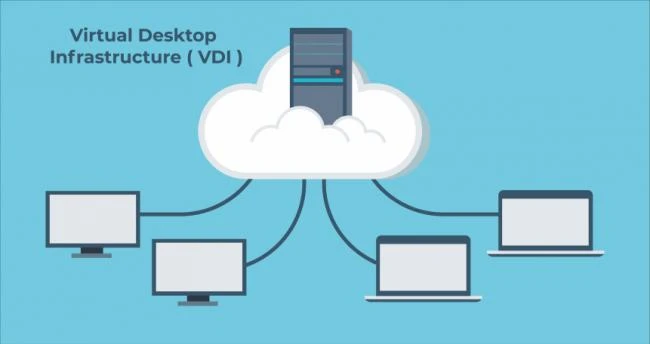
This is where virtual desktop infrastructure becomes a strong and practical solution. When designed with care, it allows designers to access demanding 3D tools from almost any location while IT teams keep control over data security, performance, and costs. This approach supports both productivity and trust across the business.
Through the right planning and thoughtful design, virtual desktop infrastructure can support smooth 3D modeling experiences that feel natural, responsive, and empowering for every user involved.
1. Understand the Performance Needs of 3D Modeling Teams
High-performance 3D modeling requires more than basic computing power. Designers rely on smooth visuals, fast rendering, and responsive tools to stay creative and accurate. Therefore, the first step involves understanding how these teams actually work each day.
By knowing this, IT leaders can align virtual desktop infrastructure with real user needs. 3D modeling workloads often include complex scenes, large files, and frequent changes. Because of this, the environment must support consistent graphics performance at all times. In addition, collaboration tools and file access must feel instant so teams can stay focused.
When teams map out these needs clearly, they build a strong foundation for success. As a result, technology decisions become simpler and more effective.
2. Build a Graphics Ready Virtual Desktop Infrastructure Foundation
A strong foundation ensures that virtual desktop infrastructure supports 3D modeling without delays or frustration. This foundation starts with choosing the right server hardware and graphics acceleration approach. When graphics resources match workload demands, users experience smooth interaction with models and designs.
Graphics acceleration plays a key role because it handles rendering and visual workloads efficiently. With the right setup, designers rotate, zoom, and edit models with confidence. At the same time, centralized infrastructure allows IT teams to manage resources wisely and scale when needed.
To support this foundation, teams should focus on balanced resource allocation. This ensures no single user affects others. In turn, everyone enjoys a stable and predictable experience.
3. Optimize Network Performance for Smooth Visual Workflows
Even with powerful servers, network performance shapes the daily user experience. High-performance 3D modeling depends on fast and reliable data delivery. Therefore, organizations must design networks that support low latency and steady throughput.
When network connections remain stable, designers interact with models in real time. This reduces fatigue and helps maintain creative flow. On the other hand, poor network design can lead to lag and frustration.
To support smooth workflows, teams often focus on consistent bandwidth and smart traffic management. As a result, visual data moves efficiently between the data center and end users. This careful planning strengthens trust in virtual desktop infrastructure across the organization.
4. Enable User Focus with the Right Display and Input Experience
The end user experience matters just as much as backend performance. Designers rely on clear displays, precise input, and responsive controls. Therefore, virtual desktop infrastructure must support high-resolution displays and accurate input devices.
When displays render details sharply, designers make better decisions and avoid errors. In addition, a smooth input response allows them to work naturally without thinking about the technology behind the scenes.
By aligning display settings and user profiles with job roles, organizations show respect for how people work. This approach keeps technology supportive rather than distracting.
5. Use Resource Management to Balance Power and Efficiency
High-performance environments require careful balance. While designers need strong resources, organizations also want efficient use of infrastructure. Resource management helps achieve both goals.
Key Resource Management Practices
- Assign graphics resources based on workload needs
- Monitor usage patterns across teams
- Adjust capacity as projects change
- Prevent resource contention through smart policies
These practices help virtual desktop infrastructure deliver reliable performance day after day. At the same time, IT teams gain visibility and control. This balance supports long term sustainability and user satisfaction.
6. Support Collaboration and File Access for Distributed Teams
Modern 3D modeling often involves teams spread across locations. Virtual desktop infrastructure supports this model by centralizing data and tools. As a result, everyone works from the same source of truth.
Centralized file access reduces duplication and errors. Designers open and save files quickly while knowing data stays secure. In addition, collaboration tools run smoothly because they sit close to the data.
This setup builds confidence among teams and leaders alike. It also reinforces a sense of connection even when people work remotely.
7. Maintain Security Without Slowing Creative Work
Security remains a top concern for organizations handling valuable designs and intellectual property. Virtual desktop infrastructure helps by keeping data in the data center rather than on local devices.
When security measures align with user workflows, designers stay productive. They do not feel blocked or monitored. Instead, security operates quietly in the background.
By combining access controls, monitoring, and encryption, organizations protect assets while
Conclusion
Supporting high-performance 3D modeling through virtual desktop infrastructure goes beyond technical setup. It reflects a commitment to people, creativity, and trust. When organizations design environments that feel responsive, secure, and intuitive, designers focus on what they do best.
They create, explore, and solve problems with confidence. Through thoughtful planning, balanced resources, and human-centered support, virtual desktop infrastructure becomes a bridge between powerful technology and meaningful work. In the end, success comes from the connection between teams, tools, and ideas that move the business forward together.