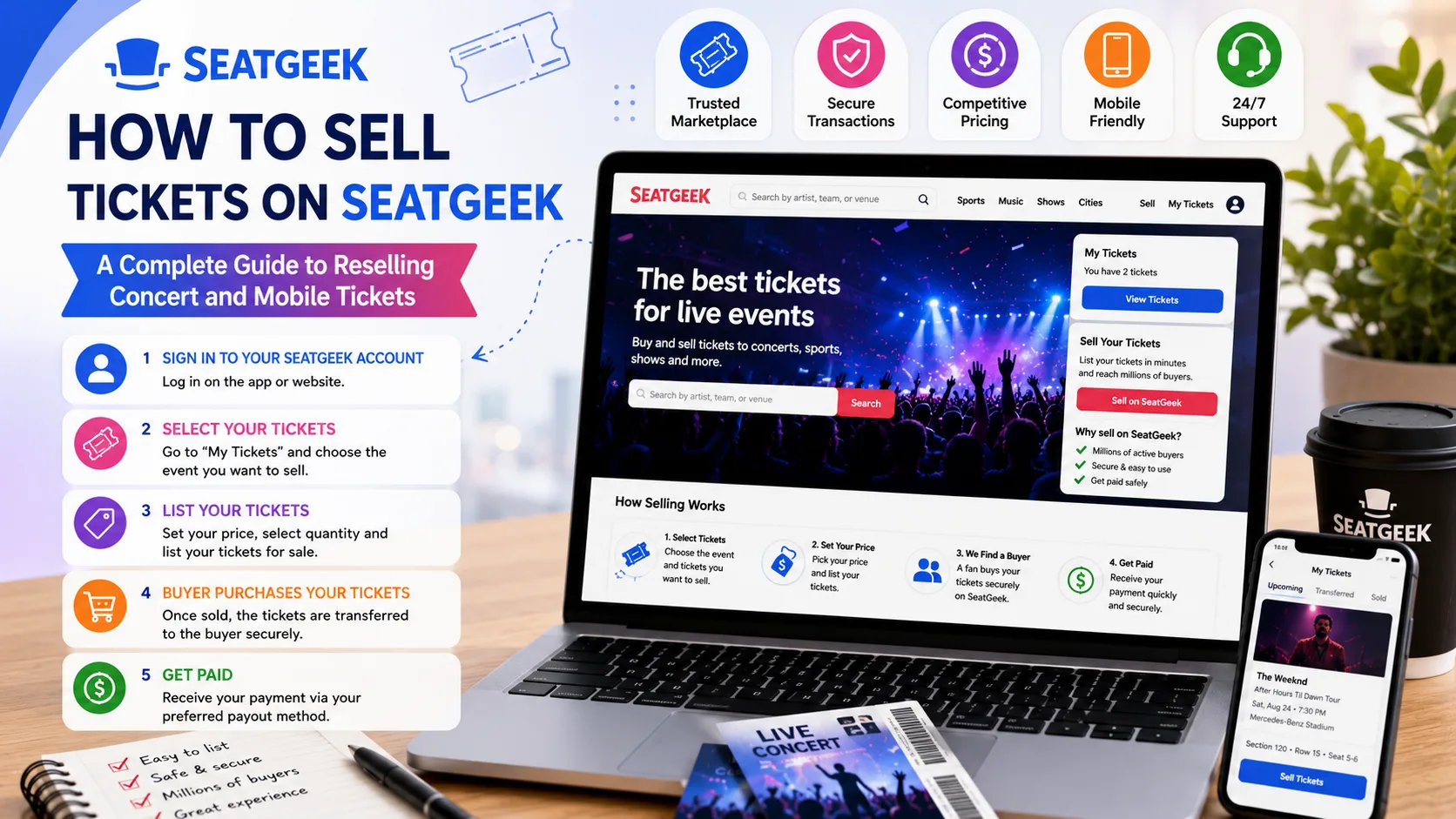
If you have tickets to a concert, sports game, theater performance, or another live event that you can no longer attend, reselling them can be a practical way to recover some or all of your money. SeatGeek provides a marketplace where eligible ticket holders can create resale listings and reach potential buyers.
The process is relatively straightforward, but eligibility, ticket delivery, pricing, and transfer requirements can affect whether you can list your tickets. SeatGeek currently states that tickets must already be in your possession and eligible for resale, and a Sell button must appear next to the tickets in your account.
This guide explains how to sell tickets on SeatGeek, how to resell tickets on SeatGeek, how selling mobile tickets on SeatGeek works, and practical strategies for selling concert tickets effectively.
Can You Sell Tickets on SeatGeek?
Yes, but not every ticket is automatically eligible for resale.
According to SeatGeek's current seller guidance, you generally need to have received the tickets and have access to them in your SeatGeek account. If the Sell option appears next to your tickets, they can generally be listed through the marketplace. If the button is missing, the tickets may not be eligible for resale or may not yet be ready to list.
Before starting, check:
- The tickets have already been delivered.
- The tickets appear in your SeatGeek account.
- A Sell button is available.
- The event and ticket type permit resale.
- You can provide the tickets to the eventual buyer according to the required delivery method.
Tickets that have not yet been delivered generally cannot be listed.
How to Sell Tickets on SeatGeek
The basic listing process can be completed through your SeatGeek account.
1. Sign In to Your SeatGeek Account
Start by signing into the SeatGeek account containing the tickets. Go to your tickets section and locate the event you want to resell.
If you have multiple events, carefully select the correct event, date, venue, and seats before proceeding.
2. Select the "Sell" Option
Look for the Sell button associated with your tickets.
If you see the button, SeatGeek considers those tickets eligible for its resale process. If you don't see it, don't assume that manually entering the ticket information will solve the problem. The ticket may have resale restrictions or may not yet be available for listing.
3. Choose the Tickets You Want to Sell
Select the number of tickets you want to put on the marketplace.
If you have several tickets together, consider whether buyers are likely to prefer them as a group. SeatGeek also allows sellers to configure ticket split options during the listing process.
4. Set Your Price
Choose the amount you want to receive for the tickets.
Pricing is one of the most important parts of the resale process. A price that is substantially above comparable listings may reduce your chances of selling, while pricing too low could leave money on the table.
Look at comparable seats for the same event and consider:
- Section
- Row
- Seat location
- Event popularity
- Current ticket supply
- Event date
- Artist or team popularity
- Whether the event is sold out
- Prices of similar listings
SeatGeek notes that marketplace sales depend on factors such as supply, demand, pricing, and timing, and it cannot guarantee that a listing will sell.
5. Choose a Payout Method
During the listing process, you'll be asked to provide or select your payout method. Make sure your payment information is accurate before completing the listing.
6. Review and Publish the Listing
Before submitting the listing, review the event, seats, quantity, price, and delivery information carefully.
SeatGeek's seller instructions also ask sellers to add the original price paid for the tickets. Providing that information can be important for the tax calculation associated with the sale. SeatGeek states that if the original price isn't entered, sales tax may be charged on the full ticket price.
Once everything is correct, submit the listing.
How to Resell Tickets on SeatGeek Successfully
Creating a listing is only the beginning. If your objective is to sell quickly, your strategy matters.
Price Based on the Current Market
One of the biggest mistakes sellers make is focusing only on what they originally paid.
The resale market is based on current demand. If comparable seats are selling for less than your original purchase price, you may need to reduce your asking price to remain competitive.
On the other hand, if demand has increased significantly, comparable tickets may command a higher price.
The key is to monitor the market instead of setting a price once and forgetting about it.
Consider Your Seat Location
Two tickets for the same concert can have very different resale values.
A seat close to the stage, a premium section, an unobstructed view, or a desirable location may attract more attention than a less desirable seat.
When comparing prices, compare tickets with similar locations rather than simply looking at the cheapest listing.
Don't Wait Until the Last Minute Without a Reason
Some events experience increased demand shortly before the event, but waiting carries risk.
If your tickets haven't sold and the event is approaching, you may have fewer opportunities to find a buyer. Monitor demand and adjust your pricing strategy as the event date gets closer.
Keep Your Listing Accurate
Never list seats, quantities, or ticket types incorrectly.
A buyer expects to receive the exact tickets described in the listing. Incorrect information can create delivery problems and may result in consequences under marketplace rules.
Selling Mobile Tickets on SeatGeek
Mobile tickets have become common for concerts and sporting events.
SeatGeek currently allows certain mobile-transfer tickets to be resold, but eligibility depends on how the tickets were obtained and whether the tickets can be supported by SeatGeek's marketplace.
For example, some tickets purchased through SeatGeek may be delivered through a third-party provider. Eligible tickets can potentially be resold if they have already been received and the Sell option is available in the SeatGeek account.
How to Sell Mobile Tickets on SeatGeek
The general process is:
- Open your SeatGeek account.
- Go to your tickets.
- Locate the eligible mobile-transfer tickets.
- Select the tickets.
- Choose Sell.
- Select the number of tickets.
- Set your price and ticket split preferences.
- Select your payout method.
- Review the listing.
- Submit the listing.
SeatGeek says some third-party mobile-transfer tickets can be resold when they were originally purchased on SeatGeek and are eligible for resale.
However, not every mobile ticket qualifies.
SeatGeek specifically notes that rotating barcodes from other platforms that are not integrated with SeatGeek cannot be resold through its marketplace.
Best Way to Sell Concert Tickets on SeatGeek
Concert tickets can be highly competitive, particularly for popular artists. The best approach combines realistic pricing, accurate listings, and good timing.
Research Comparable Tickets
Before choosing a price, examine comparable tickets for the same concert.
Don't compare a floor seat with an upper-level seat. Instead, look for tickets in the same or similar sections and rows.
Watch Demand
Demand can change quickly after:
- A concert sells out
- An artist announces additional dates
- A popular supporting act is announced
- The event date approaches
- Tickets become scarce
- An event receives significant media attention
A listing that doesn't attract buyers today could become more attractive later—or the opposite could happen.
Be Competitive
If several nearly identical tickets are available, buyers generally have more choices.
Pricing your tickets competitively can improve visibility and make your listing more attractive.
Sell as a Pair When Appropriate
For concert tickets, buyers often search for two seats together.
If you have two adjacent seats, keeping them together can make them attractive to couples and friends attending together. However, use the split settings available during listing so your tickets can be sold according to your preferences and SeatGeek's available options.
What Happens If Your Tickets Don't Sell?
A SeatGeek listing does not automatically mean that someone will purchase your tickets.
SeatGeek explicitly states that it cannot guarantee a sale because the marketplace depends on factors including supply, demand, pricing, and timing.
If your tickets aren't selling, consider reviewing:
- Your asking price
- Comparable listings
- Ticket location
- Number of tickets
- Event demand
- How close the event is
- Whether your listing is still active
Depending on the circumstances, lowering your price may improve your chances of attracting a buyer.
Common Problems When Selling Tickets on SeatGeek
The Sell Button Is Missing
This is one of the most common issues.
If the Sell button doesn't appear, SeatGeek indicates that the tickets may not be eligible for resale or may not yet be ready to list.
Check whether the tickets have been delivered and whether the ticket type is supported.
Mobile Tickets Cannot Be Resold
Not every mobile ticket can be transferred or resold through SeatGeek.
Third-party tickets with unsupported rotating barcodes are one example of tickets that cannot be resold through the marketplace.
Your Listing Isn't Selling
This is usually a market issue rather than a technical problem.
Review the prices of similar seats and determine whether your listing is competitively priced.
Important Tips Before You Sell
Keep these practices in mind:
Verify your tickets first. Make sure you actually have access to the tickets before attempting to list them.
Check eligibility. The presence of the Sell button is an important indication that your tickets can be listed.
Enter accurate ticket information. Incorrect seat or ticket details can create problems after a sale.
Monitor pricing. Ticket prices can change as supply and demand change.
Keep your account information current. Your payout information should be accurate.
Avoid speculative listings. Don't advertise tickets that you don't actually possess. Aside from creating serious delivery problems, speculative ticketing can violate marketplace rules and consumer-protection requirements. Recent regulatory attention has also focused on speculative ticket sales in the broader resale industry.
Frequently Asked Questions
Can I sell tickets I bought on SeatGeek?
Potentially, yes. If the tickets are eligible for resale, have been delivered, and the Sell button appears in your account, you can generally list them through SeatGeek's marketplace.
Can I sell mobile transfer tickets on SeatGeek?
Some mobile-transfer tickets can be resold. Eligibility depends on the ticket source, delivery method, and SeatGeek's supported integrations.
Why can't I see the Sell button?
The tickets may not be eligible for resale, or they may not have been delivered yet. SeatGeek recommends checking whether the tickets are already in your possession and whether the Sell option is available.
Can I guarantee that my concert tickets will sell?
No. A listing does not guarantee a sale. SeatGeek says marketplace activity depends on supply, demand, pricing, and timing.
How many tickets can I list?
SeatGeek's current guidance says individual resale listings are generally limited to eight tickets unless an account qualifies for a higher listing tier.
Final Thoughts
Learning how to sell tickets on SeatGeek is relatively simple when your tickets are eligible for resale. Start by checking your SeatGeek account, confirming that the tickets have been delivered, and looking for the Sell button. From there, select the tickets, choose your pricing and split preferences, provide payout information, and review the listing before publishing it.
For people interested in how to resell tickets on SeatGeek, pricing and timing are especially important. For those selling mobile tickets on SeatGeek, eligibility and delivery method deserve extra attention because some third-party mobile tickets cannot be resold.
If your goal is to sell concert tickets on SeatGeek, focus on accurate listings, competitive pricing, desirable seating information, and regular monitoring of the marketplace. There is no guaranteed formula for selling every ticket, but a well-priced and properly listed ticket has a better opportunity to attract buyers.