How to Check Your NOL Card Balance in Dubai
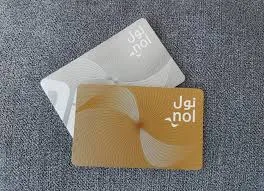
1. How to Check Your NOL Card Balance in Dubai NOL card balance check in Dubai is simple and helps ensure you have enough funds before traveling on the Metro, bus, tram, or water transport. The Roads and Transport Authority (RTA) offers multiple ways to view your balance, including online services, mobile apps, SMS, and station kiosks. Regularly checking your balance can help you avoid travel interruptions and keep your daily commute hassle-free.2. Ways to Check NOL Balance in UAEThere are several convenient methods available across the UAE to check your NOL card balance. You can use the RTA website, the NOL Pay mobile app, SMS services, ticket vending machines, metro station card readers, or customer service counters. These options allow both residents and tourists to access their balance information anytime and choose the method that best suits their needs.
3. How to Check NOL Balance Without InternetIf you do not have internet access, you can still check your NOL card balance easily. Visit any Dubai Metro station and use a ticket vending machine or card reader to view your available balance instantly. Another option is to use the SMS service provided by RTA, making it possible to check your balance even when mobile data or Wi-Fi is unavailable.
4. Check NOL Card Balance by SMSThe SMS method is one of the quickest ways to check your NOL balance without using the internet. First, register your mobile number by sending your NOL card Tag ID to 511. Once registered, send “BAL” to 511, and you will receive a reply message containing your current card balance. This service is especially useful for commuters who need instant balance information while on the move.
5. NOL Card Balance Check on the RTA WebsiteThe official RTA website allows users to check their NOL card balance online within seconds. Simply visit the NOL balance section, enter the NOL Tag ID printed on the back of your card, and click the search button. The system will display your current balance, pending credit, and card expiry details, helping you manage your travel funds more effectively.
6. Check NOL Balance Using the NOL Pay AppThe NOL Pay app offers a fast and convenient way to check your NOL card balance directly from your smartphone. After downloading the app and logging in, add your NOL card and navigate to the balance section. The app not only shows your current balance but also allows you to recharge your card, review transaction history, and manage other NOL-related services from one place.