Imagine a customer wants to book an appointment with your business after working hours. If they have to call, wait for a reply, or send a message and hope someone responds the next morning, there is a good chance they will move on.
An online booking system removes that friction.
Instead of managing appointments through phone calls, spreadsheets, emails, or social media messages, businesses can give customers a simple way to check availability and make a booking themselves.
For businesses that handle appointments, reservations, consultations, classes, services, or scheduled sessions, online booking system development can turn a time-consuming manual process into a more organized digital workflow.
What Is an Online Booking System?
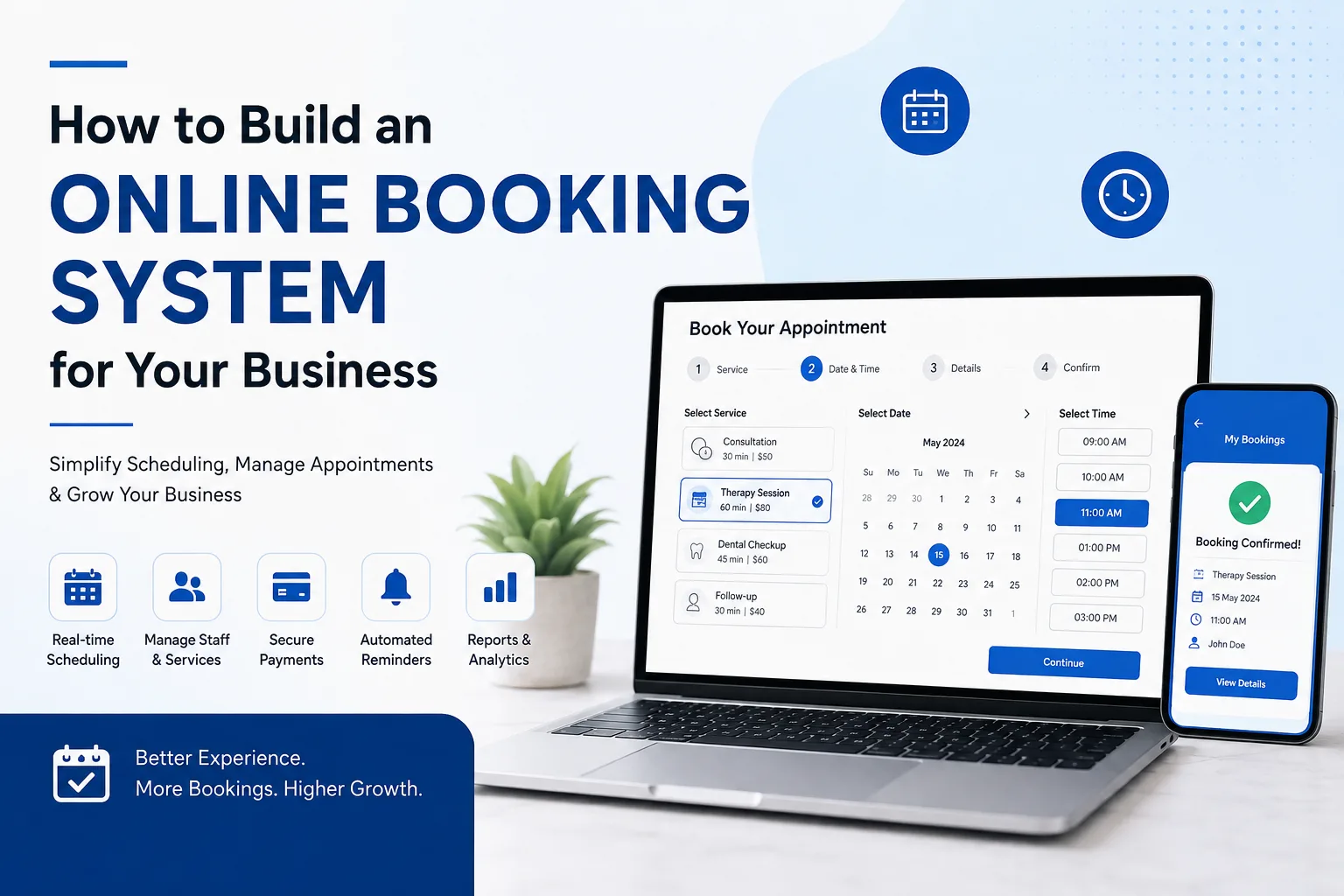
An online booking system is a web-based application that allows customers to schedule a service, appointment, reservation, or other time-based activity online.
A typical system can allow a customer to:
- Select a service
- Choose a date
- Check available time slots
- Enter personal information
- Make a payment if required
- Receive a booking confirmation
- Reschedule or cancel a booking
- Receive reminders
Behind the scenes, business staff can use an administration panel to manage schedules, services, customers, bookings, payments, and availability.
The exact functionality depends on the type of business and the way appointments are managed.
Why Businesses Need an Online Booking System
Many small businesses begin with a simple calendar, phone calls, or messaging apps. That may work when there are only a few appointments each day.
Problems often appear as the business grows.
A staff member may have to answer the same questions repeatedly:
- "Is 3 PM available?"
- "Can I book for tomorrow?"
- "Can I change my appointment?"
- "How much does the service cost?"
- "Did you receive my booking?"
An online booking platform can handle much of this automatically.
Customers get immediate access to available slots, while staff members spend less time handling routine scheduling requests.
Businesses That Can Use an Online Booking System
Online booking isn't limited to one industry. Different businesses can adapt the same basic concept to their own services.
Healthcare and Clinics
Patients can select a doctor, service, date, and available appointment time.
Salons and Spas
Customers can book haircuts, treatments, massages, consultations, or other services.
Fitness Businesses
Gyms, trainers, yoga studios, and fitness centers can manage classes and individual sessions.
Consultants
Consultants can allow prospects or existing clients to schedule meetings based on their availability.
Education and Training
Training providers can schedule classes, workshops, tutoring sessions, and consultations.
Travel and Hospitality
Businesses can manage reservations, activities, tours, or other scheduled services.
Professional Services
Law firms, agencies, accountants, and other professional service providers can use appointment scheduling for consultations.
Essential Features of an Online Booking System
A booking system should be designed around the actual scheduling process of the business. Some businesses need a simple appointment calendar, while others require multiple staff members, locations, services, and payment options.
Here are some of the most useful features.
1. Service Selection
Customers should be able to see the services available for booking.
Each service can include information such as:
- Service name
- Description
- Duration
- Price
- Assigned staff
- Availability
This helps customers choose the right option before selecting a time.
2. Availability Management
Availability is at the heart of any booking system.
Administrators should be able to define:
- Working hours
- Holidays
- Break periods
- Staff availability
- Service duration
- Location availability
- Blocked time
The system can then show customers only the slots that are actually available.
3. Calendar Management
A visual calendar makes it easier for staff to see upcoming appointments.
Different calendar views can be provided for:
- Daily schedules
- Weekly schedules
- Monthly schedules
- Individual employees
- Multiple locations
This can help staff identify scheduling conflicts before they become problems.
4. Customer Registration
Depending on the business, customers may create accounts before booking.
An account can allow customers to:
- View previous bookings
- Manage upcoming appointments
- Update personal details
- Reschedule appointments
- Cancel appointments
- View payment records
For simpler booking processes, guest booking can also be offered.
5. Online Payments
If customers need to pay during booking, a payment gateway can be integrated into the system.
Possible payment scenarios include:
- Full payment
- Partial payment
- Booking deposits
- Subscription payments
- Service fees
The payment flow should be kept straightforward so that customers don't abandon the booking process.
6. Booking Confirmation
After a successful booking, the customer should receive confirmation.
This can include:
- Service name
- Date and time
- Location
- Staff member
- Booking reference
- Payment information
- Cancellation policy
Confirmation can be displayed immediately and sent through email or other supported communication channels.
7. Automated Reminders
Missed appointments can cost businesses time and revenue.
Automated reminders can be scheduled before an appointment.
For example, a business could send:
- A confirmation immediately after booking
- A reminder one day before
- Another reminder a few hours before the appointment
The timing depends on the type of service.
8. Rescheduling and Cancellation
Customers don't always follow their original schedule.
A booking system can allow them to reschedule or cancel appointments according to business rules.
For example, a business could allow cancellation up to 24 hours before the appointment and apply a different policy for late cancellations.
9. Staff Management
Businesses with multiple employees need more than a single shared calendar.
The system can associate services with specific staff members and display availability accordingly.
This is particularly useful for:
- Clinics
- Salons
- Consulting firms
- Fitness businesses
- Training companies
10. Multiple Locations
Businesses operating from several locations can allow customers to choose a branch before selecting a service or appointment.
The system can then display availability for that particular location.
11. Admin Dashboard
The administration area gives staff control over the booking system.
An admin dashboard can include:
- Booking management
- Customer management
- Service management
- Staff management
- Calendar management
- Payment records
- Reports
- Notifications
- Cancellation settings
The dashboard should focus on the tasks staff perform most frequently rather than being overloaded with unnecessary options.
How to Build an Online Booking System
Building a booking platform requires more than creating a calendar interface. The system needs to understand availability, prevent double bookings, handle customer information, and keep different parts of the workflow synchronized.
Step 1: Define the Booking Workflow
Start by mapping out how a customer currently books a service.
For example:
Customer selects service → chooses staff → selects date → chooses time → enters details → pays → receives confirmation
This simple workflow gives developers a clear starting point.
Step 2: Identify User Roles
Decide who will use the platform.
Common roles include:
- Customers
- Staff
- Managers
- Administrators
Each role may need different permissions.
Step 3: Define Services and Availability
Determine:
- What can customers book?
- How long does each service take?
- Which employees provide each service?
- What are the working hours?
- Which days are unavailable?
- Can customers book multiple services?
- How far in advance can they book?
These details affect the system architecture.
Step 4: Design the Customer Experience
The booking process should be easy to understand.
A customer should not have to navigate through several unnecessary pages just to find an available appointment.
A typical flow might be:
Choose Service → Choose Location → Choose Staff → Select Date → Select Time → Customer Details → Payment → Confirmation
Step 5: Develop the Booking Logic
The backend needs to manage availability and prevent conflicting bookings.
For example, if one customer reserves a 2:00 PM slot, that slot should no longer appear as available to another customer.
This requires reliable scheduling logic and database management.
Step 6: Add Payments and Notifications
If the business requires payment, integrate the appropriate payment method.
Email or other notification services can then be connected for confirmations, reminders, cancellations, and updates.
Step 7: Test Real-World Scenarios
Testing should cover more than a successful booking.
Consider situations such as:
- Two customers trying to book the same slot
- A customer cancelling an appointment
- A staff member becoming unavailable
- A payment failing
- A customer rescheduling
- A business holiday being added
- A service duration changing
Testing these scenarios can reveal problems before customers encounter them.
How Much Does Online Booking System Development Cost?
There is no single price for developing an online booking system.
A basic appointment scheduler may require considerably less development than a platform with multiple locations, staff accounts, payments, automated reminders, subscriptions, reporting, and third-party integrations.
The cost can be influenced by:
Number of Features
A basic booking calendar has different requirements from a complete scheduling platform.
Number of User Roles
Customer, staff, manager, and administrator accounts may require different permissions and interfaces.
Payment Integration
Adding online payments introduces additional development and testing requirements.
Third-Party Integrations
Connecting the system with CRM, accounting, calendar, communication, or other external platforms can increase project complexity.
Custom Design
A booking system designed specifically around a company's brand and workflow may require more design and development than a standard interface.
Mobile Experience
The booking process should work well on smartphones because many customers will make appointments from mobile devices.
Ongoing Improvements
After launch, businesses may want new services, additional locations, reporting features, or integrations.
For an accurate estimate, it is better to define the required workflow and features first rather than relying on a generic development price.
Custom Booking System vs Ready-Made Software
Businesses generally have two choices: use an existing booking platform or develop a custom system.
Ready-Made Booking Software
This can work well when the business has straightforward scheduling requirements.
Advantages can include:
- Faster setup
- Lower initial investment
- Pre-built functionality
- Simple administration
However, the business may have to adapt its processes to the software.
Custom Booking System
A custom solution is built around the organization's specific workflow.
It can be useful when the business needs:
- Unique booking rules
- Multiple user roles
- Complex staff schedules
- Custom pricing
- Existing software integrations
- Specialized reporting
- Custom customer journeys
The right choice depends on the complexity of the business rather than simply choosing the option with the most features.
Benefits of an Online Booking System
24/7 Booking
Customers can make appointments even when the business is closed.
Less Manual Scheduling
Staff don't have to respond to every availability request manually.
Fewer Scheduling Errors
Automated availability can reduce the risk of overlapping appointments.
Better Customer Experience
Customers can choose a suitable time without waiting for a response.
Centralized Booking Information
Staff can manage appointments and customer information from one system.
Easier Business Management
Managers can view schedules, track bookings, and monitor appointment activity.
Improved Revenue Opportunities
A smoother booking process can make it easier for customers to complete appointments and pay for services.
Common Mistakes to Avoid
A booking system can become frustrating when the design focuses heavily on technical functionality but ignores how customers actually use it.
Making the Booking Process Too Long
Every unnecessary step creates another opportunity for a customer to leave.
Not Showing Availability Clearly
Customers should understand which dates and times are available without confusion.
Ignoring Mobile Users
A booking experience that works well on a desktop but is difficult on a phone can create unnecessary friction.
Forgetting Cancellation Rules
Businesses should define clear policies for cancellations, late changes, and refunds.
Poor Calendar Management
Staff should be able to quickly see their schedules and unavailable periods.
Adding Too Many Features at Once
A first version should focus on the booking workflow that provides the most value. Additional functionality can be added as the system evolves.
When Should You Build a Custom Booking System?
A custom booking system may make sense when your business has scheduling requirements that existing tools cannot handle effectively.
Consider custom development if you need:
- Multiple staff members
- Several locations
- Different service durations
- Complex availability rules
- Custom booking workflows
- Online payments
- Customer accounts
- CRM or ERP integration
- Automated notifications
- Detailed reporting
- Business-specific booking rules
If your requirements are simple, an existing booking platform may be enough. Custom development becomes more useful when scheduling is closely connected to the way your business operates.
Final Thoughts
An online booking system is more than a digital calendar. When designed properly, it becomes a central part of the customer journey, connecting service selection, availability, scheduling, payments, communication, and staff management.
The best booking system is not necessarily the one with the longest feature list. It is the one that makes booking simple for customers while giving staff the control they need to manage daily operations.
For businesses with unique scheduling requirements, a custom solution can provide greater control over the booking experience and allow the platform to grow alongside the business.
If your current booking process relies heavily on phone calls, messages, spreadsheets, or manual calendar updates, it may be time to consider a more structured digital approach. A web development team such as The Fabcode IT Solutions LLP can help turn a business's booking workflow into a practical online system.
Frequently Asked Questions
What is an online booking system?
An online booking system is a web-based application that allows customers to schedule appointments, reservations, services, or other time-based activities online.
How much does it cost to develop an online booking system?
The cost depends on features, design, user roles, integrations, payment functionality, scheduling complexity, and other project requirements.
Can an online booking system accept payments?
Yes. Payment gateways can be integrated when customers need to pay deposits, full service fees, subscriptions, or other charges during the booking process.
Can customers reschedule their appointments?
Yes. Rescheduling functionality can be added according to the business's scheduling and cancellation policies.
Can multiple employees use the same booking system?
Yes. A system can provide individual staff accounts and manage availability for multiple employees.
Can an online booking system integrate with other software?
Yes. Depending on the available APIs, a booking platform can connect with CRM, accounting, payment, calendar, email, and other business systems.
Is a custom booking system better than ready-made software?
Not necessarily. Ready-made software can be suitable for simple requirements. Custom development becomes more valuable when a business has unique workflows, complex scheduling rules, integrations, or specialized requirements.