People who work at a desk usually have CRM and ERP just a click away. Field teams live in a different reality. A salesperson visiting a distributor, an engineer fixing equipment at a customer site and an inspector walking through a facility all work far from the office systems that are supposed to support them.
So information travels the long way round. Orders arrive on WhatsApp, job updates come over phone calls, photos stay on personal phones and customer notes get typed in at the end of the day, if they get typed in at all. The company has paid for powerful systems, but the people closest to customers are still working outside them. A connected mobile app fixes this gap, and this guide on how mobile apps connect field teams to CRM and ERP explains the full picture.
The App Should Be a Window, Not Another Silo
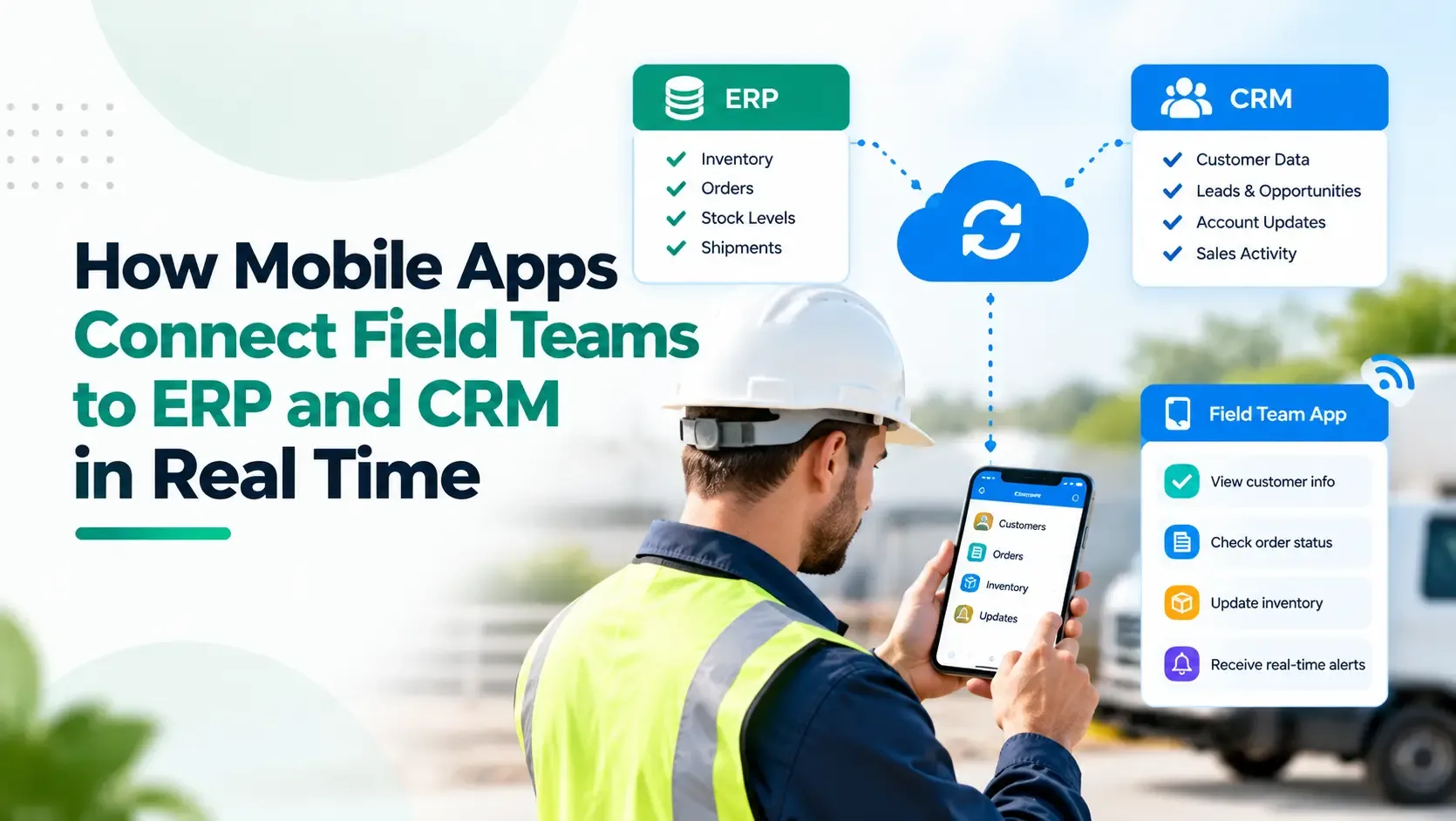
The biggest mistake is building a field app that keeps its own separate copy of the data. A good field app acts as a mobile window into the systems you already have. It reads from them and writes back to them while the work is happening, so there is only one version of the truth.
Imagine a salesperson sitting with a customer. The app already shows customer details, current pricing, available stock, unpaid invoices and the credit limit. The order can be captured on the spot, with no call to the office and no re-typing later.
What CRM Gives the Field
The CRM provides customer context. Before a visit, a representative can check the last meeting, the open opportunity and the planned next step. After the visit, notes, photos and follow-up dates go in immediately. This also helps adoption, because people use a CRM more when updating it takes seconds instead of an evening of data entry.
What ERP Gives the Field
The ERP shows whether the business can actually deliver. Depending on the company, that includes stock levels, prices, dispatch status, service history, invoices, payments and returns. When this information sits in the app, the endless back and forth between field staff and the back office largely disappears. If you want to understand how the two systems talk to each other, this overview of CRM and ERP integration is a helpful read.
APIs Keep Everything in Sync
Behind the screen, APIs carry data in both directions. Customer details and opportunities flow from the CRM to the phone, while meeting notes and new leads flow back. Prices and stock move from the ERP to the app, while orders, completed jobs and collections go the other way. Because the app depends on these connections, their reliability decides how useful the app will be.
Offline Support Is Not Optional
Real time does not mean the app should stop working when the signal drops. Field staff often work in warehouses, basements, factories and remote areas with weak coverage. A well designed app stores the needed data on the device, lets people carry on working and syncs everything once the connection returns. This should be planned from the start, not added later.
Capture Data Where It Happens
Phones can collect things a desktop never could. GPS check-ins, photographs, digital signatures, barcode scans, timestamps, inspection forms and customer acknowledgements can all be recorded at the moment of work. That information becomes part of the process immediately, instead of being rebuilt from memory at night.
Field Updates Can Start Back Office Workflows
A strong app does more than save data. It can trigger the next step. When a salesperson submits an order, the ERP can check stock, start an approval if the discount is high and notify operations. When an engineer closes a job, the service record updates, materials used are logged and the invoice process begins. When a collection executive records a payment, finance and the account manager see it straight away.
Different Roles Need Different Screens
A salesperson, a technician, a collection executive and a regional manager all need different things. Role based apps give each person only the information and actions relevant to their job, which keeps the app simple and the data secure.
When Is a Custom App Worth It?
A standard CRM mobile app can be enough for simple sales processes. A custom field app makes sense when the workflow is specialised, when several systems must appear in one screen, when offline work is important, when GPS, photos or barcodes are needed, or when teams still depend on WhatsApp, spreadsheets and paper forms. Start with the field process and choose the technology afterwards.
The Real Benefit
The real change is not one more icon on a phone. It is a much shorter gap between what happens in the field and what the business knows. Managers see visits, orders, service completion and collections sooner, and employees spend less time reporting yesterday and more time doing today’s work.
If your field teams still rely on calls, chat messages and end of day entries, it may be time to look at professional mobile app development services built around your existing CRM, ERP and processes.