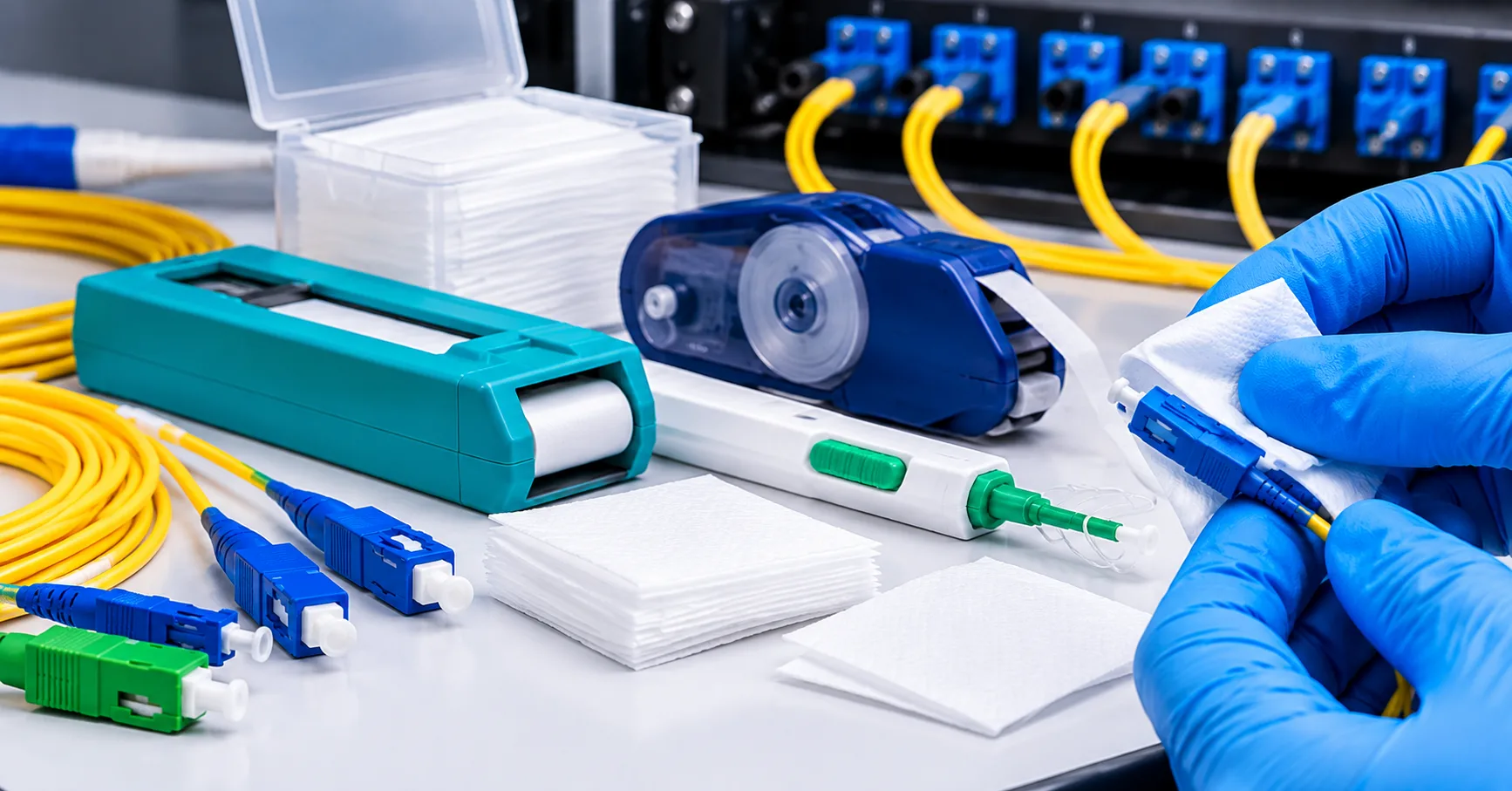
A fiber optic cleaner is a tool that lifts dust, skin oil, and other tiny residue off a connector's polished tip so light can cross each connection without extra loss, back reflection, or link failure. The core of a singlemode fiber is only about 9 microns wide, so a speck too small to see can still land right in the light path. Because of that, regular cleaning is one of the simplest habits for keeping a fiber link working as designed.
Network operators have reported that somewhere between 15 and 50 percent of network problems trace back to dirty connectors, according to the Fiber Optic Association. That range is wide, but it points to a clear lesson: contamination is a common and largely avoidable source of trouble. Knowing how cleaning tools work, and which features matter, makes it easier to pick the right one for the job.
What Does a Fiber Optic Cleaner Actually Do?
Every fiber connector holds the glass fiber inside a ferrule, and the polished tip of that ferrule is called the end face. When two connectors mate, their end faces press together so light can pass from one core straight into the next. A cleaning tool clears anything sitting on that contact area before the connection is made.
Contaminants come from many everyday sources, and they rarely give any visible warning. The FOA notes that most airborne dirt is silica based, which is hard enough to scratch a fiber when trapped between two spring-loaded ferrules. Common types of contamination include:
- Airborne dust and fine particles
- Oil from fingertips or skin
- Residue left by solvents, poor-quality wipes, or protective caps
- Debris scraped from adapter sleeves during repeated mating
Why Clean Connectors Matter for Network Performance
Dirt on an end face can block or scatter part of the light, which shows up as higher insertion loss during testing. It can also raise reflectance, meaning more light bounces back toward the transmitter instead of moving forward. In high-speed links with tight loss budgets, even a small increase can push a connection past its limits.
Contamination also tends to spread, since a dirty connector can pass debris to a clean one during mating. The FOA advises inspecting and cleaning even brand-new patch cords taken straight out of their sealed bags. Protective caps help guard against damage, but caps can carry dust themselves, so a capped connector is not automatically a clean one.
Common Types of Fiber Cleaning Tools
No single fiber optic cleaner suits every connector or setting, which is why many technicians carry more than one type. The right choice usually depends on the connector style, where it sits, and how many cleans are needed in a day. Some tools work best on exposed plugs, while others are built to reach a ferrule sitting deep inside an adapter or port.
International guidance for this work appears in IEC TR 62627-01, a technical report that describes typical cleaning tools, machines, and procedures for fiber connectors. Its 2023 edition added adhesive pad and adhesive pen tools to the methods it covers. The sections below look at the tool types people meet most often in the field.
Cleaner Pens and One-Click Tools
A fiber optic cleaner pen is a handheld, push-to-clean device with a thin strip of cleaning tape inside its tip. When pressed against a connector, the tip typically rotates as the tape advances, wiping the end face with fresh material on each click. Many pens can clean a connector sitting inside an adapter, which saves time on patch panels and equipment ports.
These tools are popular because they are quick, consistent, and easy to carry in a pocket or pouch. Pens are usually sized for a specific ferrule, such as 2.5 mm for SC, ST, and FC connectors or 1.25 mm for LC and MU connectors. Separate versions exist for multi-fiber MPO and MTP connectors, which use a wide rectangular ferrule instead of a round one.
Cleaning Cassettes and Lint-Free Wipes
A cleaning cassette is a small box that holds a reel of cleaning cloth behind a sliding shutter. Each press of the lever moves a fresh section of cloth into the window, and the connector is wiped across it. Cassettes suit exposed connectors and patch cords, especially at a workbench where many ends need attention.
Lint-free wipes are the most basic option and are often paired with a cleaning fluid. The word lint-free matters, since ordinary tissue, cotton swabs, or cloth can leave fibers and threads on the end face. Wipes are inexpensive and flexible, though they rely more on careful technique than a pen or cassette does.
Fiber Optic Cleaner Spray and Cleaning Fluids
A fiber optic cleaner spray or fluid adds a solvent to the process to help dissolve oils and loosen stubborn residue. Many of these products are made to evaporate quickly and leave little or no film on the end face. They are usually applied in small amounts to a wipe, swab, or pen tip rather than directly onto the connector.
Reagent-grade 99 percent isopropyl alcohol has long been used for this job, and the FOA cleaning reference still lists it for wet cleaning. Bulk alcohol absorbs moisture from the air and can become contaminated over time, so sealed, single-use packaging is often preferred. Alcohol and many cleaning solvents are also flammable, so they belong well away from fusion splicer arcs and other ignition sources.
Swabs for Bulkheads and Ports
Cleaning swabs are slim sticks with a lint-free tip shaped to slide into an adapter or transceiver port. They are useful inside a mating sleeve, where dust can collect and later move onto a connector. The FOA notes that cleaning inside a mating adapter is usually best done with a special swab.
Swabs come in sizes matched to the ferrule, much like pens, so a 1.25 mm swab is meant for LC-style ports. They can be used dry or with a small amount of cleaning fluid, based on the type of contamination present. Most swabs are made for one-time use, which lowers the chance of carrying dirt from one port to the next.
What a Fiber Optic Cleaning Kit Usually Includes
A fiber optic cleaning kit groups several tools into one case so a technician is ready for most connector types on a single job. Contents vary, but kits often combine a cassette, one or more cleaner pens, swabs, wipes, and a cleaning fluid. Some also add a basic inspection microscope or extra tips for different ferrule sizes.
A kit is handy for installers and contractors who move between data centers, telecom rooms, and outdoor cabinets. It also makes a wet-to-dry routine easier, since the fluid and the dry materials travel together. When comparing kits, check that the tools inside actually match the connectors used in your network.
Dry Cleaning vs. Wet-to-Dry Cleaning
Dry cleaning uses only cloth or tape with no fluid, and it handles light dust well in many day-to-day jobs. One drawback the FOA points out is that dry wiping can build a static charge on the ferrule, which may attract new dust after cleaning. Some newer dry tools use conductive materials to reduce this static buildup.
Wet-to-dry cleaning starts on a lightly dampened section of a wipe or tip and finishes on a dry section in the same motion. The fluid loosens oil and stuck particles, and the dry pass picks them up before any solvent can dry into a film. Since the FOA describes this combined method as generally preferred, a fiber optic cleaner setup that supports both steps gives you more options.
How to Use a Fiber Optic Cleaner Pen Step by Step
A frequent search among new technicians is "fiber optic cleaner pen how to use," and the routine is simpler than many expect. Most pens follow the same basic steps, though reading the maker's directions for your specific model is a good idea. A typical routine looks like this:
- Confirm the link is inactive, or check power levels with a power meter, before handling any connector.
- Inspect the end face with a scope to see what kind of contamination is present.
- Remove the pen's cap and fit the correct tip for the connector or adapter.
- Insert the tip straight into the adapter, or set it squarely on an exposed ferrule.
- Push firmly until you hear or feel the click, then pull the pen straight out.
- Inspect the end face again and repeat the clean if any debris remains.
A straight, firm push matters because an angled push may keep the tape from fully touching the end face. For oily marks that a dry click leaves behind, the FOA explains that a pen tip can be lightly dampened for one click and then followed by a dry click. Replacing the cap after use keeps the tip from collecting dust between jobs.
Inspect Before and After Every Clean
Cleaning without inspection is largely guesswork, because many contaminants are invisible to the naked eye. A fiber inspection scope magnifies the end face so dust, oil, and scratches can be spotted before a connection is made. The usual workflow is often called inspect, clean, inspect: look first, clean as needed, then check again.
The pass and fail criteria widely used across the industry come from IEC 61300-3-35:2022, which covers how debris, scratches, and defects on end faces are observed and classified. Video microscopes are often favored over direct-view scopes because they keep the user's eye away from any light in the fiber. Many video models can also save images and grade an end face against the standard, which helps with documentation.
What to Look For When Choosing a Fiber Optic Cleaner
The best tool is usually the one that fits your connectors, your workload, and the places you clean most often. A data center team cleaning hundreds of LC ports will likely need something different from a technician handling a few SC connectors on outdoor drops. Before buying, it helps to list the connector types, adapters, and ports you deal with each week.
Price matters, but cost per clean is often more useful than the sticker price of a single fiber optic cleaner tool. Durability, comfortable handling, and steady results also count, since a tool that cleans poorly simply creates repeat work. Key points worth comparing include:
- Connector fit: Match the tip or ferrule size to SC, LC, FC, ST, MPO, or MTP connectors, and check adapter and port access.
- Cleaning life: Look at the rated number of cleans per pen or cassette and how easy refills are to source.
- Static control: Conductive or static-dissipating materials can help keep a fresh end face from attracting new dust.
- Low-residue materials: Lint-free cloth and quick-drying fluids reduce the chance of leaving a film behind.
- Wet-to-dry support: Tools that work with a small amount of fluid offer more options for oily contamination.
- Ease of use: A comfortable grip and clear click feedback make repeated cleaning faster and more consistent.
Common Cleaning Mistakes to Avoid
Many cleaning problems come from habits rather than poor tools. Small shortcuts can add contamination instead of removing it, or leave a connector looking clean when it is not. Some of the most frequent mistakes include:
- Wiping an end face on clothing, a sleeve, or regular tissue
- Using cotton swabs or cloth that can leave threads behind
- Blowing on a connector, which adds moisture and particles
- Using shop compressed air, which can carry oil from the compressor
- Reusing the same section of a wipe or tape on several connectors
- Skipping inspection after cleaning
Canned air deserves a special note, since many cans hold a liquid propellant that can leave residue if tilted or sprayed too soon. The FOA suggests holding the can level and spraying for a few seconds first to clear any liquid from the nozzle. Even then, removing the connectors and cleaning them directly is often the more reliable choice.
Safety Tips When Cleaning Fiber Connectors
Most fiber systems carry infrared light, which the human eye cannot see even at power levels high enough to cause harm. For that reason, avoid looking straight into a connector or port, and confirm power levels with an optical power meter before inspection when possible. Direct-view microscopes should have a built-in infrared filter, while video scopes reduce the risk by showing the image on a screen.
Cleaning fluids need care too, since isopropyl alcohol and many solvents are flammable. Store them sealed, keep them away from open flames and splicer arcs, and use them in a well-ventilated space. Used wipes, tips, and swabs are best discarded rather than reused, which keeps old contamination from finding its way back.
Frequently Asked Questions
What does a fiber optic cleaner remove?
It removes contamination such as dust, skin oil, solvent residue, and small debris from the end face of a fiber connector. These particles can sit in the light path and raise insertion loss or reflectance. Clearing them helps a connection perform closer to its design. Heavier oily residue may need a wet-to-dry clean rather than a dry click alone.
How often should fiber connectors be cleaned?
Connectors are generally cleaned every time before they are mated, including before each test. Any exposure to air can let dust settle on the end face, even for a short time. The FOA recommends cleaning both the reference and tested cables before every test. Inspecting after each clean confirms the end face is ready.
Can isopropyl alcohol be used to clean fiber connectors?
Yes, reagent-grade 99 percent isopropyl alcohol on a lint-free wipe has long been used for wet cleaning. The end face should be dried with a clean, dry section of the wipe right after so no film remains. Bulk alcohol can absorb moisture from the air, so sealed single-use pads are often a safer choice. As with any method, the connector should be inspected afterward.
How many cleans does a cleaner pen provide?
Many pens are rated for several hundred cleans, though the exact number varies by model and maker. The rating is usually listed on the packaging or product sheet. Tracking use on busy sites helps avoid cleaning with a worn-out tape. Comparing cost per clean across models gives a fairer picture than the price alone.
Do new patch cords need cleaning?
Yes, new patch cords are generally cleaned and inspected before first use. Connectors can pick up dust during manufacturing, packing, or from the protective caps themselves. The FOA advises cleaning new cords even when they come out of sealed bags. A quick inspection before mating confirms they are ready.
What is the difference between a cleaner pen and a cassette?
A cleaner pen is a push-to-clean tool that can reach into adapters and ports. A cassette holds a reel of cloth and works best for exposed connectors and patch cords. Many technicians use both, since each handles a different part of the job. A kit often includes the two together.
Can dirty connectors damage network equipment?
Yes, dirt can cause lasting harm in some cases. Silica-based particles may scratch an end face when two ferrules are pressed together. Dirty connectors can also contaminate transceiver ports and test equipment inputs. Regular inspection and cleaning lower these risks.
Is an inspection scope needed if a fiber optic cleaner is already on hand?
An inspection scope is strongly recommended, since cleaning alone cannot confirm that an end face is truly clean. Many contaminants are too small to see without magnification. A scope shows if a connector passes or needs another clean. Video scopes add eye safety and image records for documentation.
Final Thoughts
A fiber optic cleaner is a small tool, but it supports one of the most basic parts of a healthy network: clean, well-mated connections. Pens, cassettes, swabs, wipes, and fluids each have a place, and many technicians rely on a mix of them. Pairing any cleaning method with inspection is what turns a quick wipe into a dependable routine.
When choosing tools, focus on connector fit, cleaning life, static control, and support for wet-to-dry cleaning. Industry resources such as the FOA reference guide and IEC TR 62627-01 are good places to build deeper knowledge. With the right tools and steady habits, many connector-related faults can be prevented before they reach the network.