Artificial intelligence is becoming more useful, but getting a good answer still depends on how you ask. A vague request can produce a generic response, while a clear prompt can help AI understand the task, follow your instructions, and deliver something you can actually use.
Google's Gemini 4 Argon takes this idea further. Announced on October 13, 2026, the model is designed for complex tasks that require deeper reasoning, multiple steps, and a better understanding of context. Its capabilities cover areas such as software development, scientific research, finance, and cybersecurity.
However, access to a powerful model does not automatically guarantee accurate results. You still need to explain your goal, provide useful information, define the expected output, and check the final answer.
This guide explores practical ways to prompt Gemini 4 Argon, with ready-to-use examples for everyday work, research, and learning.
What Makes Gemini 4 Argon Different?
Gemini 4 Argon is Google's latest flagship reasoning model. According to Google's official documentation, it supports a context window of approximately one million tokens, multiple thinking levels, and inputs that include text, images, video, audio, and PDF files.
These capabilities make it useful for tasks that involve more than answering a simple question. For example, it can help analyze a lengthy document, review a codebase, organize research, or work through a multi-step problem.
The model also supports tools such as code execution, function calling, and search grounding through supported interfaces. These features can help developers build workflows in which AI does more than generate text.
You can explore the technical details in Google's Gemini 4 Argon documentation.
The important point is simple: prompting is not about finding a magical sentence. It is about giving the model enough information to complete the right task in the right way.
Why Prompt Quality Matters More Than Ever
AI adoption is moving quickly across businesses. McKinsey's 2025 global survey found that 88% of respondents said their organizations regularly used AI in at least one business function. Yet widespread use does not mean every organization has successfully integrated AI into its daily operations.
Source: McKinsey, The State of AI in 2025.
The gap often comes down to how people apply the technology. Teams may use AI to write reports, summarize documents, develop training materials, or analyze data, but poorly defined instructions can lead to repeated work and unreliable results.
A good prompt helps reduce that gap by explaining the goal, supplying relevant context, and making the expected answer easy to evaluate.
As computer science pioneer Alan Turing observed:
“We can only see a short distance ahead, but we can see plenty there that needs to be done.”
That idea remains relevant as AI tools develop: progress comes from applying new capabilities to real problems and checking what they produce.
10 Practical Techniques to Prompt Gemini 4 Argon
1. Start With a Clear and Specific Task
Avoid requests that leave too much room for interpretation. Instead of asking AI to explain a broad topic, identify what you want to achieve and who the answer is for.
Weak prompt:
Explain AI in business.
Better prompt:
Explain three practical ways small businesses can use AI to reduce repetitive administrative work. Give one realistic example for each use case, explain the main limitation, and keep the language suitable for a nontechnical audience.
The second prompt sets a clear scope and gives the model a structure to follow. You are more likely to receive a useful answer without needing several rounds of editing.
2. Provide Context Before Asking the Question
Context helps the model understand the situation instead of guessing what you mean.
For example, if you want to improve a marketing campaign, include its audience, objective, current performance, and limitations.
Try this prompt:
You are helping a marketing team improve an email campaign.
Audience: HR managers at medium-sized companies.
Goal: Increase registrations for an upcoming online workshop.
Current problem: The emails receive opens but few registrations.
Review the information below and suggest five improvements. For each suggestion, explain why it may help and how the team could measure its impact.
[Paste the campaign details here.]
This approach gives Gemini a clear starting point. Google's prompt design guide also recommends clear instructions and sufficient context to improve results.
3. Define the Output Format
Sometimes an answer contains useful information but arrives in the wrong format. You may need a checklist rather than paragraphs, a comparison rather than a long explanation, or a structured report rather than a list of ideas.
Tell Gemini what the finished result should look like.
Example prompt:
Compare three project management methods for a team of ten people.
Present the result in a table with these columns:
- Method
- Main benefit
- Potential drawback
- Best use case
Finish with a short recommendation for a team managing several projects at once.
This saves editing time and makes the answer easier to review or share.
4. Use Examples to Show What You Want
Explaining a preferred style can help, but showing an example is often clearer.
This technique is called few-shot prompting. You provide one or more examples of the expected response so the model can follow the pattern.
Example prompt:
Rewrite the following product description using the sample style.
Sample style: "Plan your week in minutes. Keep tasks organized, deadlines visible, and your team moving forward."
Original text: "Our software provides advanced scheduling functionality and multiple productivity tools."
Write three alternatives. Use short sentences, everyday language, and a practical benefit. Avoid exaggerated claims.
Examples work especially well when you need consistent formatting, a particular tone, or a repeatable output structure. However, make sure your examples demonstrate the quality you actually want.
5. Break Complex Work Into Smaller Steps
For complicated tasks, asking for everything at once can make it harder to identify mistakes. A step-by-step approach gives you opportunities to review the work before moving forward.
Suppose you need to prepare a research report. Start by asking Gemini to identify the main questions, then organize the evidence, compare the findings, and draft the report.
Example prompt:
Help me prepare a report on employee training trends.
Step 1: Identify five relevant research questions.
Step 2: Suggest reliable sources for investigating each question.
Step 3: Organize the verified findings into themes.
Step 4: Draft a report based only on the evidence supplied or verified.
Flag missing information and conflicting evidence. Do not invent statistics or citations.
Review each stage before proceeding to the next.
This method is particularly useful for work involving several documents, research sources, or decisions.
6. Set Boundaries to Reduce Incorrect Answers
AI can produce confident-sounding statements that are incomplete or incorrect. Clear limits can help reduce this risk.
For research and document analysis, instruct the model to distinguish between verified facts, reasonable interpretations, and missing information.
Example prompt:
Analyze the attached business report.
Use only information supported by the report. Include the relevant page or section for each major finding. If a figure or fact is missing, write "Not stated in the report." Do not estimate missing numbers or create references. Separate direct findings from your own recommendations.
Always check important claims against the original material. This matters especially for financial, legal, scientific, and compliance-related work.
7. Choose the Right Thinking Level
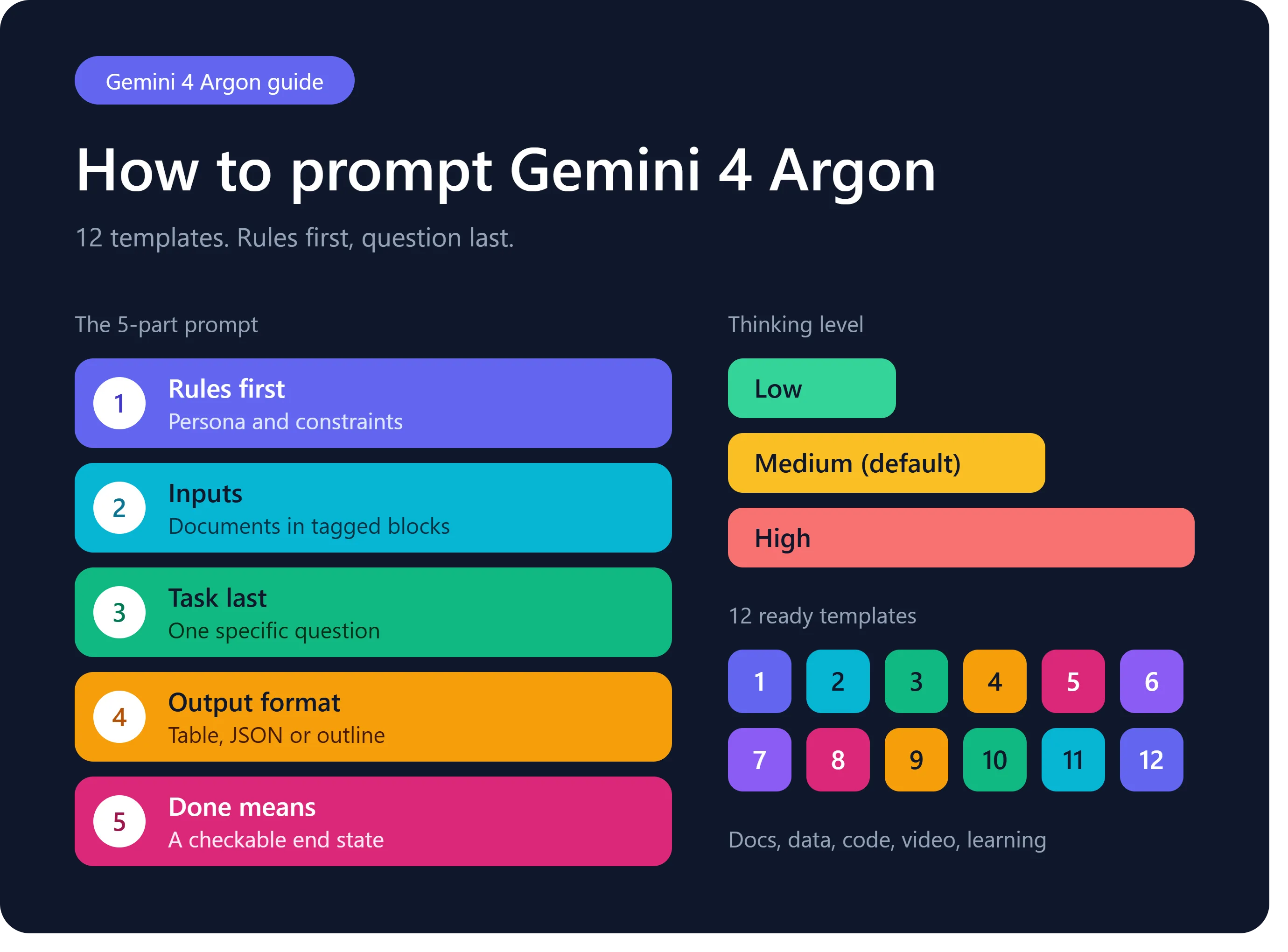
Gemini 4 Argon supports low, medium, and high thinking levels through its supported API configuration. These settings influence how much reasoning effort the model can use.
A sensible starting point is medium for many everyday tasks. Low may be sufficient for straightforward extraction or formatting, while high can be worth testing on difficult mathematical, scientific, or coding problems.
The best setting depends on the task, the required quality, response time, and cost.
For example, extracting five dates from a document generally does not require the same effort as investigating why a complex software system fails.
One important distinction: these thinking levels are API settings. Do not assume every control is available in the regular Gemini chat interface.
8. Improve Writing With Measurable Instructions
If you ask for professional writing without explaining the audience or style, you may receive polished but generic content.
Give the model practical writing rules instead.
Example prompt:
Write an 800-word article for managers responsible for employee development.
Use simple language, short paragraphs, descriptive headings, and practical examples. Explain the problem before presenting solutions. Avoid repeated ideas, unsupported claims, and promotional language. Include a checklist at the end.
Use the supplied research notes as the factual basis. Mark any missing evidence rather than inventing it.
You can also provide a short sample of your own writing to help guide the tone. After generation, review the article for factual accuracy, originality, clarity, and whether it genuinely answers the reader's question.
9. Use Gemini for Document and Visual Analysis
Gemini 4 Argon supports multiple input types, making it useful when the information you need to analyze is not limited to plain text.
Depending on the interface and enabled capabilities, you can work with PDFs, images, video, audio, and other supplied material.
For example, you might ask it to summarize a presentation, identify trends in a chart, or extract key points from a long report.
Example prompt:
Review the attached training presentation.
Identify the five main learning objectives, summarize each section, and list any slides where the explanation appears incomplete. Reference slide numbers where possible. Separate what is directly visible in the presentation from your recommendations.
Always confirm that the model has interpreted charts, labels, and source material correctly before using its findings in a final report.
10. Test and Refine Your Prompts
Your first prompt is a starting point, not necessarily the final version. If the response misses the mark, identify the specific problem instead of simply asking the model to try again.
For instance, if the answer is too broad, narrow the scope. If it lacks evidence, ask for sources. If the format is inconsistent, provide a precise example.
Keep track of the prompts that work well for repeated tasks. A small collection of tested templates can save time and improve consistency across a team.
How Prompting Can Support Workplace Learning
AI prompting is also useful for people who create and deliver training. Trainers can use AI to draft lesson outlines, create practice questions, simplify explanations, and prepare examples for different learner groups.
For example, a training manager might ask Gemini to convert a set of approved learning objectives into a draft lesson plan, including activities, assessment questions, and a suggested timetable. A subject matter expert should then review the content before it reaches learners.
Organizations can connect these activities with a Unified Learning System that supports the wider process of planning, delivering, and evaluating learning. When training materials are managed through an appropriate LMS platform, teams can organize resources and monitor learning progress more consistently.
The key is to treat AI-generated material as a draft that needs review, not as automatically approved training content.
Latest Trend: AI Is Moving Toward Longer, Multi-Step Workflows
One important development in October 2026 is the release of Gemini 4 Argon for complex, multi-step tasks. Google's announcement highlights applications ranging from large-scale code changes to research and business workflows. The model also supports a context window of about one million tokens, giving it room to work with substantial amounts of information.
This reflects a broader shift: businesses are exploring AI systems that can work through a sequence of related tasks rather than answering one isolated question at a time. However, longer context and stronger reasoning do not remove the need for good data, access controls, human review, and clear success criteria. Organizations should test these workflows against real tasks before relying on them at scale.
Sources: Google's Gemini 4 Argon announcement and official model documentation.
Common Prompting Mistakes to Avoid
Even a capable model can struggle when instructions are unclear. Watch out for these common mistakes:
- Being too vague: Replace broad requests with a specific task and intended outcome.
- Providing too little context: Supply the relevant background, data, and constraints.
- Combining unrelated tasks: Split complicated requests into manageable stages.
- Expecting perfect accuracy: Check facts, calculations, quotations, and references.
- Ignoring privacy: Avoid sharing confidential business or personal information unless the tool and your organization's policies permit it.
- Skipping evaluation: Compare the response with your original goal before using it.
Good prompting is not about writing the longest possible instruction. It is about providing the information the model needs without adding unnecessary complexity.
Frequently Asked Questions
1. What is Gemini 4 Argon used for?
Gemini 4 Argon is designed for complex reasoning, software engineering, scientific and mathematical work, and multi-step tasks. Its usefulness depends on the task, the interface, and the tools available.
2. How do I write a good Gemini 4 Argon prompt?
State the goal clearly, provide relevant context, explain any limitations, and specify the expected output. For complex tasks, divide the work into steps and review the results.
3. Does Gemini 4 Argon support long documents?
Yes. Google's official documentation lists a context window of 1,048,576 tokens. Actual use depends on the supported interface, input limits, and configuration.
4. Should I use high thinking for every task?
No. Start with a setting appropriate to the task. Test higher reasoning effort when a difficult problem needs it, and compare quality, time, and cost before making it your default.
5. Can Gemini 4 Argon make mistakes?
Yes. It can misunderstand information, make incorrect claims, or produce incomplete results. Verify important output against trusted sources, especially for high-impact decisions.
6. Can I use Gemini to create learning materials?
Yes. It can help draft lesson plans, practice questions, summaries, and learning activities. A qualified reviewer should check the accuracy, relevance, accessibility, and suitability of the final material.
Final Thoughts
Gemini 4 Argon offers new possibilities for people who need AI to handle more demanding tasks. But the strongest results still come from a clear goal, useful context, suitable instructions, and careful review.
Start with one task you perform regularly. Write a specific prompt, test the result, and improve the instructions based on what was missing. Over time, these small improvements can make AI more useful in everyday work.
The aim is not simply to get an answer faster. It is to get an answer that is accurate, relevant, and ready for the next step.