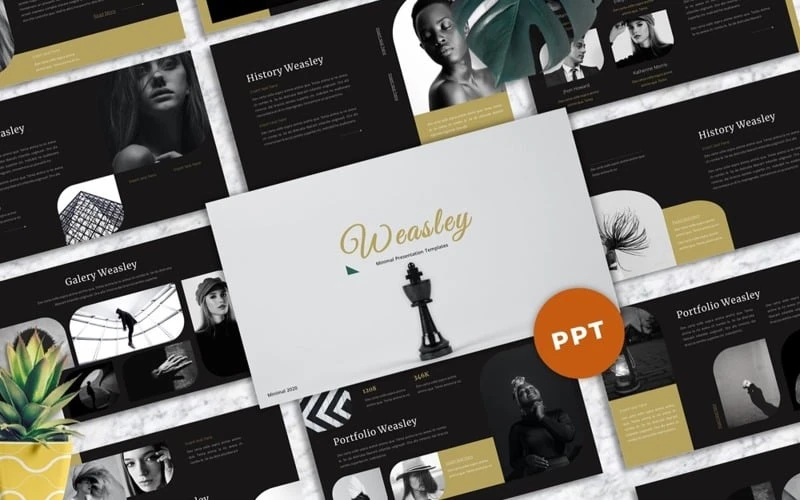
Corporate meetings often carry a reputation for being rigid, predictable, and, unfortunately, dull. Yet presentations don’t have to follow this uninspired path. In fact, well-crafted presentations can transform a standard meeting into a memorable and engaging experience that sparks discussion, inspires innovation, and keeps your team attentive from start to finish.
Whether you’re pitching a new product, sharing quarterly results, or running a team workshop, creativity in presentation design can set the tone and communicate your message effectively. Let’s explore a variety of creative presentation design ideas that can elevate your corporate meetings and help you stand out.
1. Start with an Unexpected Hook
One of the quickest ways to lose an audience is to open with a dry agenda slide. Instead, begin your presentation with something unexpected: a question, a surprising statistic, or a compelling story related to the topic. This approach immediately shifts the energy in the room and draws people in.
For instance, if you’re about to present a new marketing campaign, start by showing a short video clip that illustrates the customer’s pain point or desire. Alternatively, share a personal anecdote that connects emotionally to the topic at hand. By doing this, you’re not just presenting information; you’re telling a story that your audience will remember.
2. Use Visual Metaphors
Visual metaphors are powerful tools that make abstract or complex topics relatable. Instead of filling slides with text-heavy explanations, think of images or graphics that symbolize your core message. For example, if your topic is about overcoming challenges, an image of a bridge over turbulent waters can reinforce the idea visually.
These metaphors help your audience understand and retain information better because visuals are processed by the brain faster than text. Collaborating with a Presentation Design Agency can be especially useful here—they can help you translate complex ideas into strong visual metaphors that resonate with your team.
3. Incorporate Infographics and Data Visualizations
Corporate presentations often involve data, which can easily overwhelm an audience if presented in tables or plain charts. Creative data visualization can transform numbers into meaningful narratives. Instead of standard pie charts or bar graphs, consider using infographics, animated charts, or icon-based visuals that highlight the most critical points.
For example, if you're presenting sales growth, use a rising arrow graphic integrated with key figures, rather than listing numbers on a slide. Well-designed infographics are more than visually appealing—they make data intuitive and easier to discuss.
4. Break Up Content with Interactive Elements
Sitting through a 45-minute monologue is tough, no matter how interesting the topic. Adding interactive elements keeps your audience engaged. Tools like live polls, Q&A segments, and quizzes invite participation and make meetings more dynamic.
Imagine asking your team to vote in real-time on which product feature to prioritize, then showing the results live on screen. This turns your presentation into a conversation rather than a one-way lecture and helps everyone feel involved.
5. Use Minimalistic and Consistent Design
While creativity is key, it’s also essential to avoid clutter. A minimalistic design—using clean lines, ample white space, and a consistent color palette—makes your slides easier to follow. Stick to two or three complementary colors and no more than two fonts throughout the deck.
This doesn’t mean your presentation should be boring. Simple, bold visuals and carefully chosen animations can stand out more effectively when the overall design is clean and uncluttered.
6. Integrate Brand Identity Subtly
Your corporate presentation should reflect your brand without overwhelming the content. Subtle touches like incorporating brand colors, logos, or typefaces help maintain professionalism and brand consistency. However, avoid turning every slide into an advertisement.
Think of it like seasoning in cooking: just enough to enhance the flavor without overpowering the dish. This subtle brand integration helps reinforce your identity and builds trust with your audience.
7. Craft Custom Icons and Illustrations
Stock images and generic icons often look, well, generic. Investing in custom icons or illustrations can make your presentation uniquely yours and more visually cohesive. Custom visuals can also reflect your company culture and tone—whether that’s formal and sophisticated or creative and playful.
Custom illustrations work particularly well when explaining processes, team structures, or new ideas. They add personality and help differentiate your presentation from countless others your audience might have seen.
8. Use Short Videos or GIFs
Video content is incredibly engaging, but it must be used wisely in corporate presentations. Instead of long promotional videos, include short clips (10–30 seconds) that highlight key points. This might be a quick product demonstration, a customer testimonial, or an animation that visualizes your concept.
Well-placed videos or looping GIFs can keep energy levels high and illustrate complex ideas faster than static slides.
9. Apply Subtle Animations and Transitions
Animations can add polish and guide your audience through your content, but overusing them can be distracting. Subtle fade-ins, slide transitions, or element builds can help emphasize points and keep your slides dynamic.
For instance, you could reveal data points one at a time to pace your narrative or use slide transitions to signal a shift in topic. The goal is to support your message—not overshadow it.
10. End with a Strong Call to Action
The last slide often determines what your audience remembers most. Instead of a simple “Thank you,” end with a powerful call to action: what do you want your team or clients to do next? Summarize your key message in a single, visually impactful slide.
If it’s an internal meeting, this might mean outlining the next steps for a project. For external presentations, it could be encouraging follow-up discussions or scheduling a demo. A clear, concise conclusion makes your presentation purposeful and actionable.
11. Leverage Storytelling Throughout
Great presentations feel like stories with a clear beginning, middle, and end. Rather than dumping information slide by slide, structure your presentation around a narrative arc. Introduce a problem, explain its impact, present a solution, and end with the benefits or next steps.
Storytelling isn’t just about words; it’s also about visual flow. Each slide should lead naturally to the next, guiding your audience through your message.
12. Plan for Flexibility
Sometimes, the conversation in a meeting takes an unexpected but valuable turn. Designing your presentation to allow flexibility—such as including backup slides or modular content you can skip or expand on—makes you look prepared and confident.
For instance, if someone asks about detailed metrics, you can quickly navigate to a hidden slide that covers them. This keeps your main presentation clean while being ready for deeper discussion.
13. Use Creative Slide Layouts
Breaking away from the typical title-and-bullets format can make your slides visually striking. Consider full-bleed images with text overlays, side-by-side comparison layouts, or grid designs. Even something as simple as alternating text and image slides can add variety.
Creative layouts help maintain attention by surprising your audience visually. Just ensure they’re still readable and that your message remains clear.
14. Practice Visual Hierarchy
Visual hierarchy is about guiding the viewer’s eye to what matters most on each slide. Use larger font sizes for main headings, contrasting colors to highlight key points, and spacing to separate sections.
This approach makes your slides easier to scan quickly—especially useful in meetings where time is limited.
15. Collaborate with Professionals
Sometimes, it’s best to bring in experts. Partnering with a Presentation Design Agency can help you turn ideas into high-impact visuals and create a polished, professional deck tailored to your goals. Professionals bring fresh perspectives, creative design expertise, and technical know-how that can elevate your presentation beyond what you could achieve alone.
Conclusion
Creative presentation design isn’t about adding flashy elements just for the sake of it. It’s about finding new, thoughtful ways to communicate your message, engage your audience, and make your ideas stick. Whether through storytelling, custom visuals, interactive polls, or minimalistic elegance, there are countless ways to transform a routine corporate meeting into a memorable experience.
By embracing creativity and focusing on clarity and engagement, your presentations can do more than just share information—they can inspire action, foster discussion, and leave a lasting impression. And if you need an expert hand to bring your vision to life, collaborating with a skilled Presentation Design Agency could be the smartest move you make.