Modern workplaces have changed dramatically. Hybrid work has become the standard for many organizations, making seamless collaboration more important than ever. Employees now expect meeting rooms that allow them to connect instantly, share content effortlessly, and collaborate with remote participants without technical interruptions. This is where ClickShare Conference transforms the meeting experience.
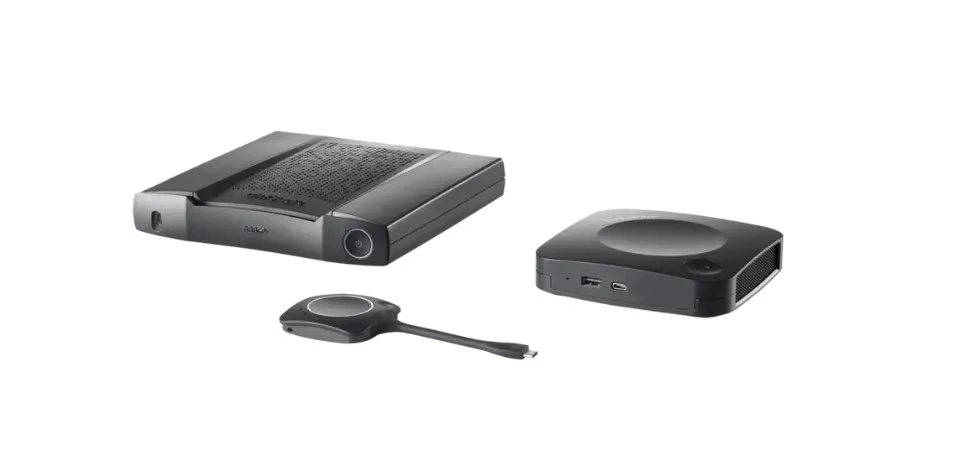
ClickShare Conference simplifies wireless collaboration by enabling users to connect their laptops to room cameras, microphones, speakers, and displays with a single click. Instead of spending valuable meeting time connecting cables or troubleshooting devices, teams can start productive discussions immediately.
This article explores how ClickShare Conference helps organizations create smarter meeting rooms, improve collaboration, and support today's flexible work environment.
What Is ClickShare Conference?
ClickShare Conference is a wireless conferencing solution designed for modern meeting spaces. It allows users to wirelessly connect their laptops to the meeting room's audiovisual equipment while using their preferred video conferencing platform.
Rather than relying on multiple adapters and cables, users simply connect and begin collaborating within seconds.
The solution works with leading conferencing platforms, making it suitable for businesses of all sizes.
Why Smart Meeting Rooms Matter
Today's meetings often include both in-office and remote participants. Traditional meeting rooms can create unnecessary delays due to cable compatibility issues, device setup, or software configuration.
Smart meeting rooms eliminate these challenges by offering:
- Fast wireless connectivity
- Easy content sharing
- High-quality audio and video
- Better collaboration
- Simplified meeting management
- Flexible device compatibility
As a result, meetings become more efficient and engaging.
1. One-Click Wireless Collaboration
One of the biggest advantages of ClickShare Conference is its simple wireless connection process.
Users can connect their laptops to the meeting room with minimal effort. There is no need to search for cables or install complex hardware before every meeting.
This simplicity helps teams begin meetings quickly while reducing unnecessary delays.
2. Works with Popular Video Conferencing Platforms
Organizations use different collaboration platforms depending on their business requirements.
ClickShare Conference supports major video conferencing applications, including:
- Microsoft Teams
- Zoom
- Google Meet
- Cisco Webex
- RingCentral
- GoTo Meeting
Employees can continue using familiar applications without changing their existing workflows.
3. Seamless Integration with Meeting Room Devices
Modern meeting rooms include several audiovisual devices.
ClickShare Conference wirelessly connects laptops to:
- USB cameras
- Microphones
- Speakerphones
- Sound systems
- Interactive displays
- Projectors
This integration creates a consistent meeting experience across different rooms.
4. High-Quality Audio and Video Experience
Clear communication is essential during virtual meetings.
ClickShare Conference provides reliable access to professional meeting room cameras and audio devices. Consequently, remote participants enjoy better sound quality and sharper video.
Improved communication helps reduce misunderstandings while making virtual meetings more productive.
5. Supports Hybrid Work Environments
Hybrid work requires technology that connects employees regardless of their location.
ClickShare Conference allows office-based employees and remote workers to collaborate naturally during the same meeting.
Everyone can participate equally, share ideas, and contribute without technical barriers.
This creates a more inclusive workplace for distributed teams.
6. Wireless Content Sharing
Presenting documents should never interrupt the flow of a meeting.
ClickShare Conference enables users to wirelessly share:
- Presentations
- Reports
- Spreadsheets
- Videos
- Images
- Business dashboards
- Web applications
Content appears instantly on the meeting room display, improving collaboration and decision-making.
7. Enhanced Meeting Room Productivity
Every minute spent solving technical issues reduces productive discussion time.
ClickShare Conference removes many common meeting room frustrations, including:
- Cable compatibility problems
- Display connection failures
- Device switching delays
- Complex AV setup
Consequently, teams spend more time collaborating instead of troubleshooting.
8. Secure Wireless Collaboration
Security remains a top priority for businesses.
ClickShare Conference incorporates enterprise-grade security features that help protect wireless communication during meetings.
Key security capabilities include:
- Secure wireless connections
- User authentication
- Encrypted communication
- Controlled device access
- Regular firmware updates
These features help organizations maintain secure collaboration environments.
9. Easy Deployment and Management
IT administrators benefit from centralized management capabilities.
ClickShare Conference simplifies deployment across multiple meeting rooms while reducing ongoing maintenance.
Administrators can:
- Configure devices remotely
- Monitor system health
- Perform software updates
- Manage room settings
- Track device status
Centralized management reduces IT workload while improving operational efficiency.
10. Flexible Meeting Room Compatibility
Every organization has different meeting room sizes and layouts.
ClickShare Conference adapts to various environments, including:
- Small huddle rooms
- Medium conference rooms
- Executive boardrooms
- Training rooms
- Collaboration spaces
- Customer meeting rooms
Its flexibility allows businesses to standardize collaboration across the workplace.
Key Features of ClickShare Conference
When selecting a wireless conferencing solution, organizations should look for features that improve usability and collaboration.
Important capabilities include:
- One-click wireless conferencing
- Bring Your Own Device (BYOD) support
- High-definition audio and video
- Wireless presentation sharing
- Support for multiple conferencing platforms
- Secure encrypted connections
- Centralized device management
- Automatic software updates
- USB peripheral integration
- Cross-platform compatibility
These features help organizations create reliable and user-friendly meeting spaces.
Benefits for Different Industries
ClickShare Conference supports collaboration across a wide range of industries.
Common applications include:
Corporate Offices
Improve collaboration between office teams and remote employees.
Educational Institutions
Enable interactive virtual lectures and faculty meetings.
Healthcare Organizations
Support secure discussions between medical professionals across locations.
Government Departments
Conduct efficient virtual meetings with secure wireless collaboration.
Financial Institutions
Facilitate confidential client meetings and internal discussions.
Technology Companies
Accelerate brainstorming sessions, product demonstrations, and global team collaboration.
Best Practices for Smarter Meeting Rooms
Organizations can maximize their investment by following a few simple practices.
These include:
- Standardize meeting room equipment.
- Train employees on wireless collaboration tools.
- Keep software updated regularly.
- Use certified cameras and audio devices.
- Monitor meeting room performance.
- Schedule preventive maintenance.
- Optimize room layouts for hybrid meetings.
These practices ensure a smooth and consistent meeting experience.
The Future of Wireless Meeting Rooms
Workplaces continue to evolve as organizations embrace flexible and hybrid working models. Meeting rooms are becoming more intelligent, connected, and user-friendly. Wireless collaboration, cloud integration, and smart device management are now essential for efficient business communication.
Solutions like ClickShare Conference support this transformation by simplifying connectivity, reducing technical barriers, and enabling teams to collaborate effortlessly from any location. As businesses continue investing in digital workplaces, smart meeting rooms will play a critical role in improving productivity, communication, and employee engagement.
Conclusion
Creating smarter meeting rooms requires technology that delivers simplicity, reliability, and flexibility. ClickShare Conference helps organizations achieve these goals by enabling wireless conferencing, instant content sharing, and seamless integration with professional meeting room devices.
Its support for leading conferencing platforms, secure wireless connectivity, centralized management, and compatibility with a wide range of meeting spaces makes it an excellent solution for modern workplaces. By eliminating technical distractions and improving collaboration, ClickShare Conference allows teams to focus on meaningful conversations, faster decision-making, and more productive meetings.
Discover how ClickShare Conference can help transform your meeting rooms into smarter, more connected collaboration spaces that support today's hybrid workforce and tomorrow's workplace innovations.