As mobile operating systems become more sophisticated, businesses are discovering innovative ways to repurpose commercial smartphones and tablets into dedicated enterprise terminals. Modern Android hardware offers high processing power, vibrant touchscreens, and extensive connectivity options at a fraction of the cost of legacy dedicated hardware. However, deploying open, feature-rich operating systems in unattended or semi-supervised public and professional environments creates a significant attack surface. Without proper lockdown safeguards, devices can easily be misused, compromised, or repurposed by unauthorized individuals.
Android Kiosk Mode addresses these challenges by transforming versatile consumer hardware into specialized, single-purpose devices. By systematically restricting access to system controls, core settings, non-essential applications, and external navigation pathways, organizations can deploy mobile technology with complete confidence. This guide provides an in-depth exploration of the architectural security benefits of Android kiosk software, key integration strategies, and the operational advantages of securing mobile endpoints at scale.
The Evolution of Android Device Lockdown
In the early days of mobile device management, locking down an Android device was a complex and fragmented process. Early solutions relied heavily on superficial app overlays or required OS rooting—a practice that stripped away essential system security features, voided manufacturer warranties, and created severe vulnerabilities.
With the introduction of modern Android Enterprise management frameworks, securing devices transformed completely. Modern operating systems support native API-level management capabilities, allowing IT managers to enroll hardware as a dedicated Device Owner. Under this framework, kiosk lockdown functions directly at the operating system level rather than as a simple background app.
When an Android tablet or phone operates under a native kiosk profile, the underlying operating system enforces lockdown policies directly. Unapproved system apps remain completely disabled, hardware buttons are remapped or deactivated, and navigation bars are hidden. Even if the device experiences an unexpected system reboot or power loss, it boots directly back into the secured kiosk shell, ensuring uninterrupted operational continuity.
Core Architectural Pillars of Android Kiosk Lockdown
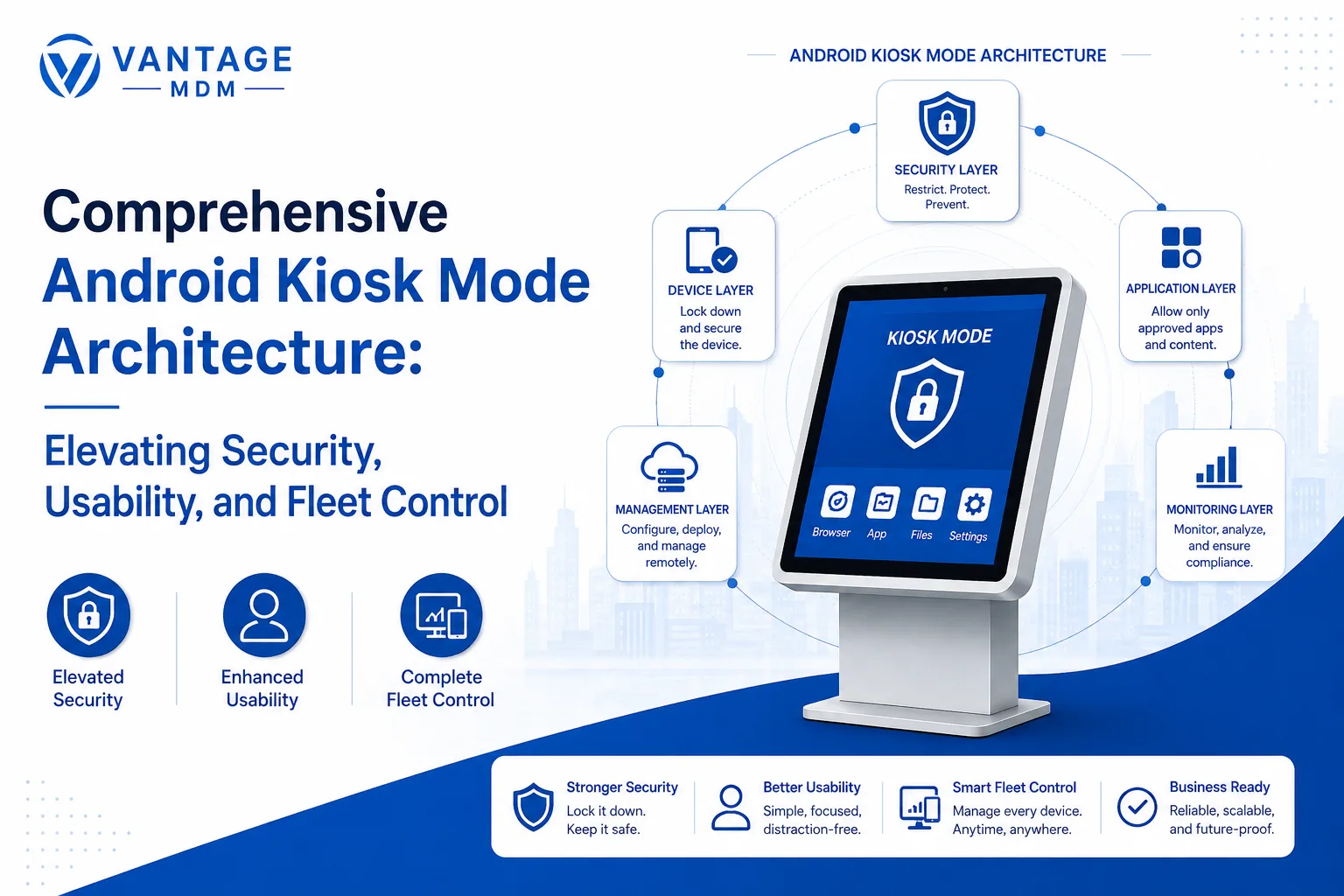
A complete kiosk lockdown deployment relies on several interconnected security and usability pillars:
1. Application Isolation and Whitelisting
The foundational rule of kiosk security is strict application whitelisting. Rather than blocking bad applications individually, administrators explicitly define the exact apps allowed to run. Every other application—including standard system tools like the Google Play Store, default web browsers, file managers, and settings—is rendered completely inaccessible.
2. User Interface and Navigation Restriction
Standard OS controls present multiple ways for users to escape dedicated applications. Android kiosk implementations systematically neutralize these escape routes by disabling:
- The status bar and pull-down notification panel.
- Recent apps overview and quick setting toggles.
- Hardware keys, including Home, Back, and Volume buttons.
- Contextual pop-ups, system dialogs, and software installation prompts.
3. Peripheral and Communication Control
Securing software is only half the battle; hardware entry points must also be protected. Kiosk policies allow administrators to disable physical USB data connectivity (leaving only charging active), restrict Bluetooth pairing to authorized peripherals, disable Wi-Fi network switching, and block external storage devices like micro-SD cards.
4. Automated Recovery and Session Resets
For public-facing applications like information kiosks or self-checkout counters, privacy and system stability are critical. Advanced kiosk software includes automated session resets that clear personal data, browser caches, and temporary files after periods of inactivity, returning the app to its initial welcome screen for the next user.
Strategic Benefits for Modern Enterprises
Implementing structured device lockdown policies provides tangible business advantages across every level of an organization:
- Maximized Operational Uptime: Preventing users from modifying settings or downloading unauthorized files dramatically decreases device crashes and configuration errors, reducing IT helpdesk tickets.
- Enhanced Data Protection and Compliance: Restricted system access prevents accidental or intentional data leaks, helping businesses comply with regulatory standards like GDPR, HIPAA, and PCI-DSS.
- Optimized Bandwidth and Hardware Longevity: Blocking background app downloads, media streaming, and unapproved web browsing conserves cellular data plans and protects hardware from unnecessary heat and battery wear.
- Streamlined End-User Experience: Eliminating OS distractions ensures that users—whether shoppers, patients, or frontline employees—interact strictly with a simple, clear, and intuitive application interface.
Industry Implementations and Multi-Sector Adoption
To appreciate the adaptability of device lockdown configurations, consider how different industries rely on restricted Android hardware for daily operations:
Retail and Interactive Digital Signage
Retailers convert large-format Android tablets into interactive catalog displays, price checkers, and self-service checkout terminals. By locking the display to the retail application, customers enjoy a smooth purchasing experience without risk of screen tampering or accidental exits.
Field Services and Public Safety
Field engineers, utility technicians, and emergency responders utilize ruggedized handhelds locked into multi-app setups. Crew members have instant access to mapping tools, work order apps, and communication channels, while non-work applications remain completely blocked to prevent distractions on the job.
Healthcare and Patient Care
Hospitals deploy locked tablets at patient bedsides for entertainment, meal ordering, and nurse calls. Simultaneously, medical staff use locked devices to record patient metrics and check electronic health records safely, knowing confidential health data is protected from unauthorized access.
To learn more about how organizations implement tailored lockdown policies across diverse fleet deployments, explore the dedicated features of Android kiosk mode available for enterprise environments.
Essential Steps for a Secure Kiosk Rollout
Deploying locked Android hardware across an enterprise requires structured planning and testing. Follow these essential steps to execute a seamless deployment:
- Map Application and Hardware Dependencies: Identify all required software components, hardware permissions (e.g., camera access for barcode scanning), and peripheral requirements before building security profiles.
- Select Enterprise Enrollment Frameworks: Utilize automated enrollment standards—such as Android Zero-Touch or Knox Mobile Enrollment—to ensure policy profiles are pushed to devices automatically during initial setup.
- Configure Granular Security Policies: Build management profiles that enforce strict app whitelisting, block system settings, disable developer modes, and establish strong administrative exit PINs.
- Implement Custom Web Browsing Controls: If your kiosk relies on web applications, deploy a dedicated kiosk browser configured with domain whitelisting, disabled URL bars, and automatic session clearing.
- Conduct Comprehensive Penetration and Field Testing: Thoroughly test the lockdown configuration under real-world conditions. Attempt common bypass techniques—such as rapid button presses, plugging in external USB devices, or forcing network disconnects—to ensure the lockdown remains unbreached.
- Establish Continuous Monitoring and Remote Support: Maintain real-time visibility over your device fleet via a centralized administrative console. Monitor device status, battery health, and online connectivity to address potential issues proactively.
Conclusion
Android Kiosk Mode represents a vital convergence of hardware affordability, operating system flexibility, and enterprise-grade security. By transforming standard consumer devices into purpose-built, secure hardware endpoints, organizations can streamline operations, protect critical data, and deliver reliable user experiences. Whether managing a small cluster of digital menus or an international fleet of field service devices, adopting a robust kiosk lockdown strategy ensures your mobile infrastructure remains safe, efficient, and fully aligned with your broader business objectives.