Your iPhone is a marvel of engineering, but it relies on a component that has a finite lifespan: the lithium-ion battery. Over time, chemical aging reduces the amount of charge a battery can hold, leading to shorter usage times and diminished performance. Understanding how to monitor your battery health is essential for maintaining a seamless mobile experience. Whether you are using a legacy model or looking for second hand iphones online in india, knowing when to service your device can save you from unexpected shutdowns and frustration.
Understanding Battery Capacity and Peak Performance
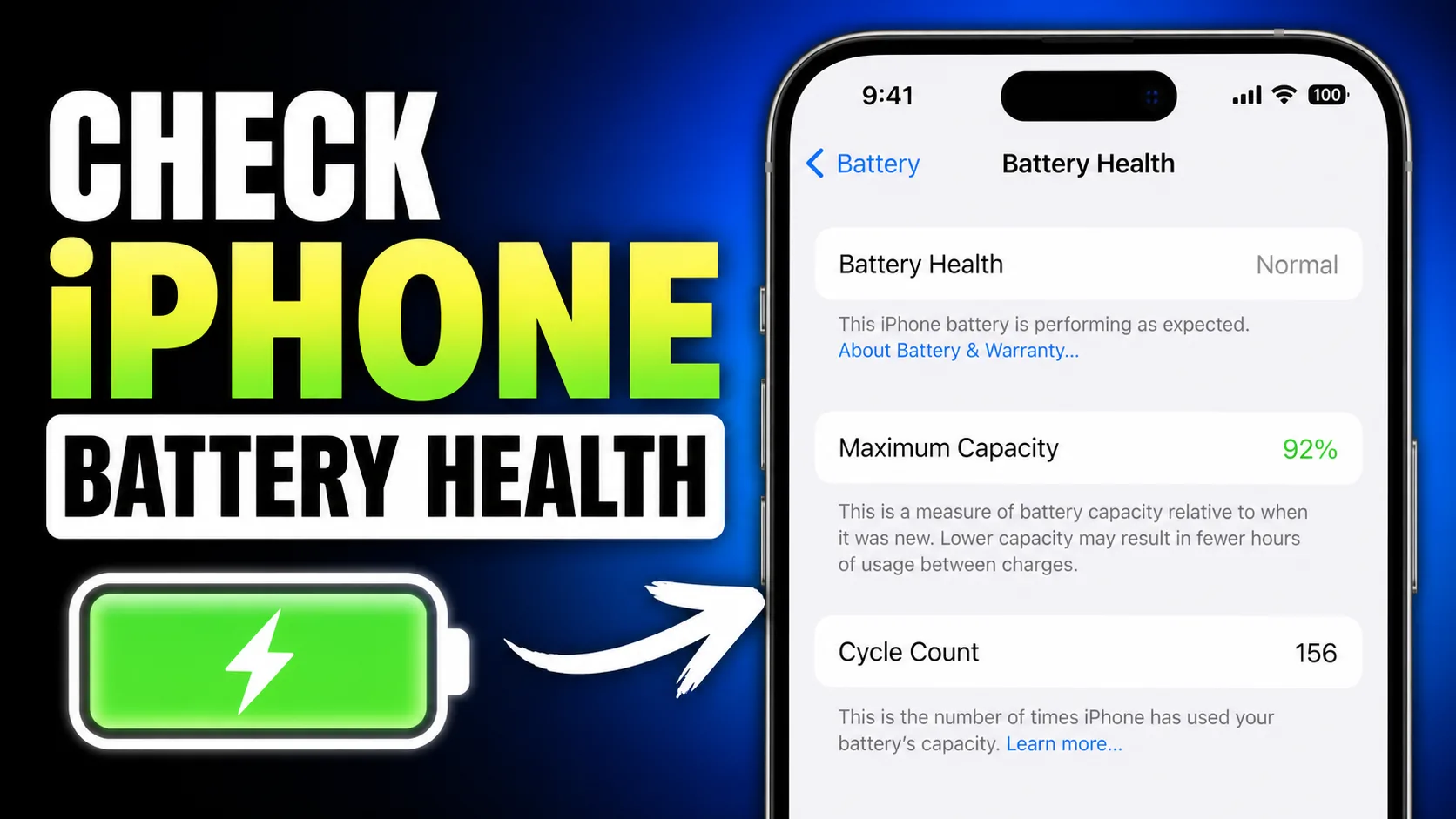
Apple provides a built-in tool to help users track the state of their power source. By navigating to Settings, then Battery, and selecting Battery Health & Charging, you can see your "Maximum Capacity." This percentage measures your battery capacity relative to when it was new. A new iPhone starts at 100%, but as the battery ages, this number drops.
Generally, Apple considers a battery "healthy" if it maintains at least 80% of its original capacity. Once it dips below this threshold, you may notice that your phone struggles to last through a full day of work. Furthermore, this section informs you if your device is still supporting "Peak Performance Capability." If the battery can no longer provide the necessary instantaneous power, the system may apply performance management (throttling) to prevent the phone from turning off unexpectedly during intensive tasks.
Noticeable Signs of Battery Degradation
Beyond the numbers in your settings menu, your iPhone will often give you physical and operational cues that the battery is failing. One of the most common signs is rapid percentage drops. If you unplug your phone at 100% and find it at 80% after just a few minutes of light browsing, the internal resistance of the cells has likely increased significantly.
Another red flag is the device becoming unusually hot during simple tasks or while charging. While some heat is normal, excessive warmth indicates that the battery is struggling to manage the flow of energy. In extreme cases, a degraded battery might even begin to swell, causing the screen to slightly lift or the frame to bulge. If you notice this, it is a safety priority to stop using the device and seek a professional replacement immediately. At EasyPhones, we prioritize device longevity and safety, helping users identify when their current hardware is no longer performing at its best.
Software Impacts and Throttling
The relationship between your battery and your operating system is complex. Newer software updates are often optimized for newer hardware, which can put a strain on aging batteries. As users look forward to the latest innovations, such as ios 26 features, it is important to remember that advanced software requires stable power delivery.
If your battery health is poor, your iPhone might implement "Performance Management." This means the CPU and GPU speeds are intentionally limited to prevent the phone from crashing. You might notice longer app launch times, lower frame rates while scrolling, or a dimming of the backlight. While this prevents the phone from dying mid-call, it significantly hampers the user experience. Upgrading your hardware through a trusted platform like EasyPhones ensures you have a device capable of handling modern software demands without these frustrating slowdowns.
When to Repair vs When to Upgrade
Deciding whether to replace the battery or buy a new phone depends on the age of your device. If you have a relatively recent model with a cracked screen or other motherboard issues in addition to a bad battery, a replacement might not be cost-effective. However, if the phone is otherwise in great condition, a simple battery swap can breathe new life into it for another two years.
For those using very old models that no longer support the latest security updates, transitioning to a newer, high-quality device is often the smarter financial move. If you want the latest technology without the brand-new price tag, you might consider an iphone 16 refurbished. This allows you to jump several generations ahead, gaining a significantly better camera system and a fresh battery that is guaranteed to last.
Maximizing the Lifespan of Your New Battery
Once you have replaced your battery or upgraded your device, you should adopt habits to keep the new cell healthy for as long as possible. Heat is the primary enemy of lithium-ion technology. Avoid leaving your phone in a hot car or using it for heavy gaming while it is plugged into a charger.
Apple’s "Optimized Battery Charging" feature is also a vital tool. It learns your daily charging routine and waits to finish charging past 80% until you need to use it, reducing the time the battery spends at a full charge, which can cause stress. For power users who demand the absolute best in efficiency and longevity, moving to a flagship like an iphone 16 pro refurbished offers advanced power management features that keep the hardware running cooler and more efficiently than older generations.
Why Quality Matters in Battery Maintenance
Choosing where to source your replacements or upgrades is critical. Low-quality third-party batteries often lack the necessary safety certifications and may report incorrect health percentages to the OS. EasyPhones focuses on providing reliable, high-standard mobile solutions to ensure that every device remains a dependable tool for your daily life.
Monitoring your battery health is not just about convenience; it is about getting the most value out of your investment. By keeping an eye on your maximum capacity, staying aware of performance throttling, and knowing when to transition to a newer model, you ensure that your connection to the digital world remains uninterrupted. Whether you choose to service your current iPhone or explore the curated selection at EasyPhones, staying proactive about battery health is the best way to avoid the frustration of a dead phone at the wrong time.