Managing digital files has become a daily challenge for businesses of every size. Whether you run a marketing agency, manage construction projects, coordinate educational programs, or oversee client documentation, an organized folder structure is essential for efficient collaboration. As organizations handle more projects, manually creating folders for every new client or task quickly becomes repetitive and time-consuming.
A well-planned folder hierarchy helps teams locate files faster, reduces duplication, and ensures everyone follows the same organizational standards. Without consistency, important documents can be misplaced, causing delays and unnecessary frustration. This is why many organizations are looking for practical ways to simplify folder management while maintaining a structured digital workspace.
Automation has transformed many routine business processes, and folder management is no exception. Instead of manually building identical directory structures repeatedly, businesses can use automated systems to generate organized folders within seconds. This not only saves time but also improves accuracy and supports long-term scalability.
Why Organized Folder Structures Matter
Digital workspaces continue growing every day. New projects, clients, departments, and employees all contribute to increasing amounts of data. Without an effective folder structure, locating important information becomes difficult.
A standardized folder system provides several advantages:
Faster access to documents
Improved collaboration across teams
Reduced duplicate files
Easier employee onboarding
Better project organization
Consistent document storage
Simplified compliance with company standards
When everyone follows the same folder hierarchy, teams spend less time searching for files and more time completing meaningful work.
The Challenges of Manual Folder Creation
Although creating folders seems like a simple task, repeating the process dozens or hundreds of times every month consumes valuable working hours.
Common problems include:
Inconsistent Folder Names
Different employees often use different naming styles, making files harder to locate.
Missing Directories
Manual setup increases the chance of forgetting important folders required for documentation.
Repetitive Administrative Work
Building the same directory structure repeatedly reduces productivity and limits time available for higher-value tasks.
Poor Scalability
As project volumes increase, manual folder creation becomes increasingly difficult to manage.
These challenges highlight the need for smarter document organization methods that reduce repetitive work while maintaining consistency.
How Automation Improves Digital Organization
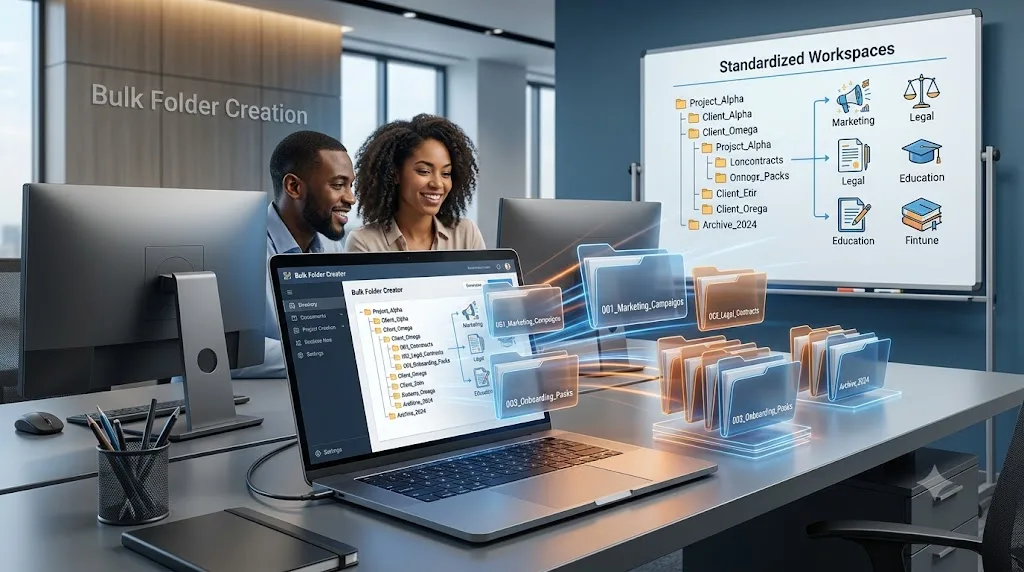
Automation allows businesses to replace repetitive folder setup with predefined templates. Instead of manually creating every folder, complete directory structures can be generated automatically based on organizational requirements.
This approach offers several benefits:
Consistent folder structures
Reduced human error
Faster project setup
Improved collaboration
Better document management
Greater operational efficiency
Organizations handling recurring projects benefit the most because every new workspace follows the same standardized layout.
Improving Productivity with bulk folder creation
Businesses managing multiple projects often need identical folder structures for every client, department, or location. Marketing agencies may require folders for proposals, campaigns, creative assets, analytics, and reports. Construction companies may organize permits, contracts, drawings, inspections, and invoices. Educational institutions often maintain folders for courses, assignments, student records, and learning materials.
Using bulk folder creation enables organizations to generate these complete directory structures automatically instead of manually creating every folder one at a time. This saves significant administrative effort while ensuring every project begins with an organized foundation.
The result is a more reliable workflow where employees spend less time performing repetitive tasks and more time delivering value to customers and stakeholders.
Industries That Benefit from Folder Automation
Nearly every industry managing digital documents can improve efficiency through automated folder creation.
Marketing Agencies
Campaign assets, client reports, contracts, media files, and creative work remain consistently organized.
Legal Firms
Case documents, evidence, agreements, billing information, and correspondence are stored within standardized structures.
Educational Institutions
Course materials, assessments, attendance records, and student documentation become easier to manage.
Healthcare Organizations
Administrative files, operational documents, policies, and departmental resources stay organized.
Engineering and Construction
Project drawings, contracts, permits, inspections, budgets, and reports remain accessible throughout the project lifecycle.
Best Practices for Creating Folder Structures
Organizations can maximize efficiency by following a few simple guidelines.
Keep Naming Conventions Consistent
Use clear, descriptive folder names that everyone understands.
Build Reusable Templates
Standard folder templates eliminate repetitive setup while maintaining consistency.
Limit Folder Depth
Avoid creating unnecessarily complex directory trees that make navigation difficult.
Review Folder Standards Regularly
Update templates as business processes evolve to ensure they continue supporting organizational needs.
Why Teams Need to create multiple folders at once
Modern businesses rarely manage only one project at a time. Teams often launch several new projects every week, each requiring the same folder hierarchy. Instead of manually repeating identical setup tasks, organizations can create multiple folders at once using automation and predefined templates.
This approach helps maintain consistent project structures, reduces setup time, and allows employees to begin productive work immediately. Rather than spending hours organizing directories, teams can focus on planning, collaboration, and delivering successful outcomes.
As project numbers continue growing, automated folder generation becomes an essential part of maintaining organized digital workspaces.
Conclusion
Effective file organization plays a critical role in business productivity. While cloud storage platforms make collaboration easier, manually creating folder structures remains a repetitive task that slows operations and introduces unnecessary errors.
Automating folder creation allows organizations to standardize project structures, reduce administrative effort, improve collaboration, and support future growth. Whether managing dozens or thousands of projects, a consistent folder hierarchy ensures documents remain organized and accessible.
By adopting automated folder management practices, businesses create efficient digital workspaces where teams spend less time organizing files and more time achieving meaningful results.
Bulk Folder Creation: A Smarter Way to Organize Digital Workspaces