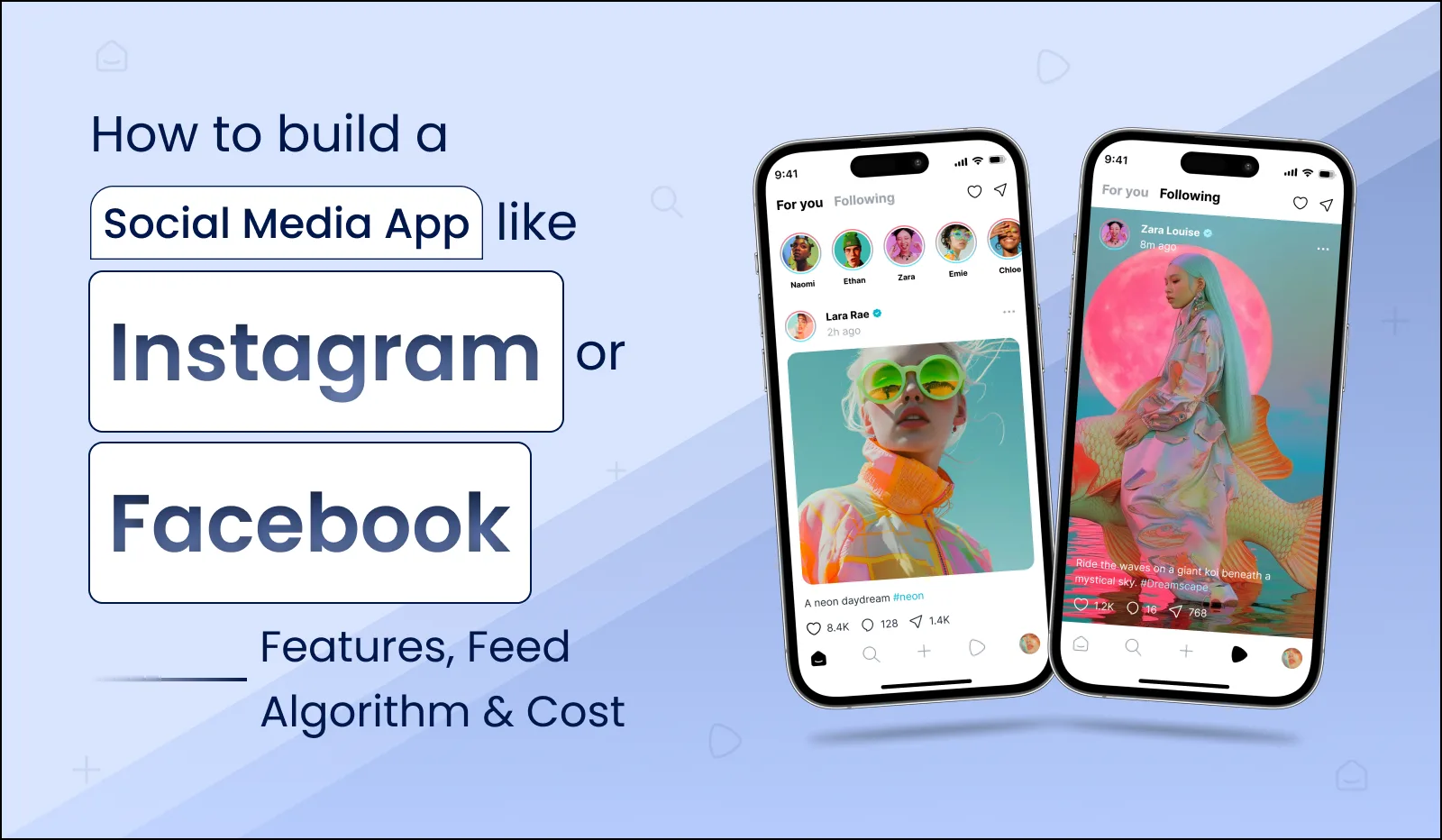
Every social media app guide describes what Instagram looks like. This one explains how to build something that competes — the niche-first strategy that’s the only real path to success in 2026, the feed algorithm architecture you can actually implement, and the content moderation system you can’t skip. Plus the real cost at India rates.
The single thing most guides don’t tell you You cannot build a general social media app in 2026 and win. Instagram has 2 billion users. TikTok has 1.5 billion. Facebook has 3 billion. Competing with them head-on with a similar feature set is not a product strategy — it’s a way to spend $200,000 and get zero users. Every social platform that succeeded in the past five years went niche first: Strava for athletes, BeReal for candid moments, Letterboxd for film lovers, Finsta for a different audience persona on Instagram, Clubhouse for audio conversation. The niche is not a marketing choice — it determines your feed algorithm (what signals matter), your content moderation rules (what is and isn’t allowed), your monetization model (how your community spends money), and your V1 feature list (what matters to this specific group that Instagram gets wrong). Pick the niche before anything else. The whole architecture follows from that decision. See Primocys social app development →
Primocys has built three live social platforms — Snaptaig (Instagram-style photo sharing), ReelBoost (TikTok-style short video on CodeCanyon), and Dapke (live streaming platform with PK battles and virtual gifting, 50K+ users, 3× engagement vs industry average). The architecture decisions, feed algorithm choices, and content moderation lessons in this guide come from shipping those three products, not from reading competitor guides. That distinction matters when the guide gets technical.
The opportunity in social media app development in 2026 is real — over 5 billion people use social platforms worldwide, and there is still room for new ideas. The gap the giants consistently miss: niche communities who want a platform built around their specific interest, not a general-purpose feed they share with everyone else. Runners on Strava don’t want their workouts mixed with food photos and political news. That is the entire market opportunity in 2026, and it is larger than most founders assume.
5B+
Social media users worldwide 2026
50K+
Live Social App Users
3×
Engagement vs Industry
$12K
Social App MVP: India
Multi-stage
Feed System Design
4 Types of Social Media Apps to Build in 2026
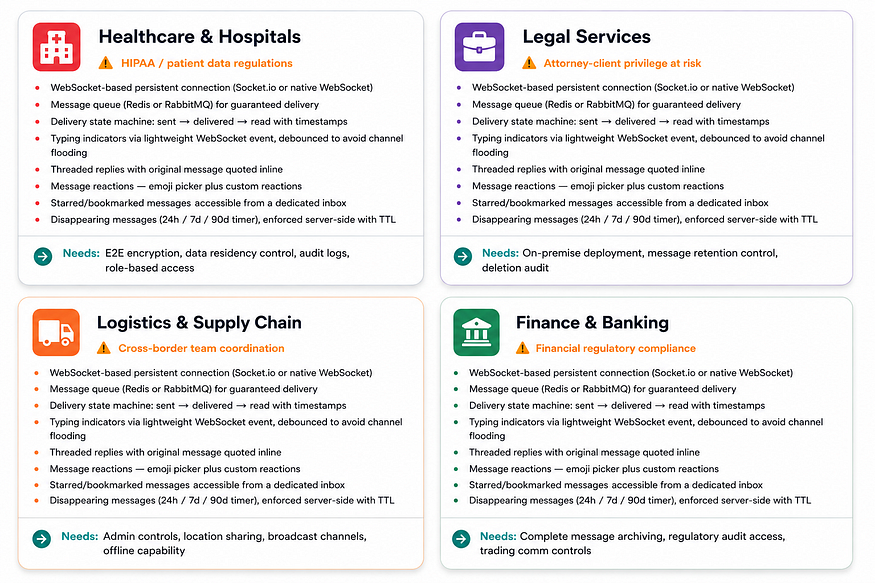
Social media is not a single product category. The three dominant archetypes in 2026 are the interest-based community app, the visual content app, and the short-form video platform. We add a fourth — the live social platform — which Primocys has shipped as Dapke. Each archetype has different infrastructure requirements, different feed algorithm needs, and a different V1 feature list. Choosing the wrong one for your audience is an architecture rebuild, not a feature update.
3 Key Decisions Before You Build a Social App
Before features, before UI design, before team hiring — three technical decisions determine your entire infrastructure stack, your development cost, and how hard it is to change course later. Getting these wrong in V1 means an architecture rebuild rather than a feature update.
01. Follow graph vs Interest graph feed
A follow-graph feed shows users content from people they follow — chronological or ranked by engagement. Simpler to build, predictable, no ML required in V1. But growth is capped by how many people a user follows: a new user who follows 10 people sees 10 people’s content. An interest-graph feed (how TikTok works, how Instagram Feed works in 2026) shows content based on what users engage with — regardless of who posted it. All major platforms have now moved from follow-graph ranking to interest-graph recommendation. A new user with zero follows can still see great content. Viral discovery is possible. But you need a recommendation engine to build it.
Impact: Follow-graph = build in 8 weeks. Interest-graph = 16+ weeks + ongoing ML model training. Wrong choice: Building an interest-graph system when your niche is a small professional community where follow graph works perfectly. That’s 2× the timeline and cost for no user benefit.
02. Server-side video transcoding vs managed media service
Every social app that supports video must transcode uploads — converting whatever format users upload into web-optimised HLS streams at multiple resolutions. You can build this yourself (FFmpeg on EC2) or use a managed service (Cloudflare Stream, Mux, or AWS MediaConvert). Self-built transcoding costs $0 in fees but requires DevOps expertise and scales poorly under traffic spikes. A single viral video can consume terabytes of bandwidth in hours — your infrastructure must absorb that without degradation. Managed services cost $1–$5 per 1,000 minutes of video delivered but absorb spikes automatically.
Impact: For MVP with under 10,000 users, managed services (Mux/Cloudflare Stream) are almost always the right choice. At 100,000+ users, the math shifts toward self-built. Wrong choice: Building custom video transcoding in V1 before you have evidence of video-heavy usage. The engineering time is better spent on product.
03. Real-time infrastructure: WebSocket vs polling vs push only
Social apps with live feeds, DMs, notifications, and live streaming need real-time infrastructure. Polling (refreshing the feed every 30 seconds) is simple but creates a poor user experience. WebSocket connections keep a persistent connection open — every new post, like, or message appears instantly. RTMP + WebRTC handles live video with sub-2-second latency (how Primocys built Dapke). The decision matters because WebSocket connections consume server resources proportionally to concurrent users — your backend architecture must account for this from the start.
Impact: WebSocket requires horizontal scaling from day one (Redis Pub/Sub for message fanout). Don’t design for polling first and add WebSocket later — it’s a backend rewrite. Wrong choice:: Building polling for “MVP simplicity” when your core product is a real-time social experience. Users notice a 30-second delay on likes.
3 Live Social Media Apps Built by Primocys
Snaptaig, ReelBoost, and Dapke are live on the App Store and Google Play — real products, real users, and the architecture decisions we bring to every build.
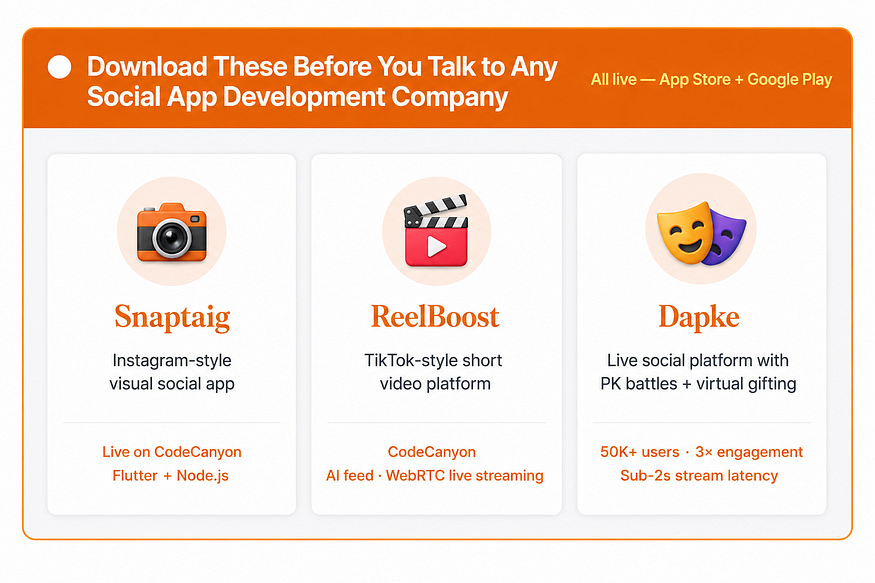
Every architecture decision in this guide — the feed algorithm, the WebRTC live streaming, the virtual gift economy, the content moderation pipeline — was made building one of these three products. When we say “sub-2 second streaming latency,” that’s the number Dapke achieves in production, not an estimate.
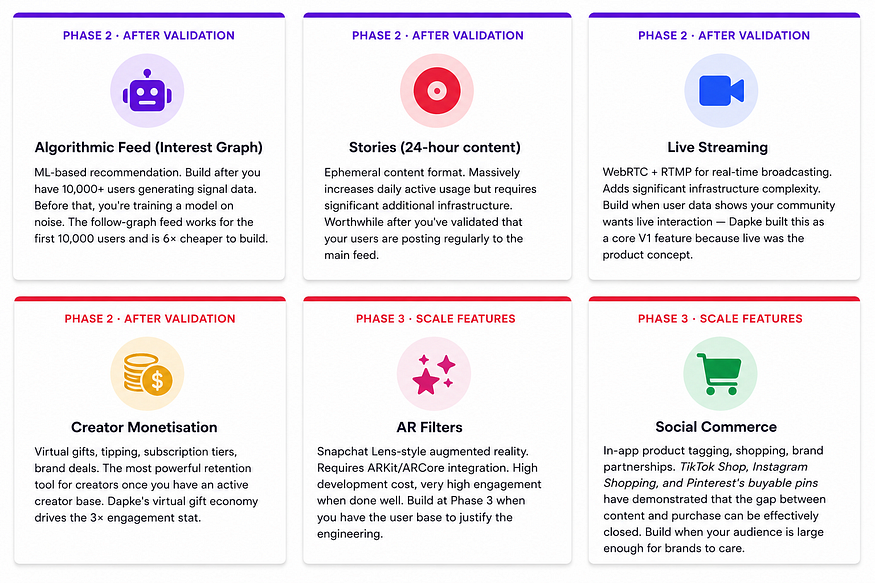
Social Media App Features: V1 vs Phase 2
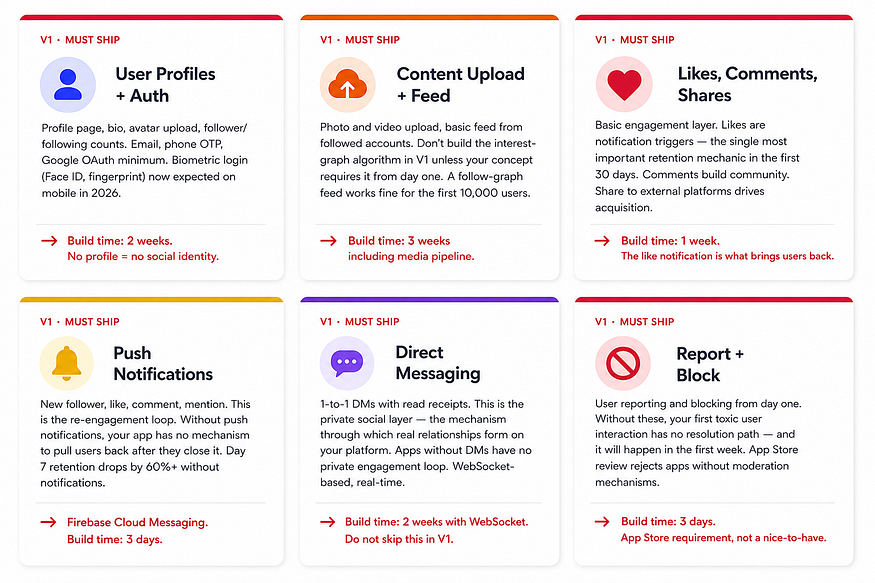
Every social app article lists 40+ features. That list is how you build a $500,000 product no one uses. The honest breakdown: users will leave within 48 hours if V1 is missing any of these non-negotiables. Everything else is Phase 2 — and you’ll know which Phase 2 features matter after 90 days of real user data tells you.
Must-Have Social App Features in V1
Phase 2 Features to Add Later
Social Media App Feed Algorithm Explained
Every major platform now runs a multi-stage recommendation system built on large embedding models, retrieval layers, and real-time ranking networks that score thousands of candidate posts per session. You’re not building that in V1. But you do need an architecture that can grow toward it. Here’s the production pattern — simplified to what a founder-stage social app can actually build.
Multi-Stage Feed Algorithm — What You Build in 2026
01. Candidate Retrieval
Pull candidate posts from: accounts the user follows + posts from interest categories the user engages with + trending content in the user’s niche. In V1: follow-graph only. In V2: add interest category matching using simple collaborative filtering.
— Stack: PostgreSQL query + Redis cache for hot posts. V2: pgvector for embedding-based similarity search.
02. Candidate Scoring
Score each candidate post for this specific user. Signals: relationship strength (how often do you interact with this account?), content type preference (does this user watch videos or prefer photos?), recency, past engagement patterns.
— Stack: Python scoring service. V1: rule-based. V2: lightweight ML model trained on engagement events.
03. Diversity + Business Rules
Prevent feed from showing 10 posts from the same account. Apply content moderation scores (remove flagged content). Boost sponsored content (future monetisation). Enforce content policy rules (no violence, no hate speech even in recommendations).
— Stack: In-memory filtering layer before final sort. Rule engine, not ML.
04. Final Ranking + Serve
Sort scored, filtered candidates. Return top N posts to the API. Cache the result per user with a TTL (time-to-live) — don’t recompute the entire feed on every scroll, only on session start or after TTL expires.
— Stack: Redis sorted set for cached feed. API endpoint returns paginated results. Prefetch next page in background.
05. Engagement Signal Collection
Track every user action — like, comment, share, watch time (for video), scroll past (negative signal). This is the training data for your V2 recommendation model. Collect it from day one even if you don’t use it yet.
— Stack: Event stream (Kafka or simple Redis queue). Analytics database (ClickHouse or TimescaleDB for time-series). Do NOT skip this in V1.
The most important instruction in this diagram: collect engagement signals (Step 5) from day one, even if you start with a simple follow-graph feed. The data you collect in months 1–3 is the training data for the V2 recommendation model. Starting to collect it at month 4 means you lost 90 days of irreplaceable signal data.
What Instagram’s algorithm actually does in 2026 — and the version you can build: Instagram runs separate AI ranking pipelines for Feed, Reels, Stories, Explore, and Search — each with different objective functions. What they share is a multi-stage architecture. When an asset is uploaded to Instagram, it travels through an asynchronous media-understanding pipeline that processes features across multiple layers — computer vision models segment video frames, OCR scans for on-screen text, and audio transcription engines parse spoken words. You are not building that. But you are building the same multi-stage architecture (candidate retrieval → scoring → diversity rules → final ranking) with simpler signals. Start with rule-based scoring, collect engagement data, train your first lightweight model at 10,000 users. The architecture is identical — only the model complexity differs.
Content Moderation for Social Media Apps
Content moderation is the most under-discussed part of social media app development and the one that kills more social platforms post-launch than any technical failure. You need reporting and blocking from day one, a clear policy, an automated first pass to catch the obvious cases, and a human path for the rest. App Stores will reject your app without basic moderation. Advertisers won’t touch a platform without content standards. And a single viral piece of harmful content with no moderation response ends platforms permanently.
Layer 1 — Automated pre-screening (build in V1)
Run every uploaded image and video through AWS Rekognition or Google Cloud Vision API before publishing. These services flag nudity, violence, hate symbols, and known CSAM (child sexual abuse material) automatically. Cost: $1–$3 per 1,000 images. This is not optional — it’s the minimum for App Store compliance and protects you from being the distribution channel for the worst content categories. Set up before your first user, not after the first violation.
Layer 2 — Text content moderation (build in V1)
Run captions, comments, and bio text through OpenAI Moderation API (free) or Perspective API (Google) to flag hate speech, harassment, and spam. Not a replacement for human review but catches the obvious cases at zero cost. Combine with a keyword blocklist specific to your niche — a fitness app has different moderation needs than a general social platform.
Layer 3 — User reporting and human review queue (build in V1)
Every piece of user-reported content goes into a moderation queue reviewed by a human (you, initially). Build the admin dashboard before launch — a content report with no review mechanism is the same as no moderation. Target: review all reports within 24 hours in the first 3 months. As volume grows, hire community moderators from your user base first (they understand the niche) before hiring generalist moderators.
Layer 4 — Community guidelines (write before launch)
A clear, specific community guidelines page that tells users exactly what is and isn’t allowed on your platform — not a generic copy-paste of another platform’s rules. Niche-specific rules matter: a photography platform has different standards for artistic nudity than a general social platform. Clear guidelines reduce borderline cases, give your moderation team a reference document, and demonstrate to App Store reviewers that you have a content policy.
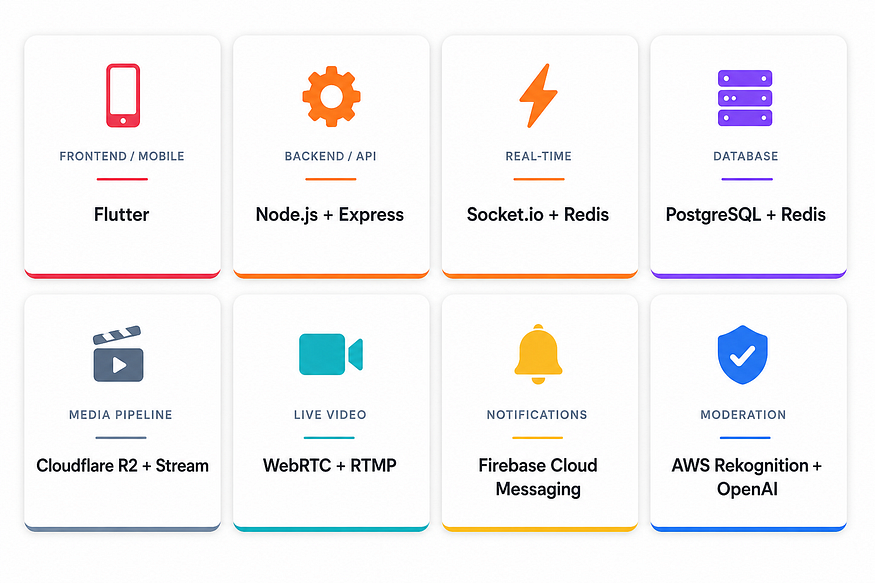
Best Tech Stack to Build a Social Media App
Niche Social Media App Ideas for 2026
The apps that broke through in the last few years did not compete with the big networks head-on. They found a group that was underserved by the giants and built for that group specifically. Strava did this for runners and cyclists. BeReal did it with a single daily prompt. Letterboxd did it for people who take films seriously.
Your niche is not just a marketing positioning decision. It determines the following technical and product choices:
What choosing a niche actually determines (beyond marketing): Your follow graph seed — who are the first 100 accounts you pre-populate the app with? Your content moderation rules — a healthcare platform and a gaming platform have entirely different community standards. Your feed algorithm signals — a fitness app weights workout completion posts differently than a general interest feed. Your V1 feature list — a trade professional network needs portfolio and certification verification; a fitness app needs workout logging integration. Your monetisation model — a creator platform monetises differently than a brand community. The niche is an architecture decision. Define it before you write specifications, not after you build a generic platform and try to find an audience for it.
Three niche opportunities that represent genuine 2026 gaps in the social app market, based on real search demand and where the major platforms are failing specific communities:
Niche 1: Regional social platforms in high-WhatsApp/TikTok markets: Brazil, Nigeria, Indonesia, and the Middle East all have large social media user bases and either regulatory pressure on global platforms (Brazil TikTok restrictions) or underserved local content preferences (Arabic-language content on platforms tuned for English). A niche social app built specifically for a regional market — local language, local payment methods, local content moderation norms — can own the space that Instagram and TikTok’s global algorithms fail to serve well. Primocys has live apps for exactly these markets and a Nigerian client who built exactly this kind of localised platform (Adegbuyi Oduguwa’s B2B and B2C platform for Made in Africa products). Contact us about regional social app development.
Niche 2: Professional community platforms (the LinkedIn gap): LinkedIn is terrible for specific professional trades — electricians, mechanics, independent contractors, healthcare workers, teachers. A social platform that combines professional portfolio display, job-finding, and community discussion for a specific trade vertical has almost no real competition and a clear monetisation path (job listing fees, verified credential badges, professional directory). The moderation requirements are simpler than a consumer platform, the follow graph seeds from professional associations and trade publications, and average user LTV is significantly higher than consumer social.
Niche 3: Creator-first social platforms with better monetisation splits: Instagram and TikTok both take 30–50% of creator earnings from monetisation features. A social platform that offers creators 80% of virtual gift revenue, subscription income, and brand deal facilitation — with a community built around a specific content vertical — is a real 2026 opportunity. Dapke’s virtual gift economy and 3× engagement vs industry average demonstrates that creator monetisation is the most powerful retention tool on a social platform. The platform wins when creators win on it.
Social Media App Development Cost in 2026
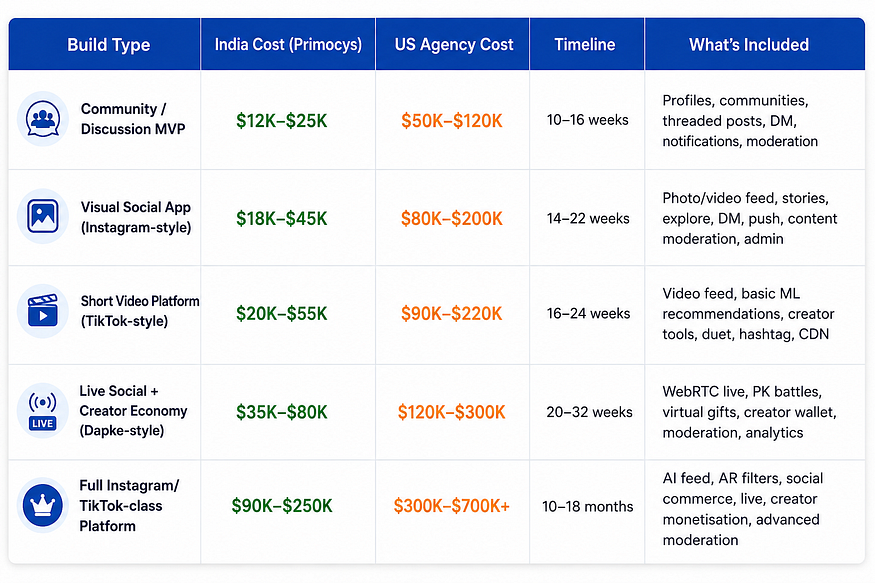
The cost most guides don’t include: media infrastructure ongoing costs: The build cost is one number. The monthly operating cost for a social app that handles video is another — and most cost guides ignore it. Video transcoding, CDN delivery, and storage scale with your user count. At 1,000 daily active users uploading 2 videos each, you’re transcoding 2,000 videos per day. At $0.01 per minute of transcoding and average video length of 30 seconds, that’s $10/day or $300/month — manageable. At 100,000 daily active users, the same math gives you $30,000/month in media costs alone. Plan for this before launch. The transition from Cloudflare Stream/Mux to self-hosted FFmpeg transcoding (which has higher setup cost but lower per-minute cost) typically makes financial sense at 50,000+ daily active users.
“The social apps that succeed in 2026 are not the ones with the most features — they are the ones that serve a specific community better than the general platforms do. Instagram is too big to care about electricians, fitness coaches in Lagos, or Arabic-language creators in Riyadh. That gap is the market. The technology to fill it has never been more accessible or more affordable at India development rates.”
Primocys · Social Media App Development
We’ve Built 3 Live Social Platforms. We Can Build Yours.
Snaptaig (Instagram-style), ReelBoost (TikTok-style), Dapke (50K+ users, 3× engagement, live streaming). Download any of these before our first call and use them. The architecture, the feed algorithm, the WebRTC live streaming — it’s all real, in production, handling real users right now. Fixed price from $18,000.
Instagram-style apps
Snaptaig on CodeCanyon. Flutter + Node.js, photo/video feed, stories, DM.
TikTok-style platforms
ReelBoost — AI feed, creator tools, live streaming, hashtag discovery.
Live social platforms
Dapke pattern — WebRTC live, PK battles, virtual gifts, creator wallet, 50K+ users.
Regional social apps
Nigeria, Brazil, Indonesia, Middle East — local language, payments, moderation norms.
AI feed recommendation
pgvector + collaborative filtering. Follow-graph in V1, interest-graph in V2.
Fixed price from $18,000
Agreed scope, agreed cost, full source code. No hourly billing surprises.
Conclusion
If you want to build a social media app like Instagram or Facebook in 2026, the winning move is not copying their feature list — it’s picking a niche, choosing the right feed architecture (follow graph vs interest graph), and building content moderation in from day one. Get those three decisions right and a focused MVP is realistic at $12,000–$45,000 in India development rates, not the $200,000+ most founders assume. Primocys has already shipped three live social apps — Snaptaig, ReelBoost, and Dapke — so every recommendation in this guide comes from production experience, not theory.
Ready to move from plan to build? Talk to a social media app development company that ships →
Not Sure Whether to Build or Buy? Run the Numbers with Us.
Tell us your workflow and user count. We’ll give you an honest 5-year TCO comparison — custom India rates vs best SaaS — in 48 hours. No pitch if buy wins.