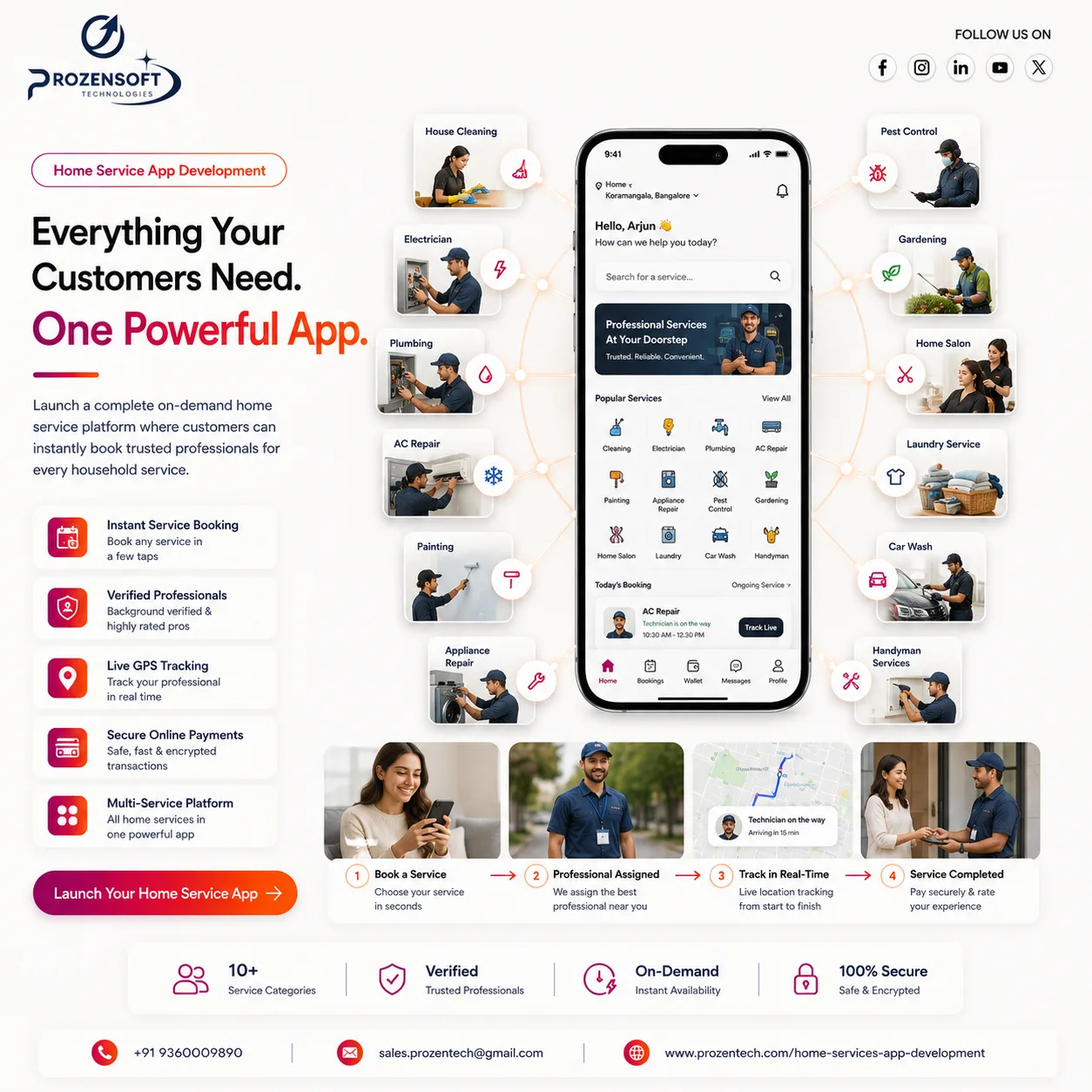
Modern customers prefer convenient and reliable ways to book household services without spending time searching for individual professionals. Whether they need cleaning, plumbing, electrical repair, appliance servicing, beauty care, or home maintenance, users expect to find verified providers and schedule services directly through a mobile application.
Home Services App Development enables startups, service companies, agencies, and marketplace owners to connect customers with qualified professionals through one centralized platform.
A complete home services solution can include a customer application, service provider application, website or business panel, and a powerful admin dashboard. It helps businesses manage bookings, providers, service categories, pricing, payments, commissions, locations, reviews, and customer support efficiently.
1. Customer App for Easy Home Service Booking
The customer application should make finding and booking a trusted service professional simple and transparent.
Users can register using their mobile number, email address, Google account, or Apple account. After creating their profile, they can save multiple addresses such as home, office, apartment, or another service location.
The app can display different service categories, including:
- Home cleaning
- Plumbing services
- Electrical repairs
- Appliance servicing
- Air conditioner maintenance
- Carpentry services
- Painting services
- Pest control
- Beauty and salon services
- Moving and packing
- Gardening services
- Home security installation
Customers can select a category, explore available services, review pricing, and view service descriptions before making a booking.
Each provider profile can display important details such as experience, skills, completed jobs, service areas, customer ratings, reviews, pricing, identity verification, and availability.
The customer can select a preferred provider or allow the platform to automatically assign an available professional.
Before confirming the booking, the user can choose the service date, time slot, address, service package, quantity, and additional requirements. They can also upload images or provide notes to explain the issue clearly.
The customer app can include secure payments, promotional codes, live provider tracking, booking history, rescheduling, cancellation, digital invoices, support chat, ratings, and repeat booking options.
These features create a convenient booking experience and help customers confidently choose the right professional.
2. Service Provider App for Job and Earnings Management
The service provider application helps professionals manage their profiles, availability, service requests, schedules, earnings, and customer communication.
Providers can register by submitting personal and professional details such as:
- Full name and contact information
- Profile image
- Identity proof
- Address proof
- Professional certificates
- Work experience
- Service categories
- Service locations
- Bank or payout details
The admin can review the submitted information and approve the provider before activating the account.
Once approved, providers can choose the services they offer, configure their working hours, define service areas, and switch their availability between online and offline.
When a customer creates a booking, the provider receives a request containing the service type, customer location, scheduled time, estimated duration, expected earnings, and customer instructions.
The provider can accept or reject the request based on availability. After accepting, integrated map navigation can help them reach the customer’s location.
Providers can update the booking through different stages, such as:
- Booking accepted
- Travelling to customer
- Arrived at location
- Service started
- Service completed
- Payment received
If additional work or materials are required, the provider can submit an updated quotation for customer approval before continuing the service.
The provider application can also include daily and monthly earnings, completed job history, customer ratings, withdrawal requests, incentive tracking, document expiry alerts, schedule management, and support access.
These tools allow professionals to manage their services independently while maintaining clear communication with customers and the platform.
3. Complete Home Service Booking Workflow
A structured workflow ensures that customers, providers, and administrators receive accurate updates throughout the service journey.
The process begins when the customer opens the application and selects a required service category.
The customer chooses a service package, enters the service address, selects a suitable date and time, and provides additional instructions. Images or videos can also be uploaded when required.
The application displays the estimated price, taxes, platform charges, available discounts, and final payable amount.
Once the booking is confirmed, the system identifies a suitable provider based on:
- Selected service category
- Provider availability
- Service location
- Customer distance
- Provider rating
- Required skills
- Scheduled time
The booking request is sent to an eligible provider. After the provider accepts it, the customer receives the professional’s profile, estimated arrival time, contact options, and live location.
When the provider reaches the customer’s address, the booking can be verified using an OTP before starting the work.
The provider examines the requirement and begins the service. If the final cost differs from the original estimate, an additional quotation can be sent to the customer for approval.
Once the service is completed, the provider updates the booking status. The customer can verify the work, complete the payment, download the invoice, and provide a rating and review.
The final payment can be distributed automatically based on the configured platform commission and provider earnings.
This automated workflow reduces manual coordination and provides transparency at every stage of the booking.
4. Admin Panel for Complete Marketplace Management
The admin panel acts as the centralized control system for the entire home services platform.
Administrators can manage customers, providers, service categories, bookings, payments, commissions, locations, promotions, disputes, and support requests.
The admin can create main categories and subcategories with separate descriptions, prices, durations, images, and service requirements.
Pricing can be configured using different models, including:
- Fixed service pricing
- Hourly pricing
- Inspection-based pricing
- Package pricing
- Provider-defined pricing
- Location-based pricing
- Emergency service pricing
The admin can review provider registrations, verify documents, approve accounts, assign service categories, monitor performance, and suspend providers who do not follow platform policies.
A centralized booking dashboard can display:
- New service requests
- Scheduled bookings
- Active services
- Completed bookings
- Cancelled requests
- Rescheduled bookings
- Payment status
- Refund requests
- Customer complaints
The platform owner can configure a fixed commission or percentage-based commission for every completed booking. The remaining amount can be added to the provider’s earnings account.
Financial management features can include transaction reports, provider payouts, withdrawal approval, refunds, taxes, platform revenue, promotional discounts, and downloadable invoices.
The admin dashboard can also display total users, active providers, popular services, completed jobs, cancellation rates, average ratings, service-area demand, and monthly revenue.
These insights help business owners improve pricing, provider quality, customer satisfaction, and overall marketplace performance.
5. Scalability and Advanced Home Services Features
A professionally developed home services platform should support business growth and changing service requirements.
The application can be built for different business models, including:
- Single home service company
- Multi-category service provider
- Multi-vendor service marketplace
- Franchise-based service platform
- Multi-city home services business
- Subscription-based maintenance company
Businesses can initially launch with a few popular services and gradually add new categories based on customer demand.
For example, a platform may begin with cleaning, plumbing, and electrical services. It can later introduce beauty services, appliance repairs, pest control, painting, moving services, and annual maintenance packages.
Advanced features can include:
- Recurring service bookings
- Monthly subscription plans
- Annual maintenance packages
- Emergency service requests
- Real-time provider tracking
- Video consultation before booking
- In-app chat and calling
- Provider bidding and quotations
- Loyalty points and referrals
- Corporate customer accounts
- Multiple languages and currencies
- Automated provider assignment
- Service warranty management
- Before-and-after work images
A multi-vendor model can allow independent professionals and service companies to register, manage their services, configure availability, receive bookings, and track earnings.
The platform owner can generate revenue through booking commissions, provider subscriptions, featured listings, service charges, advertisements, and cancellation fees.
A scalable technical architecture ensures that the application can manage increasing customers, providers, bookings, payments, notifications, and real-time updates without affecting performance.
Conclusion
Home Services App Development provides businesses with a powerful way to connect customers and verified service professionals through one convenient platform.
By combining service discovery, scheduled bookings, provider management, secure payments, real-time tracking, ratings, and centralized administration, the application can simplify the complete home service experience.
A customizable home services application can help businesses reduce manual operations, increase service bookings, improve provider productivity, and expand into new service categories and locations.