Ecommerce businesses manage a wide variety of digital files every day. Product images, supplier documents, marketing campaigns, invoices, product descriptions, advertising materials, website assets, and customer related documents can quickly accumulate. As a store grows, finding the right file can become difficult when everything is stored without a clear system.
Establishing the best folder structure for ecommerce can make everyday file management easier and support better collaboration between teams. A well planned structure gives each type of file a logical location and helps employees spend less time searching for documents.
Start With Business Functions
One of the simplest ways to organize ecommerce files is to create folders according to business functions rather than individual employees.
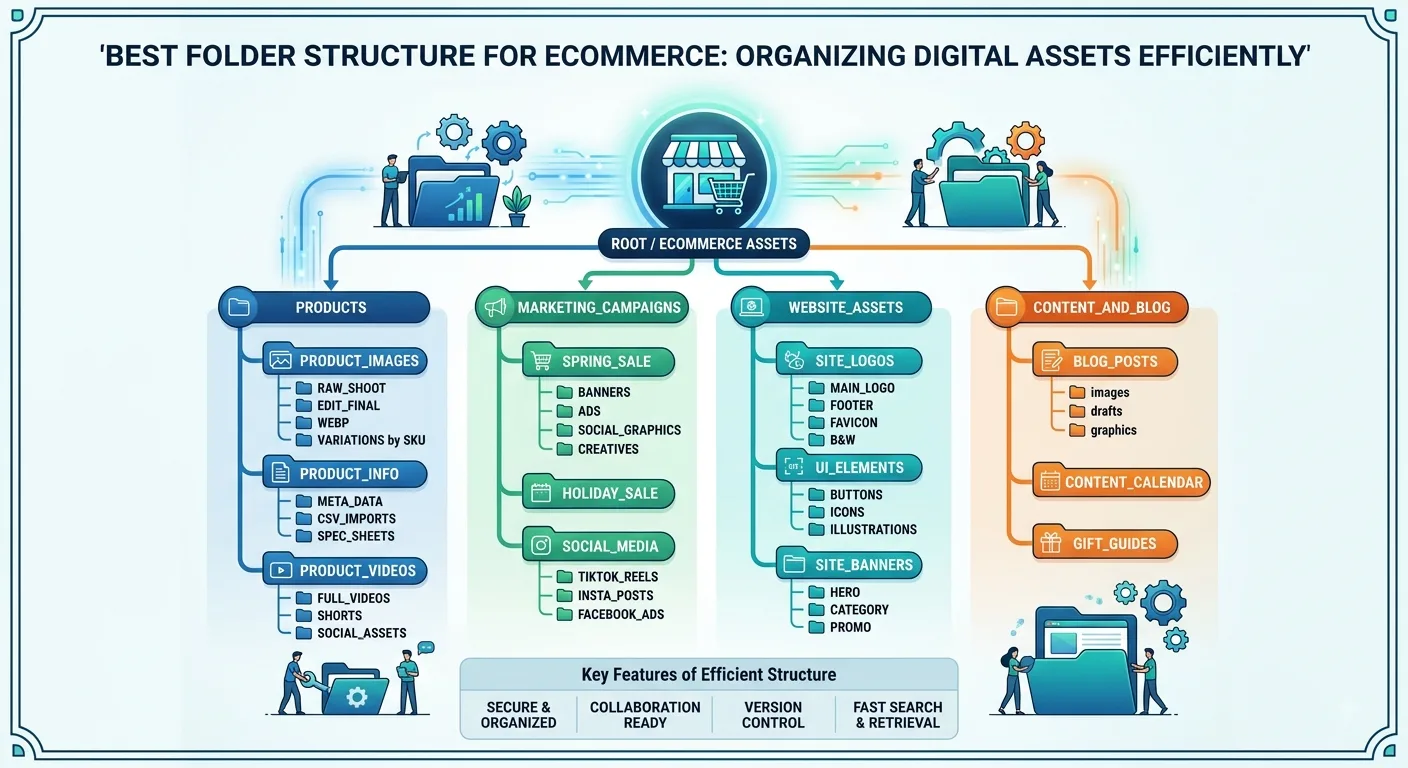
A primary structure could include:
- Products
- Marketing
- Suppliers
- Orders
- Finance
- Website
- Advertising
- Customer Service
- Operations
- Legal
This approach creates a system that can continue working even when employees join or leave the company. Files remain connected to business activities instead of individual people.
For example, a marketing employee may change, but the Marketing folder and its structure can remain unchanged.
Organize Product Assets Properly
Product related files can quickly become one of the largest collections in an ecommerce business. Each product may require images, videos, descriptions, specifications, packaging information, pricing details, and supplier documents.
A Product folder could contain categories such as:
- Electronics
- Home Goods
- Accessories
- Seasonal Products
Each category can then contain individual product folders.
For example:
Products > Electronics > Wireless Headphones
Inside the product folder, additional folders could include:
- Product Images
- Product Videos
- Descriptions
- Specifications
- Packaging
- Supplier Documents
This structure makes it easier for designers, marketers, product managers, and other employees to find the assets they need.
Create a Dedicated Marketing Structure
Ecommerce marketing can generate hundreds of files throughout the year. Social media graphics, email campaigns, advertisements, blog images, promotional materials, and seasonal campaigns all need somewhere to go.
A Marketing folder could include:
- Social Media
- Email Marketing
- Blog Content
- Graphics
- Promotions
- Seasonal Campaigns
- Influencer Campaigns
Campaign specific folders can then contain the relevant briefs, images, copy, videos, and final versions.
For example:
Marketing > Seasonal Campaigns > Christmas 2026
This keeps campaign assets together instead of scattering them across different locations.
Keep Supplier Documents Organized
Supplier information is another important part of ecommerce file management. Businesses may work with dozens or hundreds of suppliers, each providing different documents.
A Suppliers folder could include:
- Supplier Agreements
- Price Lists
- Product Catalogues
- Invoices
- Certifications
- Shipping Documents
- Contact Information
If the company works with many suppliers, each supplier can have its own folder.
This makes it easier to locate contracts, pricing information, and other documents when needed.
Separate Financial Documents
Financial files should have their own dedicated section because they are often accessed by accounting teams, managers, and business owners.
A Finance folder might contain:
- Invoices
- Receipts
- Tax Documents
- Budgets
- Expenses
- Financial Reports
- Payment Records
Monthly or yearly subfolders can also be used when the volume of files becomes large.
For example:
Finance > 2026 > Invoices > August
This type of organization makes historical documents easier to locate.
Organize Website and Advertising Assets
Ecommerce websites depend heavily on digital assets. Product banners, website graphics, landing page images, promotional materials, and advertising creatives can quickly become difficult to manage.
A Website folder could contain:
- Website Images
- Banners
- Landing Pages
- Product Graphics
- Website Copy
- Design Files
An Advertising folder could include:
- Google Ads
- Social Media Ads
- Display Ads
- Video Ads
- Campaign Reports
Keeping these assets separated helps teams quickly identify which files belong to the website and which are intended for advertising.
Create Consistency Across Teams
A standardized folder system allows different departments to work within the same organizational framework.
Designers know where graphics belong. Marketing teams know where campaign files should be stored. Operations teams can locate supplier documents. Finance teams can find invoices and reports.
This reduces the need for employees to create their own folder systems.
It also makes collaboration easier because everyone understands where shared documents should be located.
Use Consistent File Naming
Folder organization works best when file names are also consistent.
Instead of using names such as:
- finalimage.jpg
- finalimage2.jpg
- newfinal.jpg
a business could use a structured naming format such as:
- product-name-front-01.jpg
- product-name-side-01.jpg
- product-name-lifestyle-01.jpg
For campaigns, names could include the campaign, platform, date, and version.
Consistent naming makes files easier to search and reduces confusion between multiple versions.
Automate Repetitive Ecommerce Folders
Growing ecommerce businesses may repeatedly create the same folder structure for new products.
For example, every new product might need:
- Images
- Videos
- Product Description
- Supplier Documents
- Marketing
- Packaging
- Advertising
Creating these folders manually for hundreds of products can take significant time.
A folder automation system can help generate predefined structures instead of requiring employees to create every folder individually.
This can be particularly useful for stores that regularly add new products or manage large product catalogues.
Avoid Making the Structure Too Complicated
Organization does not mean creating as many folders as possible.
An overly complicated structure can make file management harder because employees may have to navigate through multiple layers before reaching the document they need.
A good structure should provide enough detail without creating unnecessary complexity.
For example, instead of creating separate folders for every individual marketing asset type, businesses can group related files together when the volume does not justify additional folders.
The goal should always be simple navigation.
Review the Structure Regularly
As an ecommerce business grows, its folder structure may need to change.
New departments, products, sales channels, suppliers, and marketing campaigns may require additional categories.
Businesses should periodically review their organization system and remove outdated folders or combine categories that are no longer useful.
A folder structure should support the current workflow rather than simply preserve the way files were organized years ago.
Conclusion
The best folder structure for ecommerce depends on the size, products, teams, and workflow of each business. However, organizing files around major business functions such as products, marketing, suppliers, finance, website, advertising, and operations provides a strong foundation.
Adding consistent naming conventions, logical subfolders, and automation can make the system even more efficient. For ecommerce businesses managing hundreds or thousands of digital assets, a structured approach can reduce search time, improve collaboration, and make file management easier as the company grows.