In today's digital-first world, data is one of the most valuable assets a business owns. Customer records, financial information, applications, databases, emails, and operational files are essential for daily operations. Losing access to this data can lead to downtime, financial losses, regulatory penalties, and damage to customer trust.
This is where backup solutions play a critical role.
A modern backup solution does more than simply copy files. It helps businesses protect critical data, recover quickly from disasters, defend against ransomware, and ensure business continuity. Whether you're a small business or a large enterprise, having the right backup solution can mean the difference between a minor disruption and a major catastrophe.
What Is a Backup Solution?
A backup solution is a system, software, or service that creates copies of data and stores them in a secure location for future recovery.
If data is lost due to accidental deletion, hardware failure, cyberattacks, software corruption, or natural disasters, the backup can be used to restore the information and resume operations.
Modern backup solutions can protect:
- Physical servers
- Virtual machines
- Databases
- Applications
- End-user devices
- Cloud workloads
- Files and folders
- Entire operating systems
The primary goal is to ensure that data remains available even when unexpected events occur.
Why Are Backup Solutions Important?
Businesses face numerous threats that can result in data loss.
Hardware Failures
Hard drives, storage arrays, and servers can fail without warning. Without backup solutions, valuable business data may be permanently lost.
Human Error
Employees may accidentally delete files, overwrite documents, or misconfigure systems. Backups provide a safety net for recovering lost information.
Cybersecurity Threats
Ransomware attacks continue to target organizations worldwide. Attackers encrypt data and demand payment for recovery. A secure backup allows businesses to restore their data without paying a ransom.
Natural Disasters
Floods, fires, earthquakes, and power outages can damage on-premises infrastructure. Offsite backups help ensure data survives these events.
Compliance Requirements
Many industries require organizations to maintain backup and recovery processes to meet regulatory and compliance standards.
Types of Backup Solutions
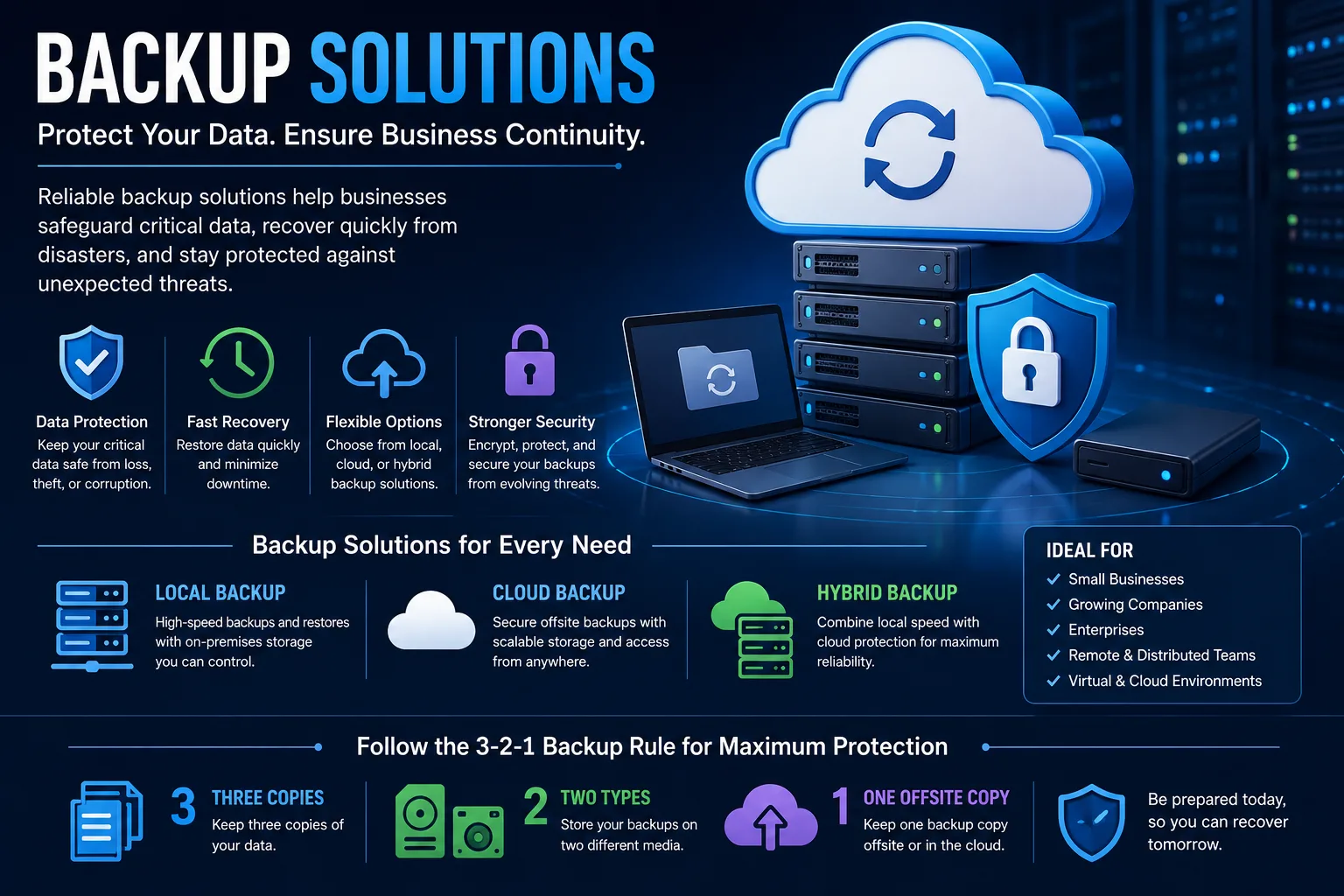
Local Backup
Local backups store data on physical devices such as external drives, NAS systems, or backup servers within the organization's premises.
Advantages:
- Fast backup and recovery
- Full control over data
- No internet dependency
Disadvantages:
- Vulnerable to local disasters
- Limited scalability
Cloud Backup
Cloud backup stores data in remote data centers managed by cloud service providers.
Advantages:
- Offsite protection
- Scalable storage
- Accessible from anywhere
Disadvantages:
- Depends on internet connectivity
- Ongoing subscription costs
Hybrid Backup
Hybrid backup combines local and cloud backups to provide both fast recovery and offsite protection.
Advantages:
- Best of both worlds
- Enhanced disaster recovery
- Greater flexibility
Disadvantages:
- More complex management
- Higher initial investment
Essential Features of a Modern Backup Solution
Not all backup solutions are created equal. Businesses should look for features that improve security, reliability, and recovery performance.
Automated Backups
Automation eliminates the need for manual backup processes and reduces the risk of human error.
Incremental and Differential Backups
These methods reduce backup times and storage consumption by backing up only changed data.
Encryption
Data should be encrypted both during transmission and while stored to protect against unauthorized access.
Compression and Deduplication
These technologies reduce storage requirements and improve backup efficiency.
Ransomware Protection
Modern backup solutions should include immutable backups, air-gapped storage, or advanced security measures to prevent backup tampering.
Disaster Recovery Integration
Advanced solutions support rapid recovery of systems, applications, and workloads after a disaster.
Centralized Management
A single management console simplifies monitoring, reporting, and backup administration.
Backup Solutions for Different Business Needs
Small Businesses
Small organizations typically need affordable, easy-to-manage backup solutions that protect critical business data without requiring dedicated IT staff.
Mid-Sized Businesses
Growing businesses often require hybrid backup solutions with stronger security, scalability, and disaster recovery capabilities.
Enterprises
Large organizations need comprehensive backup solutions capable of protecting multiple locations, virtual environments, cloud workloads, and mission-critical applications.
Best Practices for Effective Backup Management
Having a backup solution is important, but following best practices ensures maximum protection.
Follow the 3-2-1 Rule
Maintain:
- Three copies of your data
- Two different storage media
- One offsite backup copy
Test Recovery Regularly
Backups should be tested periodically to verify that data can be restored successfully.
Automate Backup Schedules
Automated backups reduce the risk of missed backup windows.
Protect Backups from Ransomware
Implement immutable storage, access controls, and backup isolation whenever possible.
Monitor Backup Health
Regular monitoring helps identify failures and ensure backups remain current.
Choosing the Right Backup Solution
When evaluating backup solutions, consider:
- Data volume
- Recovery requirements
- Budget
- Compliance needs
- Security requirements
- Cloud integration capabilities
- Scalability
- Management simplicity
The ideal solution should align with your business objectives while providing reliable protection against data loss.
Final Thoughts
Data loss can occur at any time, and the consequences can be costly. A reliable backup solution is no longer optional—it is a critical component of modern business continuity and cybersecurity strategies.
Whether you choose local, cloud, or hybrid backup solutions, the goal remains the same: ensuring your data is protected, recoverable, and available when your business needs it most.
By investing in the right backup appliances today, organizations can reduce risk, improve resilience, and maintain confidence in an increasingly digital world.