Digital ticketing has transformed the way people attend concerts, sporting events, theater performances, and festivals. Instead of printing paper tickets, most venues now use mobile tickets that can be securely transferred between users. One of the leading ticketing platforms offering this convenience is AXS.
Whether you've purchased tickets for a friend, can't attend an event, or simply need to send tickets to someone else, understanding the AXS ticket transfer process is essential. Fortunately, AXS provides a built-in transfer feature for many eligible events, allowing tickets to be sent quickly and securely through the AXS app or website.
In this guide, you'll learn How to Transfer AXS Tickets, How to Transfer Tickets on AXS, common transfer requirements, troubleshooting tips, and best practices for ensuring a smooth and successful ticket transfer.
What Is an AXS Ticket Transfer?
An AXS ticket transfer is a feature that allows ticket owners to securely send eligible digital tickets to another person without sharing account credentials or screenshots.
Once a transfer is accepted, the recipient receives the tickets in their own AXS account, where they can access them for entry on event day.
This process helps reduce fraud and ensures that tickets remain valid.
Can You Transfer AXS Tickets?
In many cases, yes.
However, transfer availability depends on several factors, including:
- Event organizer rules
- Venue policies
- Artist restrictions
- Ticket type
- Timing before the event
Some events disable transfers entirely or only allow them after a specific date.
If the transfer option is unavailable, it usually means the event organizer has restricted ticket transfers.
Requirements Before You Transfer AXS TicketsBefore starting the process, make sure you have:
- An active AXS account
- The latest version of the AXS mobile app (if using a smartphone)
- The recipient's email address or mobile number associated with their AXS account
- A stable internet connection
- Eligible tickets that support transfers
It's also a good idea to verify that the recipient has already created an AXS account to avoid delays.
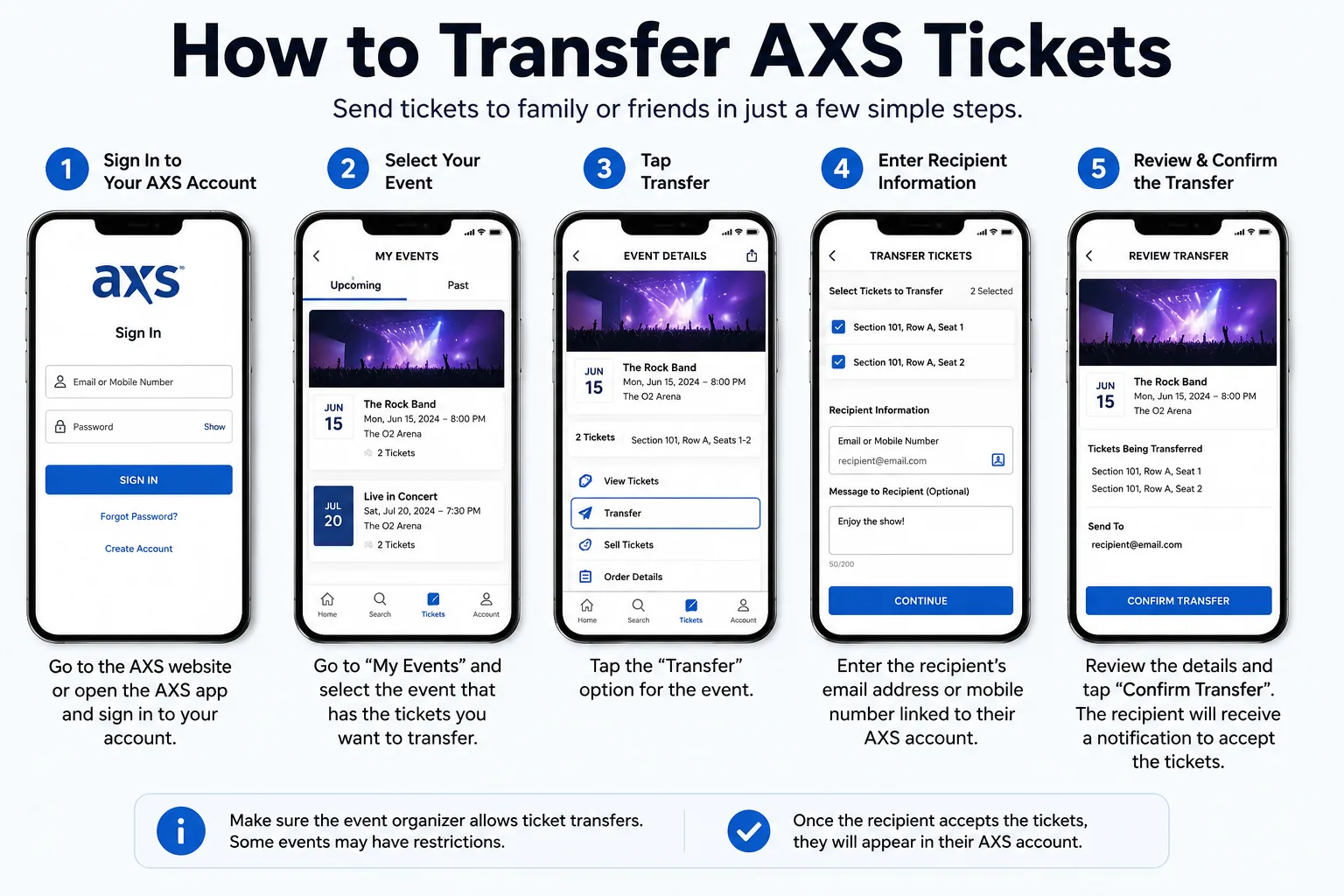
How to Transfer AXS Tickets
If your tickets are eligible, follow these steps.
1: Sign In to Your AXS Account
Open the AXS app or visit the AXS website.
Log in using your registered email address and password.
2: Go to Your Tickets
After signing in, open:
Your Tickets
or
My Events
Locate the event for which you want to transfer tickets.
3: Select the Event
Tap or click on the event.
Your available tickets will appear on the screen.
4: Choose Transfer
If transfers are permitted, you'll see a button labeled:
Transfer
Select it to begin the AXS ticket transfer process.
If you don't see this option, the event may not allow transfers.
5: Select the Tickets
If you purchased multiple tickets, choose the specific tickets you want to transfer.
You can often transfer:
- One ticket
- Several tickets
- All tickets
depending on the event's rules.
6: Enter the Recipient's Information
Provide the recipient's:
- Email address, or
- Mobile phone number
Be sure to enter the information correctly to prevent delays or transfer errors.
7: Review the Transfer
Double-check:
- Event name
- Number of tickets
- Recipient's contact information
Confirm everything is accurate before proceeding.
8: Send the Transfer
Tap or click:
Transfer Tickets
The recipient will receive an email or notification with instructions to accept the transfer.
How to Transfer Tickets on AXS Successfully
If you're wondering How to Transfer Tickets on AXS without complications, following a few best practices can help.
Verify the Recipient's Account
Ask the recipient to create an AXS account before sending the tickets. Using the same email address associated with their account helps ensure a smooth transfer.
Confirm Event Restrictions
Some events limit ticket transfers until a certain date or disable them completely. If the transfer option isn't available, check the event details or contact AXS support.
Send Tickets Early
Avoid waiting until the last minute. Sending tickets a day or two before the event gives the recipient time to accept the transfer and resolve any issues.
What Happens After the Transfer?Once the transfer is sent:
- The recipient receives a notification.
- They accept the transfer through their AXS account.
- The tickets move from your account to theirs.
- The recipient can access the tickets for event entry.
Until the recipient accepts the transfer, the tickets may remain in a pending status.
Can You Cancel an AXS Ticket Transfer?If the recipient has not yet accepted the transfer, you may be able to cancel it through your AXS account. The exact option depends on the event and current transfer status. Once the recipient accepts the tickets, the transfer is generally considered complete and cannot be reversed through the app.
Common AXS Ticket Transfer ProblemsAlthough the process is straightforward, some users experience issues.
Transfer Button MissingPossible reasons include:
- Event restrictions
- Venue policies
- Artist limitations
- Tickets not yet eligible for transfer
Ask the recipient to:
- Check spam or junk folders.
- Verify the email address used.
- Confirm they have an AXS account.
If you entered the wrong email address, you may need to cancel the pending transfer (if available) and start a new one using the correct information.
Tickets Still PendingPending transfers usually indicate that the recipient has not yet accepted the tickets. They should log into their AXS account and complete the acceptance process.
App IssuesIf the AXS app isn't working properly:
- Update the app.
- Restart your device.
- Try using the AXS website instead.
Benefits of AXS Ticket Transfer
Using the official AXS ticket transfer feature offers several advantages.
Secure DeliveryTickets move directly between verified AXS accounts.
Reduced FraudRecipients receive authentic digital tickets rather than screenshots or copied barcodes.
Easy ManagementBoth sender and recipient can manage tickets within their own AXS accounts.
Faster Event EntryTransferred tickets remain valid for mobile scanning at supported venues.
Tips for a Smooth Ticket Transfer
Follow these recommendations for the best experience.
Transfer Early
Don't wait until you're at the venue. Early transfers leave time to resolve unexpected issues.
Use the Official AXS Platform
Always complete transfers through the official AXS website or mobile app. Avoid sharing screenshots or account passwords.
Check Internet Connectivity
A stable internet connection helps prevent transfer interruptions.
Keep the App Updated
Install the latest AXS updates to ensure compatibility with current features.
Verify Ticket Details
Before transferring, confirm:
- Event name
- Date
- Time
- Venue
- Number of tickets
Frequently Asked Questions
Can every AXS ticket be transferred?
No. Transfer availability depends on the event organizer, venue, and ticket restrictions.
Is there a fee for AXS ticket transfer?
Many standard ticket transfers are free, but policies can vary depending on the event or organizer.
Can I transfer only one ticket?
Yes. If allowed by the event, you can often transfer individual tickets instead of your entire order.
Can the recipient use the tickets immediately?
After accepting the transfer, eligible tickets are generally available in the recipient's AXS account and can be used for entry on event day.
Can transferred tickets be transferred again?
This depends on the event organizer's policies. Some events allow additional transfers, while others restrict them after the initial transfer.
Best Practices for Event DayTo avoid problems at the venue:
- Complete transfers before arriving.
- Ensure the recipient has accepted the tickets.
- Charge your smartphone fully.
- Bring a valid photo ID if required.
- Confirm that the tickets appear in the AXS app before leaving for the event.
Planning ahead can make entry faster and less stressful.
Final ThoughtsUnderstanding AXS ticket transfer is the easiest way to securely share eligible event tickets with friends, family members, or other attendees. By following the official process outlined by AXS, you can learn How to Transfer AXS Tickets safely while reducing the risk of transfer errors or invalid ticket issues.
Whether you're learning How to Transfer Tickets on AXS for the first time or you've used the feature before, the key steps remain the same: verify that your tickets are eligible, use the official AXS app or website, enter the recipient's information carefully, and send the transfer well before the event. Following these best practices will help ensure a smooth, secure, and hassle-free ticket transfer experience.