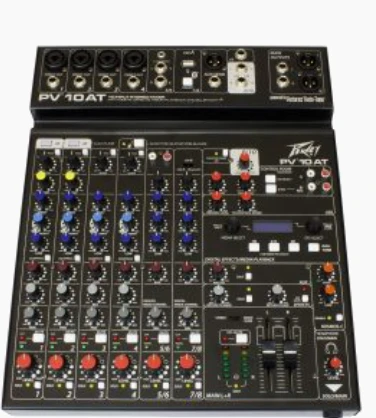
A mixing console can look intimidating at first glance. Rows of knobs, sliders, and buttons stretch across the surface. Lights blink. Labels crowd the panel. Still, its purpose stays simple. It lets you control volume, shape tone, and combine multiple sound sources into one balanced output.
In this blog, you will learn how to understand specifications, recognize important controls, and follow signal flow so you can use an audio mixing console with confidence in live or studio settings.
Core Specifications and Controls Explained
An audio mixing console acts as the command center of your sound system. Every microphone, instrument, and playback device passes through it before reaching speakers or recording software. When you understand how its sections work together, you stop guessing and start making clear decisions.
Input Channels and Signal Flow
Each vertical strip on the console represents an input channel. You plug a microphone or instrument into that channel. The signal then travels through several stages before reaching the main output.
Mic inputs accept low-level signals from microphones. Line inputs handle stronger signals from keyboards, playback devices, or audio interfaces. Some channels offer both options.
Phantom power appears on many mixers. It supplies voltage to condenser microphones that require it. You activate it carefully and only when needed.
The gain knob sits near the top of each channel. It controls how strong the incoming signal becomes before further processing. If you set the gain too high, distortion occurs. If you set it too low, the sound may feel weak or noisy. Adjust the gain first, then shape the tone.
Signal flow follows a path. It moves from input to gain, then to EQ, through faders, and finally to the main output. When you understand this path, you know where problems begin and how to correct them.
EQ Section and Tone Shaping
EQ controls allow you to adjust frequency ranges. Most consoles include high, mid, and low bands. Turning these knobs changes how bright, warm, or punchy a sound feels.
High frequencies add clarity and sparkle. Low frequencies add weight. Midrange often shapes presence and definition. Small adjustments can make a vocal sit comfortably in a mix.
Some mixers use fixed EQ bands. Others offer parametric controls, which let you choose exact frequencies to adjust. Parametric EQ provides more flexibility, though basic fixed EQ works well for many situations.
Start with all EQ controls set flat. Make small changes. Cut frequencies before boosting them when possible. Subtle moves often sound more natural than extreme settings.
Faders, Pan Controls, and Mix Balance
Faders control channel volume. You slide them up or down to adjust how much of each sound enters the final mix. The master fader controls the overall output level.
Balancing channels takes patience. Raise one instrument slightly, then listen. Lower another gently. The goal is clarity, not volume.
Pan controls place sound in the stereo field. Turning the pan knob left or right shifts a channel’s position between speakers. Panning creates space. Guitars can sit slightly left, keyboards slightly right, while vocals stay centered.
Visual fader positions help you stay organized. You can glance at the board and understand your mix layout quickly.
Auxiliary Sends and Effects Routing
Auxiliary sends, often labeled aux, provide additional output paths. You can send part of a channel’s signal to monitors on stage. Performers hear themselves clearly without changing the main mix.
Aux sends also route signals to external effects. You can connect a reverb unit and control how much of each channel enters it. Pre-fader sends operate independently of channel volume. Post-fader sends follow the fader’s position.
This routing adds flexibility. You shape separate monitor mixes while maintaining control over front-of-house sound.
Built-In Effects and Digital Processing
Many modern mixers include built-in effects. Reverb and delay add depth to vocals and instruments. You adjust effect levels directly from the console.
Some digital models include compression and limiting. Compression smooths dynamic spikes. It keeps vocals steady and instruments controlled. Limiters prevent sudden peaks from damaging speakers.
Digital consoles often store presets. You can save settings for different venues or performers. That feature speeds up setup and reduces guesswork during busy events.
Integrated processing reduces the need for external gear. Fewer devices mean fewer cables and a simpler setup.
Connectivity and Output Options
Main outputs connect your mixer to powered speakers or amplifiers. Some consoles include subgroup outputs, which allow you to control multiple channels together. You can group drums or backing vocals for quick adjustments.
USB connectivity appears on many mixers. You can record directly to a computer without additional hardware. This feature works well for live recordings or home studios.
Connection types vary. XLR connectors handle balanced signals for microphones and speakers. TRS jacks support balanced or unbalanced connections. RCA connectors often link consumer devices.
Flexible outputs allow your system to grow. You can integrate larger sound systems, recording setups, or streaming equipment as needed.
Build Quality and User Interface Design
Physical design affects daily use. Analog mixers use tactile knobs and sliders. Digital models may include touchscreens combined with physical controls.
An intuitive layout saves time. Clear labeling helps you adjust settings quickly during a show. Sturdy construction protects internal components from wear and transport.
Live environments demand reliability. Solid chassis materials and well-secured knobs stand up to repeated use. Good design supports both speed and durability.
Conclusion
When you understand the features of an audio mixing console, you move from confusion to control. You adjust gain with purpose, shape tone with subtlety, and balance channels thoughtfully. Sound becomes something you craft, not something you react to.
As digital processing continues to evolve and consoles grow more compact yet powerful, your knowledge of these fundamentals allows you to adapt and create consistent, polished mixes in any setting.