

When it comes to storing your precious files, videos, and photos, choosing the right storage system is more important than ever. With so many options out there, how do you ensure your data stays safe, organized, and easily accessible?
Direct Attached Storage (DAS) systems offer an incredible solution for people needing quick and secure data access. Whether you're a professional managing large files or just someone who wants peace of mind about their data, a DAS system might be the perfect fit.
But how do you choose the right one?
In this blog, we'll walk you through the seven essential features to look for in DAS storage solutions.
1. Storage Capacity
When you pick a DAS storage, it’s important to think about how much space you’ll need. Storage capacity refers to how much data the system can hold. It’s like choosing a storage box: if you have a lot of items, you need a bigger box. DAS systems come in different sizes, so make sure you pick one that can hold all your files, pictures, and videos.
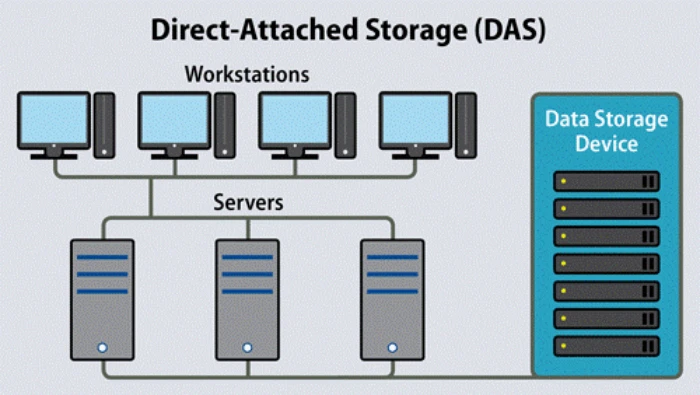
Moreover, direct-attached storage (DAS) is the connection between storage and a server or servers without a storage network or any network device, such as a router, switch, hub, or director.
If you think you’ll need even more space in the future, it’s a good idea to choose a system that can be expanded later on. Some DAS systems allow you to add more storage drives, which means you can grow your storage capacity over time.
2. Speed and Performance
To ensure smooth performance, consider both the transfer speed for large files and the system's access speed for daily tasks. These factors directly impact your workflow and can make your tasks more efficient without delays.
Data Transfer Speed
The speed at which your DAS system can transfer data is really important. You want a system that can send and receive files quickly, especially if you need to work with large files like videos. The higher the speed, the faster you’ll be able to access your data.
Access Speed for Daily Tasks
For everyday tasks, the DAS system should let you quickly open files or save new ones without waiting too long. A system with good speed will make your tasks feel smoother.
Does It Affect Your Work?
The faster your DAS is, the easier it will be to do your tasks without delays. It will make your work more efficient. When looking for a DAS, always check how fast it can transfer data.
3. Ease of Use
One of the most important things to look for in DAS storage is how easy it is to set up and use. You don’t want to spend a lot of time trying to figure out how to make it work. These systems should come with simple instructions so that you can start using them right away.
Simple Setup: Look for DAS systems that are easy to set up. Many of them just need you to plug it in, and it’s ready to use.
User-Friendly Interface: The system should have an easy-to-navigate interface. This means you can quickly find and manage your files.
Compatibility: It should work well with your computer or devices. This way, you won’t face any issues connecting it.
Management Software: Some DAS systems come with software that helps you manage files, which can make your life easier.
Remote Access: Look for options that let you access your files from anywhere if that is important to you.
4. Reliability and Durability
Reliability is all about how dependable the DAS storage solution is over time. You want a system that lasts and keeps your data safe. To ensure long-term reliability, consider key features like build quality, data protection measures, and recovery options.
These factors play a crucial role in safeguarding your data and extending the lifespan of your DAS system.
Build Quality
Reliability is all about how dependable the DAS storage solution is over time. You want a system that lasts and keeps your data safe. Look for one with a strong build quality and materials that can withstand daily use. Some DAS systems are built to be more durable, protecting your data even if something happens to the device.
Data Safety and Protection
Your data is valuable, so you need to make sure it’s safe. Look for DAS systems with backup features or RAID (Redundant Array of Independent Disks). These features protect your data if one drive fails. By using multiple drives, the system can recover your data easily without losing anything important.
Data Recovery Options
In case something goes wrong with your DAS, make sure it has options to help recover your data. Some systems come with built-in recovery tools that can help you get your data back if you lose it.
5. Connectivity Options
DAS systems can connect to your computer in different ways. It’s important to check how the system connects to your computer or other devices. The most common methods include USB, Thunderbolt, and eSATA.
USB Ports: USB connections are the most common. They are easy to use and available on most computers.
Thunderbolt: This is a faster connection that is great if you need very high speeds.
eSATA: Some systems use eSATA, which is also fast but might not be as common as USB or Thunderbolt.
Network Connection: Some DAS systems offer network connections, allowing you to connect to the internet.
Multiple Ports: Having more than one port can make it easier to connect to different devices at the same time.
6. Cost-Effectiveness
While looking for a DAS storage system, consider how much it costs. You don’t want to spend too much money, but you also want to get good quality. Compare prices from different brands and models. Keep in mind that some systems might have a higher upfront cost but can save you money in the long run because of their durability and performance.
If you are on a budget, look for systems that offer good value for money. Make sure the system gives you a good balance of features and cost.
7. Scalability and Expansion
When you first buy a DAS system, you may only need a small amount of storage. But as time goes on, you may need more space. That’s why scalability is an important feature. A scalable system allows you to add more storage without buying a new system.
Some DAS systems let you add more hard drives as you need them. This makes it easy to grow your storage over time without worrying about running out of space.
Conclusion
Selecting the right DAS storage solution is essential for securing your data and ensuring it remains easily accessible. By considering factors such as storage capacity, speed, ease of use, reliability, connectivity options, cost-effectiveness, and scalability, you can make an informed decision. A well-chosen DAS system will not only meet your current needs but also grow with you as your data storage requirements increase. By focusing on these seven key features, you’ll ensure that your storage solution is reliable, efficient, and future-proof, providing you with peace of mind and smooth data management for years to come.


