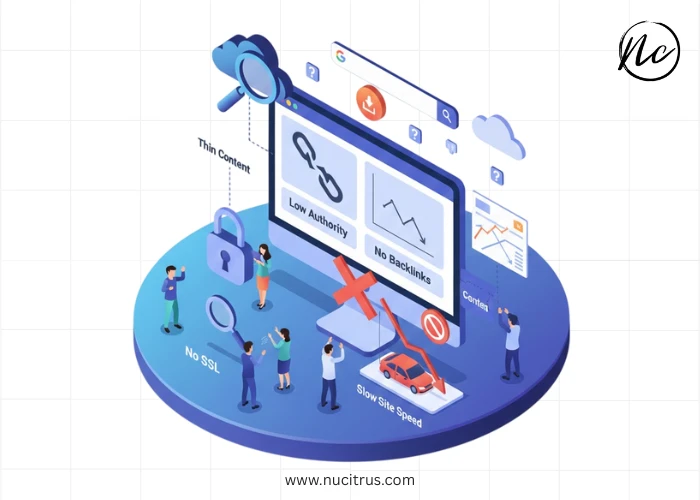
You've invested time and money building a professional website, published quality content, and waited patiently for visitors to arrive. Yet weeks or months later, your site remains invisible in Google search results. This frustrating scenario affects countless website owners who struggle to understand why their website is not ranking despite their best efforts.
Google's search algorithm considers hundreds of ranking factors when determining which websites deserve top positions. Understanding the most common reasons for poor rankings helps diagnose your specific issues and implement solutions that actually move the needle. Let's explore why your website is not ranking and what you can do about it.
Your Website Is Too New
Brand-new websites face inherent disadvantages in Google's ranking system. Search engines favor established domains with proven track records, making immediate top rankings extremely rare regardless of content quality.
The "Google Sandbox" effect—though never officially confirmed—describes how new sites often struggle to rank even for low-competition keywords during their first 3-6 months. Google essentially evaluates whether your site deserves trust before granting significant visibility.
Solution: Be patient while implementing solid SEO fundamentals. Focus on creating exceptional content, building quality backlinks, and establishing authority. New sites can rank, but it requires time and consistent effort rather than quick fixes.
Technical SEO Issues Block Google
If Google can't properly crawl and index your website, your website is not ranking because search engines literally cannot find your content.
Robots.txt Blocking: Check your robots.txt file isn't accidentally blocking important pages. A misconfigured robots.txt can prevent Google from accessing your entire site, ensuring zero rankings regardless of content quality.
Noindex Tags: Pages with noindex meta tags instruct Google not to include them in search results. Accidentally leaving noindex tags on important pages—common when migrating from staging to production—guarantees those pages won't rank.
Crawl Errors: Broken links, server errors, and redirect chains frustrate Google's crawlers. Use Google Search Console to identify and fix crawl errors preventing proper indexing.
Site Speed: Extremely slow loading times (5+ seconds) discourage Google from crawling your site frequently and negatively impact rankings directly. Optimize images, enable caching, minimize code, and use quality hosting.
Solution: Conduct comprehensive technical SEO audits identifying and fixing issues. Google Search Console reveals most technical problems requiring attention.
Missing or Poor Keyword Optimization
When your website is not ranking, inadequate keyword research and optimization often share blame. You might target keywords nobody searches for, face unrealistic competition levels, or fail to optimize content properly.
Wrong Keywords: Targeting keywords with zero search volume guarantees your site won't attract traffic even if it ranks. Conversely, targeting extremely competitive keywords ensures you can't rank against established authorities.
Keyword Cannibalization: Multiple pages targeting identical keywords compete against each other, diluting ranking potential. Google struggles determining which page to rank, often ranking none prominently.
Thin Content: Pages with 200-300 words rarely rank for competitive terms. Google favors comprehensive content thoroughly addressing topics. Aim for 1,000+ words on important pages while maintaining quality and relevance.
Solution: Conduct thorough keyword research identifying realistic opportunities. Target long-tail keywords with moderate search volume and manageable competition. Create comprehensive, well-optimized content for each target keyword.
Lack of Quality Backlinks
Backlinks remain among Google's strongest ranking signals. If your website is not ranking despite solid content and technical optimization, insufficient backlinks likely explain the problem.
No Backlinks: Brand new sites without any backlinks struggle immensely. Google uses backlinks as votes of confidence—websites without votes seem unimportant regardless of content quality.
Low-Quality Backlinks: Thousands of spammy directory links, purchased backlinks, or links from irrelevant sites provide minimal value and potentially trigger penalties.
Competitors Have More: Even with decent backlinks, you won't outrank competitors with significantly stronger link profiles unless you offer substantially superior content.
Solution: Develop systematic link-building strategies, including guest posting on reputable sites, creating linkable assets (original research, comprehensive guides, and tools), broken link building, and digital PR generating editorial mentions.
Content Quality Doesn't Meet Standards
Google's algorithm increasingly prioritizes content quality, expertise, and user satisfaction. Low-quality content ensures your website is not ranking regardless of technical excellence.
Duplicate Content: Copying content from other sites or having identical content across multiple pages triggers penalties and prevents rankings.
Lack of Expertise: Google's E-E-A-T framework (Experience, Expertise, Authoritativeness, Trustworthiness) evaluates content quality. Superficial content lacking expertise struggles against authoritative competitors.
Poor User Experience: High bounce rates, low time on page, and minimal engagement signal to Google that users don't find your content valuable, directly harming rankings.
Outdated Information: Old content with obsolete information, broken links, and outdated statistics loses rankings to fresher, more current alternatives.
Solution: Create genuinely valuable content demonstrating expertise. Update existing content regularly. Focus on user intent—answer questions thoroughly rather than just incorporating keywords. Monitor engagement metrics and improve underperforming content.
Mobile Optimization Problems
Google uses mobile-first indexing, meaning your mobile site determines rankings even for desktop searches. If your website is not ranking, mobile issues might explain why.
Not Mobile-Responsive: Websites that don't adapt to mobile screens provide terrible user experiences on smartphones. Google penalizes non-responsive sites severely.
Mobile Usability Issues: Tiny text, buttons too close together, horizontal scrolling, and interstitials blocking content frustrate mobile users and trigger ranking penalties.
Different Mobile Content: Showing different content on mobile versus desktop confuses Google and dilutes ranking potential.
Solution: Implement responsive design, ensuring perfect functionality across all devices. Test thoroughly using Google's Mobile-Friendly Test tool. Prioritize mobile user experience since most visitors use smartphones.
Weak Site Architecture and Internal Linking
Poor website structure makes it difficult for Google to understand your site's hierarchy and importance distribution, contributing to why your website is not ranking.
Orphan Pages: Pages with no internal links pointing to them remain undiscovered by search engines and users alike.
Deep Page Depth: Important pages buried five or more clicks from the homepage seem unimportant to Google, reducing their ranking potential.
No Topical Clusters: Random content organization without clear topical relationships prevents establishing topical authority.
Solution: Create logical site architecture with important pages three clicks or fewer from the homepage. Implement topic cluster strategies with pillar content linking to related subtopics. Use descriptive anchor text in internal links.
Ignoring Search Intent
When your website is not ranking, content-intent mismatch often explains the problem. Google prioritizes pages matching what users actually want when searching specific terms.
Informational vs. Commercial Mismatch: Targeting commercial keywords ("buy running shoes") with informational content (guides about choosing running shoes) results in poor rankings since Google shows shopping pages instead.
Wrong Content Format: Searches suggesting list-based content (e.g., "best productivity apps") rank lists, not detailed reviews. Mismatch in format prevents rankings.
Solution: Analyze current top-ranking pages for target keywords. Match their content format, depth, and approach while adding unique value. Align content with user intent rather than forcing keywords into inappropriate contexts.
Conclusion
Local businesses wondering why their website is not ranking often overlook local SEO fundamentals essential for geographic visibility.
Unclaimed Google Business Profile: Without optimizing your Google Business Profile, you're invisible for "near me" searches and local pack results.
Inconsistent NAP Information: Name, address, and phone number inconsistencies across directories confuse Google and harm local rankings.
Missing Local Keywords: Not incorporating location-based keywords prevents ranking for geographic searches.
Solution: Claim and optimize the Google Business Profile completely. Ensure NAP consistency across all directories. Build local citations. Encourage customer reviews. Incorporate location keywords naturally throughout content.
Frequently Asked Questions
How long does it take for a website to rank on Google?
New websites typically need 3-6 months before seeing significant rankings, though this varies widely. Low-competition keywords might rank within weeks, while competitive terms require 6-12+ months of consistent SEO effort. Patience combined with proper optimization eventually produces results.
Can I rank without backlinks?
Ranking for very low-competition, long-tail keywords without backlinks is possible but limited. Competitive keywords almost always require quality backlinks. Focus on creating excellent content while gradually building authoritative backlinks for best results.
Why did my website suddenly stop ranking?
Sudden ranking drops usually indicate Google algorithm updates penalizing your site, manual penalties for guideline violations, technical issues preventing indexing, or competitors improving their SEO. Check Google Search Console for manual actions and technical errors.
Do I need to hire an SEO expert if my website is not ranking?
Not necessarily. Many ranking issues have straightforward solutions you can implement yourself with proper guidance. However, complex technical problems, competitive industries, or persistent issues often benefit from professional expertise accelerating results.
How often should I update content to maintain rankings?
Update important pages quarterly or when information becomes outdated. Fresh, current content signals relevance to Google. However, avoid unnecessary changes just for the sake of updates—focus on genuine improvements adding value.
Will paid advertising help my organic rankings?
No. Google Ads and organic rankings are completely separate. Paid advertising doesn't directly improve organic rankings, though increased brand awareness from ads might indirectly boost organic clicks and engagement metrics.