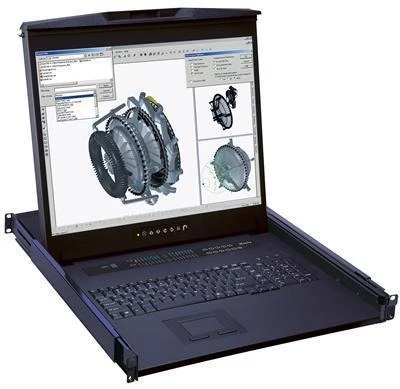
Managing servers efficiently in tight spaces can be a real challenge. That's where a KVM drawer becomes a critical component of smart IT infrastructure. Designed to combine a keyboard, video monitor, and mouse into one compact, rack-mountable unit, a KVM drawer streamlines your workflow and keeps your server room organized. Whether you're a seasoned network administrator or setting up your first data centre, the practicality of this tool can't be overstated.
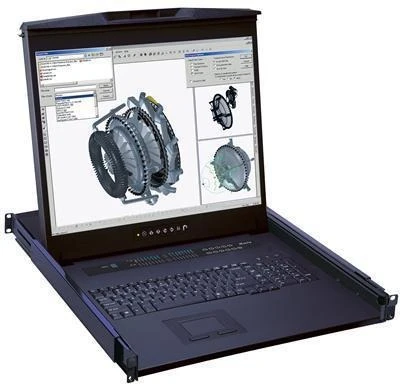
Built to fit into standard 19-inch server racks, most KVM drawers take up only 1U or 2U of space. When closed, they're virtually invisible; when opened, they provide full, hands-on access to your servers. This convenience helps reduce downtime, increase productivity, and improve overall server management.
Why You Need a KVM Drawer in Your Server Rack
You might be wondering: "Why not just use a separate keyboard, monitor, and mouse?" Good question. But when you're managing multiple servers in limited space, bringing in external peripherals every time you need access becomes inefficient—and messy.
A KVM drawer eliminates this problem. It integrates all three essential components into one slide-out device that stays within the rack at all times. This makes system maintenance, BIOS access, and direct troubleshooting much easier and faster.
Moreover, these units are often used in conjunction with KVM switches, allowing a single drawer to control multiple servers across the same rack—or even across different racks. This turns a chaotic server room into an efficient, centralized command centre.
Key Features to Look for in a KVM Drawer
When evaluating a KVM drawer for purchase, make sure it offers:
- Durable Slide Rails: For smooth operation and longevity.
- High-Resolution LCD Display: Typically between 17" to 19", often with full HD.
- Integrated Keyboard and Touchpad: So you don't need extra peripherals.
- KVM Switch Compatibility: Control multiple machines from one console.
- Locking Mechanism: For security and rack integrity.
- Foldable Design: To save space and minimize obstruction when not in use.
- Hot-swappable USB and VGA/DVI/HDMI inputs: For flexible connectivity.
Benefits of Installing a KVM Drawer
Let's look at how a KVM drawer positively impacts your server management experience:
- Saves Space: Uses minimal rack units.
- Reduces Cable Clutter: No external devices are needed.
- Centralizes Control: Manage all servers from one interface.
- Boosts Productivity: Faster access during maintenance or emergencies.
- Improves Aesthetics: Clean, professional rack layout.
- Enhances Security: The drawer can be locked when not in use.
How to Install a KVM Drawer Properly
Installation is simple but critical. Here's how to do it right:
- Measure Your Rack Space: Ensure you have at least 1U or 2U available.
- Mount the Slide Rails: Use the included brackets or adjustable rails.
- Slide the Drawer into Place: Lock it down using thumb screws or latches.
- Connect Video & Input Cables: Link it to your KVM switch or server directly.
- Power It On and Test: Make sure the keyboard, video, and mouse are all functional.
If your model includes a KVM switch, connect the servers accordingly and label them for quick access.
KVM Drawer vs. Rackmount Monitor: What's the Difference?
A KVM drawer often gets confused with a rackmount monitor, but they serve slightly different purposes.
- Rackmount Monitor: Just a screen—may or may not include a keyboard or mouse.
- KVM Drawer: Includes monitor, keyboard, and mouse in one pull-out tray. Some models also integrate a KVM switch.
In essence, the KVM drawer is the more versatile option, particularly if you frequently perform on-site server access or maintenance.
Applications Across Industries
KVM drawers are used in a wide array of professional environments:
- Data Centers: For fast access to physical servers.
- Broadcasting Studios: For monitoring equipment and controls.
- Industrial Automation: For managing PLCs and control systems.
- Surveillance Systems: To operate DVRs and NVRs securely.
- Government & Military: For secure, confined-space IT environments.
Frequently Asked Questions
What is a KVM drawer used for?
It provides integrated access (keyboard, video, and mouse) to one or more servers directly from the rack.
Is a KVM drawer compatible with all servers?
Yes, as long as your rack is standard (19") and the ports are compatible (USB, HDMI, VGA, etc.).
How much space does it take up?
Most KVM drawers take up 1U or 2U of vertical rack space.
Can I use a KVM drawer with a KVM switch?
Absolutely. Many models come with built-in KVM switches, while others can be connected to external units.
Is it worth getting a touchscreen KVM drawer?
If you manage visual or automation tasks, a touchscreen can speed up interaction. Otherwise, standard models are fine for general server management.
What's the lifespan of a KVM drawer?
With regular use and maintenance, a quality unit can last 5–10 years or longer.
Conclusion
A KVM drawer is more than a convenience—it's a necessity in environments where uptime, speed, and space matter. From data centres to control rooms, these tools allow IT professionals to manage their servers efficiently, securely, and without the hassle of external devices.
When you're ready to upgrade your infrastructure, a KVM drawer is an investment that offers both immediate and long-term returns in terms of productivity, organization, and peace of mind.