
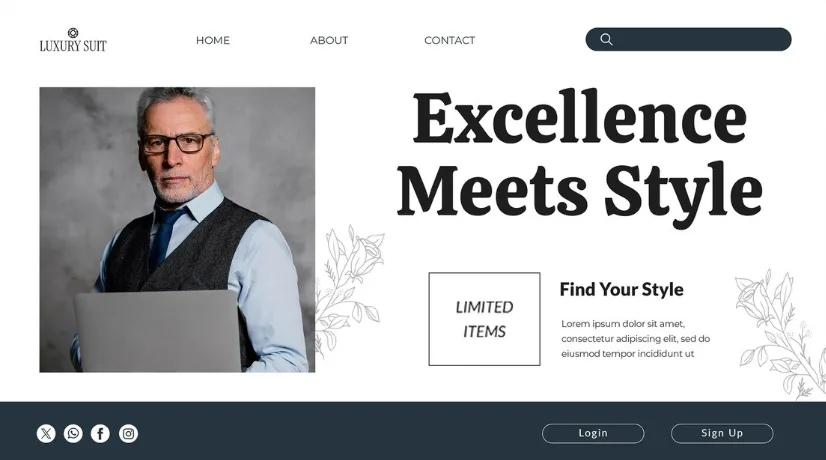
Choosing a personal portfolio HTML template feels like it should be the easy part. You browse through options, find one that looks impressive, download it, and get to work. Simple enough.
But here is the reality that most professionals discover after the fact. The template they chose, based on how it looked in a preview screenshot, turned out to be a poor fit for their actual professional needs. Maybe it was difficult to customize without extensive coding knowledge. Maybe it loaded too slowly on mobile. Maybe the project display sections did not handle their specific type of work well. Maybe it looked identical to dozens of other portfolios because it was so widely used and so lightly customized.
Choosing a portfolio template well, choosing one that actually produces better professional results rather than just looking good in isolation, requires knowing what to evaluate beyond visual appeal. This guide covers exactly that.
Why Template Choice Affects Professional Results
The Template Is the Foundation of EverythingEvery piece of work you carefully curate, every word of biography you thoughtfully write, every testimonial you collect and feature, all of it is presented through the frame that your template creates. A template that frames your work well amplifies its impact. One that frames it poorly diminishes it regardless of the intrinsic quality of the work being presented.
Beyond framing, the template determines the practical capabilities of your portfolio, what kinds of content can be displayed effectively, how visitors navigate through your work, how easy it is for motivated visitors to contact you, and how the site performs on the devices where professional evaluation most frequently happens.
Getting the template right from the start is more efficient and more effective than choosing based on appearance and correcting problems later.
What to Look for in Design Quality
Professional Visual Design That Serves Your WorkThe first thing to assess in any portfolio template is whether the design genuinely serves the presentation of professional work or whether the design itself is competing with the work for attention.
The best portfolio templates use design to create context and credibility without overwhelming the work itself. Clean typographic systems that make text content readable and authoritative. Generous white space that gives visual work room to breathe. Color palettes that enhance rather than distract. And layout structures that guide the eye naturally toward the work rather than drawing attention to clever design effects that have nothing to do with your professional capabilities.
Avoid templates that seem to be showcasing the template designer's creativity rather than creating a neutral, high-quality frame for your work. The portfolio template's job is to support your professional presentation, not to perform on its own behalf.
Typographic IntelligenceTypography is one of the most immediately impactful design elements in professional perception and one of the most commonly underestimated when professionals are evaluating templates.
A template with a thoughtful typographic system, appropriate heading scale, readable body text, and clear hierarchy between different levels of information creates a professional impression that visitors feel without consciously analyzing. A template with poor typography, inconsistent sizes, inappropriate font choices, and poor line spacing creates a slightly uncomfortable reading experience that subtly undermines the professional impression, even when visitors cannot identify why.
When evaluating templates, read the demo content carefully. Does it feel comfortable and confident to read? Does the hierarchy between headings and body text feel logical and clear? Does the typography feel appropriate for the professional context the template is designed for?
Visual Consistency Across All Page TypesMany templates look spectacular on the homepage demo but become noticeably less carefully designed on project pages, contact pages, and other internal sections. This inconsistency signals that the template was designed with the showcase page in mind rather than the complete professional visitor experience.
Browse every available page type in any template you are seriously considering. Check that the same design quality and consistency present on the homepage extends throughout the entire template because your professional evaluation does not happen only on your homepage.
What to Look for in Work Presentation Capabilities
Project Display Options That Match Your Work TypeDifferent professionals have different work display needs. A motion designer needs video integration that is clean and prominent. A brand designer needs a high-resolution static image display that does justice to typography and color. A UX designer needs the ability to display user research, wireframes, and final interface screens in logical relationships to each other. A writer needs a clean text layout with appropriate reading comfort.
Before selecting any template, assess whether its project display sections handle your specific type of work effectively. Test this mentally by imagining your actual work, your real images, your real case study content, and your real project types in the template's project sections. Does it work? Does it do justice to what you are displaying?
Case Study Page DepthThe most impactful professional portfolios present work as complete case studies rather than as image galleries. A case study includes the context of the project, the challenge or brief, the approach and key decisions, process documentation if relevant, final execution imagery, and outcomes or results.
Evaluate whether the templates you are considering include page designs that support this kind of case study depth with appropriate sections for each of these content types, organized in a logical and readable sequence. A template with only a single image display for each project severely limits your ability to create the deep, story-driven work presentation that most effectively builds professional confidence.
What to Look for in Functional Capabilities
Contact and Conversion PathwaysThe most beautiful portfolio website in existence is professionally useless if motivated visitors cannot easily take the next step toward working with you. Before selecting any template, evaluate how accessible and prominent the contact options are throughout the site.
Is there a contact option visible from every page in the navigation, in the footer, or as a persistent element, or does contact require navigating to a specific page? Is the contact process itself clean and simple, a form with minimal required fields, or a clearly displayed email address? And is there a visual prompt near each project or services section that guides engaged visitors toward inquiry at the moment their interest is highest?
Mobile Experience QualityA portfolio that looks impressive on a large desktop monitor but delivers a poor experience on mobile is failing a significant portion of its audience. Professional evaluation increasingly happens on mobile devices, and the moment when someone follows a link from your LinkedIn profile or an email signature to your portfolio, they are often doing it on their phone.
Test every template on an actual mobile device rather than just using desktop browser responsive preview tools. Navigate through multiple pages. Check that project images display at appropriate quality and scale. Verify that any contact forms are easy to complete on a touchscreen. And assess the overall experience, does it feel designed for mobile or does it feel like a desktop experience that has been squeezed onto a small screen?
Loading PerformancePortfolio loading speed is a professional signal in itself. A slow portfolio implies the same lack of attention to technical performance that clients in technical fields would be concerned about seeing in your work. Beyond the professional impression, slow loading directly causes visitors to abandon before engaging with your work, eliminating the opportunity your portfolio was supposed to create.
Test the loading speed of any template's demo using Google PageSpeed Insights before selecting it. Look specifically at mobile performance scores, which are most relevant given mobile-first browsing patterns.
What to Look for in Customization and Maintenance
Customization That Does Not Require Advanced CodingIf customizing a template requires advanced JavaScript knowledge or complex CSS architecture understanding, most professionals will produce a poorly customized result that looks worse than the default. Look for templates with clearly commented code, CSS variables for common customization points like colors and fonts, and comprehensive documentation that explains how to make the most common changes.
The test is simple: read through the template's documentation and assess whether the customizations you need to make are clearly explained in a way you can follow with your current technical abilities.
Long-Term Maintenance AccessibilityYour portfolio will need updates, new projects added, old ones retired, biography refreshed, and skills updated. The ease of making these routine updates without breaking the template's design consistency determines whether your portfolio remains current or gradually becomes outdated through neglect.
Evaluate whether adding a new project page follows a clear and repeatable process. Check whether the template includes documentation for routine updates rather than just initial setup.
Conclusion
Choosing a personal portfolio HTML template for better results requires going beyond visual appeal to systematically evaluate design quality, work presentation capabilities, functional contact pathways, mobile performance, loading speed, and customization accessibility. Each of these dimensions directly affects how effectively your portfolio represents you and how consistently it contributes to real professional outcomes.
When you apply this evaluation framework carefully, you choose a template that amplifies rather than constrains your professional presentation, creating the kind of portfolio that genuinely advances your career or business rather than just occupying a URL.
For professionals who want the widest selection of templates that genuinely excel across all of these evaluation dimensions, investing in high-quality, premium HTML templates built for professional portfolios is the clearest path to the best possible starting point. The best premium HTML templates combine sophisticated design quality, comprehensive work presentation capabilities, mobile-optimized performance, and customization accessibility that allows every professional to build a genuinely distinctive and high-performing digital presence.
Frequently Asked Questions (FAQs)
Q1. How do I test a portfolio HTML template's mobile performance before purchasing it?
The most reliable testing method is to visit the template's live demo on an actual mobile device, not just a desktop browser window resized to simulate mobile. Navigate through multiple pages, test any interactive elements, and assess the overall experience quality. Supplement this hands-on test with Google PageSpeed Insights, which provides specific performance scores for mobile and desktop separately, along with actionable recommendations for performance improvement. Pay particular attention to the mobile score and the Largest Contentful Paint metric, which reflects how quickly the main content of each page becomes visible to visitors, a critical factor in whether mobile visitors stay engaged or abandon.
Q2. What is the most important single feature to look for in a portfolio HTML template?
Work presentation capability is arguably the most important single feature because it is the primary job the portfolio exists to do. A template can look visually stunning in a demo but be practically limited in how effectively it presents the specific types of professional work you do. Case study page depth, the ability to present each project as a complete narrative with contextual information, process documentation, and outcome evidence, is the specific capability within work presentation that most consistently separates high-performing portfolios from mediocre ones. Prioritize templates that provide genuine case study page depth over those that offer only image galleries with minimal content structure.
Q3. How much coding knowledge do I need to customize a portfolio HTML template effectively?
The level of coding knowledge required depends on how extensively you want to customize the template and which template you choose. For basic customization, changing text content, swapping images, updating contact information, and adjusting colors through CSS variables, a basic understanding of HTML structure and CSS styling is sufficient and can be learned within a few hours using free online resources. For more substantial customization, adding new sections, modifying layout structures, or implementing additional interactive features, intermediate CSS and basic JavaScript knowledge is helpful. The most template-friendly approach for non-developers is to choose a template whose default design is already close to your ideal result, minimizing the customization depth required to achieve a satisfying outcome.
Q4. Should I choose a minimal or feature-rich portfolio HTML template?
The answer depends on your specific professional context and what your portfolio most needs to accomplish. Minimal templates clean, focused, with limited sections and simple layout structures work well for professionals whose work speaks clearly for itself without much contextual support, and for those who want to launch quickly with the most essential portfolio elements. Feature-rich templates with more sections, more layout variety, and more interactive capabilities work better for professionals whose work benefits from extensive contextualization, who have diverse service offerings to communicate, or who want to build a more comprehensive professional hub rather than a simple work showcase. The risk of a feature-rich template is using only some features and looking unfinished. The risk of a minimal template is being too spare to communicate everything your professional presentation needs.
Q5. How do I evaluate whether a portfolio template's default design can be customized enough to feel distinctively mine?
Evaluate customization potential by looking specifically at how the template handles its most prominent visual elements: color application, typography, and primary imagery. If all three can be changed to match your specific brand standards, your exact colors, your specific fonts, and your authentic photography, the template has sufficient customization potential for genuine personal branding. Templates that apply color, typography, and imagery choices in isolated, easily identified ways are most customizable. Templates that have these choices baked deeply into complex CSS architecture or JavaScript-generated elements are harder to change comprehensively. Reading the template documentation specifically for customization guidance, rather than just setup instructions, reveals how much flexibility the developer has designed into the customization process.