A single event can produce hours of useful footage. But turning that footage into content does not always mean making one polished video.
You might need a complete session recording for your website, a few short clips for social media, a speaker highlight for promotion, or several videos around different topics. This is where video editing and video repurposing come into play.
The two processes often overlap, but they are not the same. One focuses on improving and shaping a video, while the other focuses on finding new ways to use existing content.
So, what is the difference between them, and when should you use each?
Video Repurposing vs Video Editing: The Core Difference
The simplest way to understand event video repurposing vs video editing is to look at the end goal.
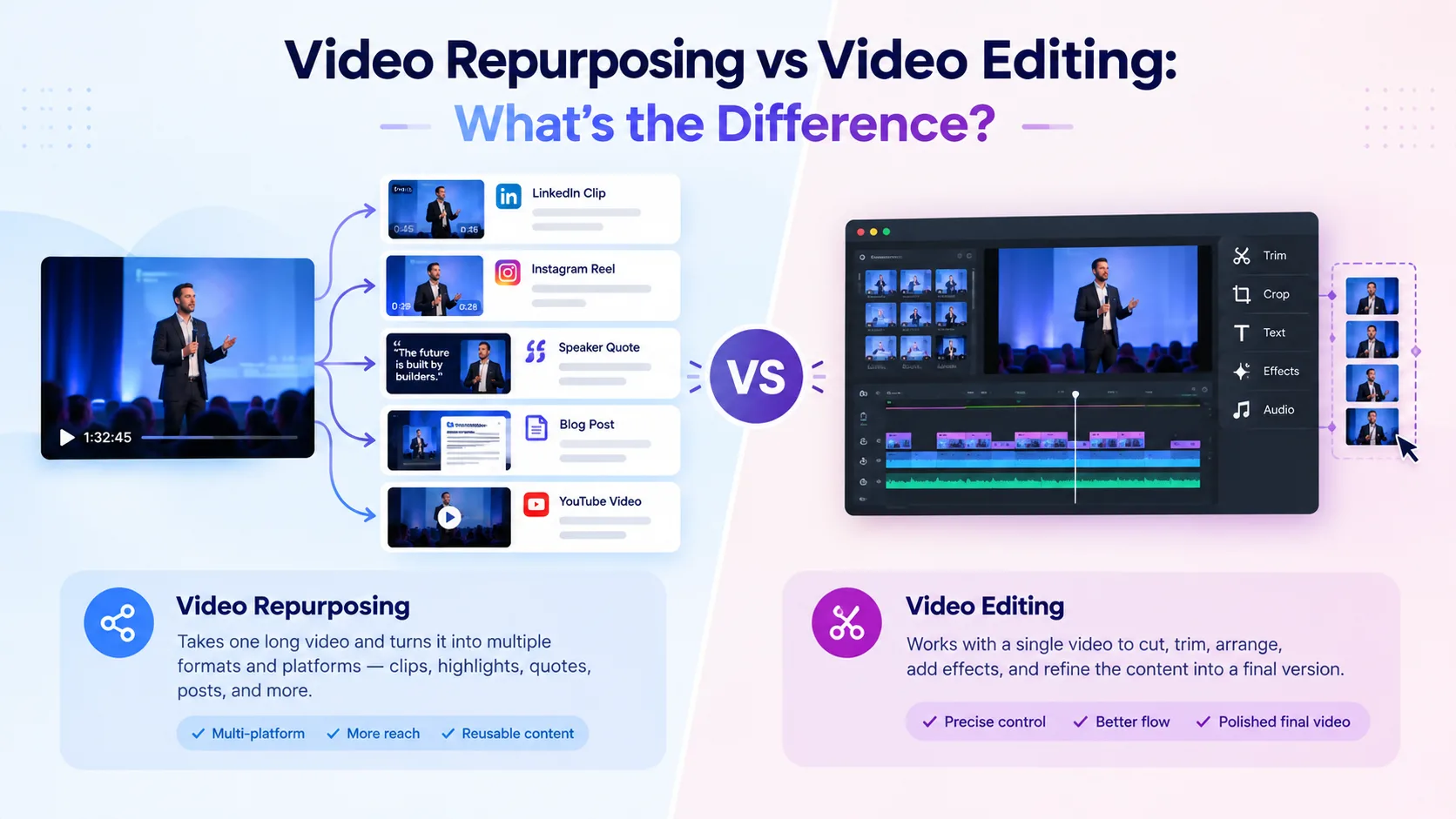
Video editing takes footage and turns it into a polished version of the intended video. It may involve cutting unwanted sections, improving audio, adding captions, arranging scenes, and refining the overall flow.
Video repurposing takes existing video content and turns it into new content pieces for different purposes, audiences, or platforms.
For example, an editor might turn a 60-minute conference recording into a polished 45-minute session. A content team could then use that recording to create five short clips, a speaker highlight, and several topic-specific videos.
Video EditingVideo RepurposingImproves or reshapes a videoCreates new content from existing videoFocuses on one finished pieceCan produce multiple content assetsRefines structure and presentationAdapts content for different usesStarts with raw or existing footageStarts with existing contentAims for a polished final videoAims to extend the content's value
The distinction becomes even clearer when you consider the question each process answers.
Editing asks: “How can we make this video work better?”
Repurposing asks: “What else can we create from this video?”
That difference affects the way content teams select footage, plan their workload, and decide what happens after an event recording is complete.
What Happens During the Video Editing Process?
The video editing process is concerned with how a particular video looks, sounds, and flows.
For an event recording, an editor may:
- Remove unwanted sections and long pauses
- Rearrange footage to improve the flow
- Clean up audio
- Add captions or graphics
- Correct visual issues
- Adjust pacing
- Prepare the final version for publication
The result is still fundamentally the same piece of content, just more polished and suitable for its intended use.
For example, if a keynote was recorded for an hour, editing might turn the raw recording into a clean, 40-minute version for an event website or content library.
Editing can also involve decisions that go beyond simply removing bad footage. An editor may decide where a video should begin, which sections need more time, where a visual should appear, or how quickly one idea should move into the next.
These decisions help the final video feel intentional rather than like a recording that was simply shortened.
What Happens During Video Repurposing?
Video repurposing looks at the same footage from a different perspective. Instead of asking how to improve one video, the focus shifts to what else can be created from it.
A conference session may contain several useful ideas, strong statements, audience questions, or memorable moments. Each can become a separate piece of content.
A practical video content repurposing process can look like this:
Start With the Original Recording
Choose footage with enough useful material to create additional content. Conference sessions, webinars, interviews, and panel discussions are common examples.
A longer recording can be particularly valuable because it gives the content team more material to work with. One session may contain several topics, speakers, questions, and useful explanations.
Find Reusable Moments
Look for strong statements, useful explanations, audience questions, interesting discussions, and sections that can stand on their own.
For longer recordings, transcripts and AI-assisted search can make this step faster. Instead of watching the entire session repeatedly, a content team can search for specific topics or phrases and review the surrounding context.
Match Moments to Their Purpose
Not every section should become the same type of video.
A detailed explanation may work as an educational clip, while a short, memorable statement may be better suited to social media. A speaker's answer to an audience question could also become a standalone video if it makes sense without the rest of the discussion.
The goal is not simply to cut a video into smaller pieces. Each new asset should have a clear reason for existing.
Edit the New Assets
Each repurposed asset may still need trimming, captions, audio adjustments, reframing, or other changes based on where it will be published.
The source stays the same, but the output is adapted for a new purpose.
This is what makes video content repurposing different from simply cutting a long recording into random short sections.
Does Video Repurposing Still Require Editing?
Yes. This is where the two processes are most closely connected.
Repurposing does not mean taking a section of a video and publishing it without changes. Each new asset may need to be trimmed, captioned, reframed, branded, or adjusted for its intended platform.
For example, a 60-second section from a conference session may need a stronger opening, captions, vertical framing, and tighter pacing before it works as a social media clip.
So, video repurposing decides what new content to create, while editing helps determine how that content should look and sound.
That is why the two processes often work together rather than replacing one another.
In fact, separating them too strictly can create unnecessary work. A content team may identify a great repurposing opportunity but still need an editor to make the resulting clip feel complete.
The important point is that repurposing adds a content strategy layer on top of editing. It asks why a particular moment should be reused and where it can provide value.
How AI Fits Into Video Repurposing and Editing
AI is increasingly being used to speed up both processes, but it supports them in different ways.
For video editing, AI can assist with tasks such as transcription, caption generation, silence detection, audio cleanup, reframing, and basic cuts.
For video repurposing, AI can analyse long recordings, identify potential highlights, search transcripts, detect topics, and help create shorter clips.
This can be especially useful for event teams dealing with hours of footage. Instead of watching every recording from beginning to end, they can use AI video editing tools to narrow down potentially useful sections and review the results.
For example, an AI-assisted system may identify several moments where a speaker discusses a particular topic. An editor or content manager can then review those moments and decide whether they should become individual clips.
The technology speeds up discovery and production, but it does not necessarily understand the broader content strategy. A moment that looks interesting in isolation may not work for a particular audience or platform.
Human review still matters. A technically clean clip may lack context, and an automatically selected highlight may not be the strongest choice for the intended audience.
When Should You Edit and When Should You Repurpose?
The right approach depends on what you need from the footage.
Choose video editing when you need to:
- Polish a recording for publication
- Improve its structure or pacing
- Remove unwanted footage
- Clean up audio and visuals
- Create one finished video
Choose video repurposing when you want to:
- Get more content from existing footage
- Create multiple short-form assets
- Adapt content for different platforms
- Highlight different topics or speakers
Extend the value of event recordings
There is also a useful third scenario: when you need both.
Suppose an event team records a 50-minute panel. The first goal may be to create a polished full-session video. Once that is ready, the team can identify five or six moments that deserve a second life as shorter content.
In this case, editing and repurposing are not competing for the same task. They are helping the same recording serve different content needs.
This approach can also make content production more efficient because the team does not have to create every asset from scratch.
Make Every Recording Work Harder!
Video editing and video repurposing are not competing approaches. They solve different parts of the content process.
Editing focuses on creating a better version of a video. Repurposing focuses on getting more content from that video.
For event teams, understanding this difference makes post-event content planning easier. A single recording can become a polished full-length session as well as multiple clips, highlights, and platform-specific assets.
The goal is not to choose between editing and repurposing. It is to know when to edit, when to repurpose, and how the two can work together.
Frequently Asked Questions:
1. What is the main difference between video editing and video repurposing?
Ans. Video editing improves or reshapes an existing video, while video repurposing turns that content into new assets for different purposes, audiences, or platforms.
2. Can the same video be edited and repurposed?
Ans. Yes. A long event recording can first be edited into a polished video and then repurposed into shorter clips, highlights, or topic-specific content.
3. What types of videos can be repurposed?
Ans. Conference sessions, webinars, interviews, panel discussions, podcasts, presentations, and other long-form recordings can often be turned into multiple shorter content pieces.
4. Can AI help with video repurposing and editing?
Ans. Yes. AI can assist with tasks such as finding highlights, generating transcripts and captions, creating clips, removing silences, improving audio, and adapting videos to different formats.