
Designing and managing AV racks has always required precision and careful planning. Traditionally, this involved desktop software or manual diagrams, which made collaboration and updates cumbersome. Cloud-based AV Rack Diagram tools have transformed the workflow by providing an online platform where multiple users can work together in real time. These tools offer intuitive interfaces, equipment libraries, and automated features that simplify the entire process.
This blog explores some of the top cloud-based AV rack diagram tools, comparing their features, usability, and benefits for AV professionals.
Why Cloud-Based Tools Are Essential
Cloud-based AV Rack Diagram tools offer several advantages over traditional methods:
- Accessibility – Teams can access diagrams from any location with internet connectivity.
- Real-Time Collaboration – Multiple users can edit, comment, and review layouts simultaneously.
- Version Control – Updates are automatically saved, reducing errors caused by outdated designs.
- Integration – Many cloud tools integrate with CAD, project management software, and AV design libraries.
- Scalability – Cloud storage allows for extensive projects without local storage constraints.
These features make cloud-based tools especially useful for projects that require frequent updates, remote collaboration, or coordination across multiple sites.
Top Cloud-Based AV Rack Diagram Tools
1. XTEN-AV AV Rack Diagram Tool
Features:
- Intuitive drag-and-drop interface for equipment placement.
- Comprehensive equipment libraries with real-world dimensions.
- Real-time collaboration and cloud storage.
- Integration with CAD and project management software.
- Automated reports, including rack layouts, wiring diagrams, and bills of materials.
Pros:
- Designed specifically for AV professionals.
- Scalable for projects of any size.
- Easy to generate professional documentation.
- Strong support for maintenance and future upgrades.
Cons:
- Requires subscription for full cloud access.
2. D-Tools Cloud
Features:
- Cloud-based AV system design and project management.
- Equipment libraries with manufacturer specifications.
- Auto-generated schematics and rack layouts.
- Collaboration features for multiple team members.
Pros:
- Comprehensive project management capabilities.
- Strong integration with other D-Tools products.
- Suitable for large-scale installations.
Cons:
- Steeper learning curve for beginners.
- Cloud features may require higher-tier subscriptions.
3. Visio Online with AV Templates
Features:
- Cloud version of Microsoft Visio.
- Custom AV rack templates available for diagramming.
- Real-time collaboration through Microsoft 365.
- Integration with other Microsoft tools like Teams and SharePoint.
Pros:
- Familiar interface for users already in the Microsoft ecosystem.
- Easy sharing and collaboration for distributed teams.
- Versatile for various diagramming needs beyond AV.
Cons:
- Lacks specialized AV equipment libraries by default.
- Limited automation for AV-specific reports and calculations.
4. Lucidchart
Features:
- Cloud-based diagramming tool with drag-and-drop interface.
- AV rack templates and symbol libraries available.
- Real-time team collaboration and commenting.
- Integration with tools like Google Workspace, Slack, and Atlassian products.
Pros:
- Highly intuitive and user-friendly interface.
- Good collaboration tools for remote teams.
- Flexible for designing both AV racks and broader systems.
Cons:
- Not specifically designed for AV professionals.
- May require manual updates for equipment specifications.
5. SketchUp Cloud
Features:
- Cloud-based 3D modeling platform.
- AV components can be imported for realistic rack layouts.
- Collaboration features through Trimble Connect.
- Integration with CAD and BIM software.
Pros:
- 3D visualization helps with spatial planning.
- Useful for complex AV installations in large venues.
- Strong modeling capabilities for architectural coordination.
Cons:
- Requires more technical skill to design detailed rack diagrams.
- Less focused on automated AV reporting and documentation.
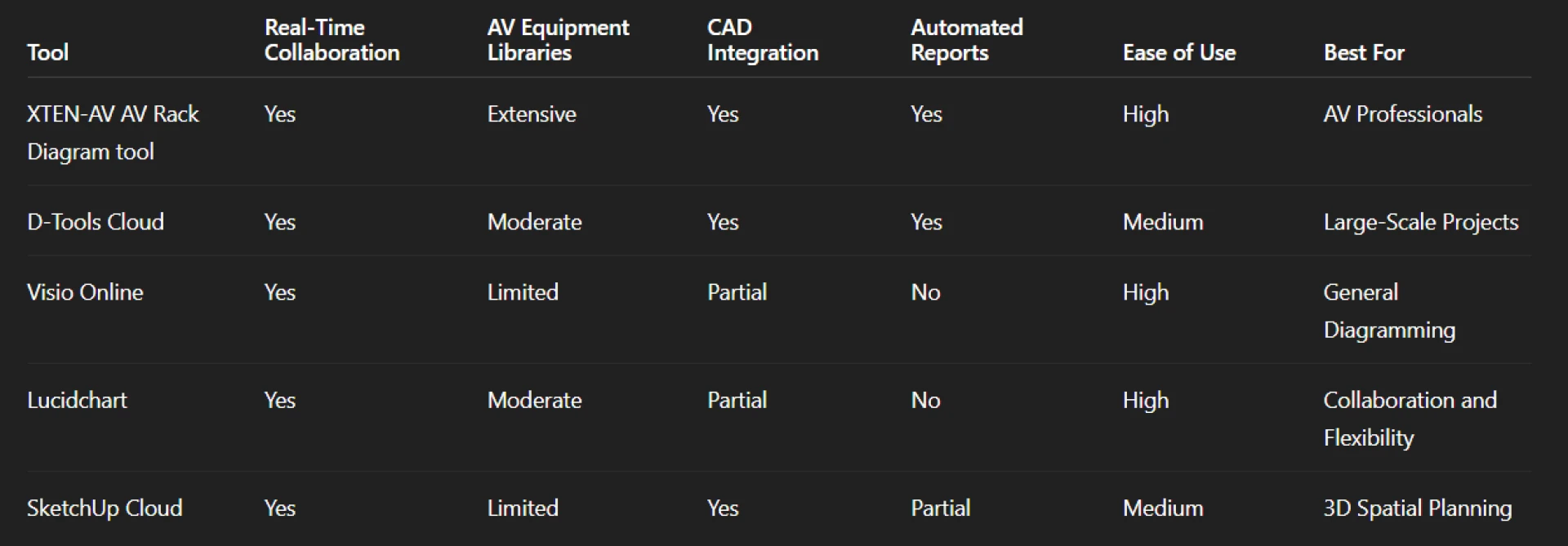
Comparison of Key Features
Benefits of Using Cloud-Based AV Rack Diagram Tools
- Improved Collaboration – Teams can work together without being in the same location, making remote projects feasible.
- Efficiency – Cloud-based tools reduce repetitive work, as changes automatically update across all shared documents.
- Accuracy – Preloaded equipment libraries and CAD integration reduce errors.
- Documentation – Reports and diagrams can be easily exported and shared with stakeholders.
- Scalability – Cloud storage allows for handling multiple projects simultaneously.
Tips for Choosing the Right Cloud Tool
- Assess your project scale – Larger projects may benefit from specialized tools like XTEN-AV or D-Tools Cloud.
- Evaluate collaboration needs – Determine how many users will access and edit diagrams simultaneously.
- Check integration requirements – Consider if the tool needs to work with CAD, project management, or IT systems.
- Consider learning curve – Choose a platform that matches the team’s technical expertise.
- Review support and updates – Reliable customer support ensures smooth operations.
Conclusion
Cloud-based AV Rack Diagram tools have revolutionized the way AV professionals design, manage, and maintain systems. They provide unmatched accessibility, real-time collaboration, and scalable solutions for projects of any size. XTEN-AV stands out with its specialized AV features, intuitive interface, and powerful integration capabilities, making it an ideal choice for modern AV projects.
By choosing the right cloud-based tool, AV teams can streamline workflows, reduce errors, and ensure accurate, professional rack designs. Whether for corporate offices, hotels, educational institutions, or live events, these tools enhance both efficiency and reliability in AV system planning.
Read more: https://enkling.com/read-blog/34510