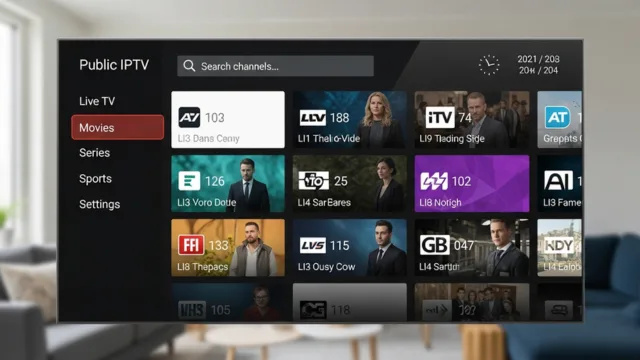
An m3u player online provides a convenient way to access and manage compatible IPTV playlists through a web browser. Instead of relying on a dedicated application, users can often load an M3U playlist and browse available channels from a single interface. However, smooth playback depends on several factors, including playlist quality, internet stability, browser compatibility, and the reliability of individual streams. Understanding these factors can help users create a better streaming experience.
Understanding M3U Playlists
M3U is a playlist format that contains references to media streams rather than usually storing the video content itself. A playlist can include channel names, stream URLs, categories, logos, and other metadata.
M3U8 is a closely related format that is commonly associated with UTF-8 encoding and HTTP Live Streaming. Whether a particular playlist works depends on the format, the streaming source, and the capabilities of the selected player.
Before using a playlist, users should ensure that it comes from a legitimate and trustworthy source and is compatible with their chosen player.
Choose a Reliable M3U Player Online
The first step toward smooth playback is selecting a suitable m3u player online. Different browser-based players offer different features and levels of compatibility.
Look for a player that supports the playlist format you intend to use. Useful features can include playlist importing, channel search, categories, favorites, sorting, and basic playback controls. A simple and well-organized interface can make it easier to find channels and manage larger playlists.
It is also useful to check whether the player works properly with your preferred browser and device.
Use a Stable Internet Connection
Internet stability is one of the most important factors affecting live streaming. Even when a playlist and player are working correctly, an unstable connection can cause buffering, freezing, or interruptions.
Whenever possible, use a reliable broadband connection. If you are using Wi-Fi, keep your device within a reasonable range of the router. A wired connection may also provide more consistent performance on supported desktop devices.
Other devices using the same network can consume significant bandwidth. Reducing unnecessary downloads, large uploads, or high-bandwidth activities while streaming may help improve playback consistency.
Check the Quality of the Stream Source
An online player cannot fix an unreliable streaming source. If a particular channel repeatedly stops, buffers, or fails to load while other channels work normally, the issue may be associated with that individual stream.
Test several channels from different categories to identify whether the problem affects the entire playlist or only specific entries. This simple test can help determine whether you should troubleshoot your connection, player, or playlist.
Using updated and legitimate playlist sources can also reduce problems caused by expired or broken stream addresses.
Keep Your Playlist Updated
M3U playlists can change over time. Channel URLs may be updated, channels may be removed, and additional metadata may be added.
An outdated playlist can therefore contain links that no longer work. If the legitimate source of your playlist provides regular updates, replace older versions with the latest available version.
Keeping the playlist current can reduce broken channels and make it easier to organize available content.
Organize Large Channel Lists
Large M3U playlists can contain hundreds or thousands of entries. Without proper organization, finding a specific channel can become difficult.
If your m3u player online provides search and filtering tools, use them to locate channels quickly. Categories can help separate different types of programming, while favorites can provide quick access to frequently watched channels.
A well-organized playlist also makes troubleshooting easier because you can quickly identify which categories or streams are experiencing problems.
Keep Your Browser Updated
Because an online player operates within a browser, browser compatibility can influence playback. An outdated browser may have difficulty handling certain modern web video technologies.
Keep your preferred browser updated and make sure JavaScript and other required browser features are enabled when necessary. If a player does not work correctly, testing it in another modern browser can help determine whether the problem is browser-specific.
Clearing outdated cached data may also resolve occasional website loading issues.
Reduce Common Buffering Problems
Buffering can have several causes. Network congestion, insufficient bandwidth, an unstable Wi-Fi connection, or an overloaded streaming source can all contribute to interruptions.
If buffering affects only one channel, try another channel to compare performance. If every channel experiences problems, check your internet connection and browser before changing other settings.
Avoid repeatedly refreshing a stream without identifying the cause of the problem. A systematic approach can make troubleshooting faster and more effective.
Consider Device Performance
The device you use can also influence playback. Older computers, tablets, or mobile devices may struggle with high-resolution video or demanding browser applications.
Close unnecessary browser tabs and applications if your device has limited resources. Keeping the operating system and browser updated can also help maintain compatibility.
For high-resolution streams, make sure the device has sufficient processing capability and memory for smooth playback.
Pay Attention to Privacy and Security
When using an online M3U player, users should consider privacy and security. Avoid websites that request unnecessary personal information, unknown software installations, or suspicious browser extensions.
If you are entering a playlist URL, make sure you understand what information the URL contains and avoid sharing private playlist credentials publicly. Choosing reputable services and reviewing their privacy practices can help reduce unnecessary risks.
Conclusion
An m3u player online can provide a convenient way to manage compatible IPTV playlists and access available streaming channels through a browser. However, smooth playback depends on more than the player itself.
For a better experience, use a reliable and legitimate playlist, maintain a stable internet connection, keep your browser updated, organize large channel lists, and regularly replace outdated playlist information. When playback problems occur, test multiple channels to determine whether the issue comes from the stream, playlist, browser, device, or network.
With the right setup and basic troubleshooting, online M3U playback can become a simple and convenient way to manage compatible streaming content.
Web:- https://iptvplayer.stream/iptv-player
#m3uplayeronline