As organisations continue to embrace digital transformation, print management remains a critical aspect of maintaining secure, cost-effective, and efficient business operations. While many businesses already have a well-established print infrastructure consisting of multifunction printers (MFPs), print servers, user directories, and network devices, managing these resources efficiently can become increasingly challenging as organisations grow.
This is where PaperCut MF stands out. Designed to integrate seamlessly with existing print environments, PaperCut MF enhances print management without requiring businesses to replace their current hardware. Instead, it adds intelligent print tracking, secure print release, cost recovery, environmental reporting, and workflow automation to your existing infrastructure.
What Is PaperCut MF?
PaperCut MF is a comprehensive print management software solution that helps organisations monitor, control, and secure printing, copying, scanning, and faxing across their network.
Unlike standalone print solutions, PaperCut MF works alongside your existing printers and multifunction devices, providing centralised management while supporting leading printer manufacturers such as:
- Canon
- Sharp
- HP
- Epson
This hardware compatibility allows businesses to maximise the value of their existing print investments.
Why Integrate Instead of Replace?
Many organisations assume that implementing new print management software requires replacing printers or redesigning their network.
Fortunately, PaperCut MF is designed to integrate into existing infrastructure with minimal disruption.
Key advantages include:
- No need to replace existing printers
- Supports mixed-brand print fleets
- Compatible with existing print servers
- Integrates with Active Directory and LDAP
- Works with cloud and hybrid environments
- Minimal downtime during deployment
This makes implementation faster, more affordable, and less disruptive to daily operations.
Components of an Existing Print Infrastructure
Before integrating PaperCut MF, it's helpful to understand the typical components already present in most organisations.
These include:
- Network printers
- Multifunction printers (MFPs)
- Print servers
- User authentication systems
- Active Directory
- LDAP directories
- File servers
- Cloud storage platforms
- Mobile devices
- Desktop workstations
- Wireless networks
PaperCut MF connects with these systems to create a unified print management environment.
Integrating with Print Servers
Most businesses already use Windows Print Server or similar server environments to manage print queues.
PaperCut MF integrates directly with these servers to:
- Track every print job
- Apply print policies
- Generate usage reports
- Monitor printer status
- Control user permissions
Because it operates alongside existing print queues, there is no need to recreate your entire print environment.
Active Directory Integration
One of PaperCut MF's greatest strengths is its seamless integration with Microsoft Active Directory.
Benefits include:
- Automatic user synchronisation
- Group-based permissions
- Single Sign-On (SSO)
- Simplified user management
- Reduced administrative workload
When employees join or leave the organisation, PaperCut automatically updates user access based on Active Directory information, reducing manual administration.
Secure Print Release
Data security is becoming increasingly important, particularly in industries handling confidential information.
PaperCut MF enables Secure Print Release, where documents remain in a virtual print queue until users authenticate themselves at the printer.
Authentication methods include:
- PIN codes
- Swipe cards
- RFID cards
- Mobile authentication
- Username and password
- QR code login
This significantly reduces the risk of sensitive documents being left unattended on printer trays.
Integrating Multifunction Devices
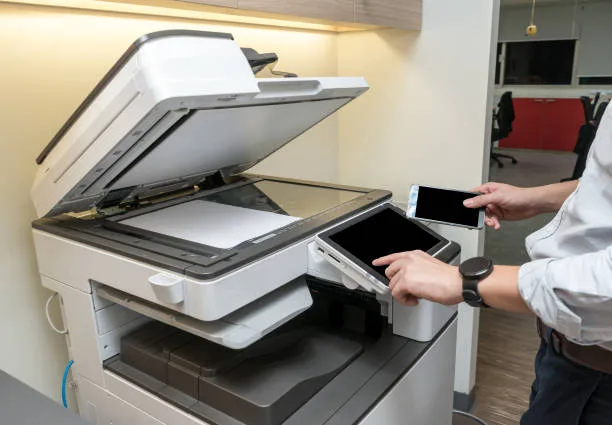
PaperCut MF supports embedded software on many leading multifunction printers.
This allows users to access PaperCut features directly from the printer's touchscreen.
Available functions include:
- Secure printing
- Scan to email
- Scan to cloud storage
- Scan to network folders
- Print release
- User authentication
- Account selection
The familiar interface improves user adoption while simplifying print management.
Cloud Integration
Modern workplaces increasingly rely on cloud platforms for collaboration.
PaperCut MF integrates with popular cloud services including:
- Microsoft OneDrive
- SharePoint Online
- Google Drive
- Dropbox
- Box
Employees can securely scan documents directly to cloud storage, eliminating unnecessary manual uploads and improving workflow efficiency.
This is especially valuable for hybrid and remote work environments.
Mobile Printing Support
Today's workforce expects the flexibility to print from smartphones, tablets, and laptops.
PaperCut MF supports:
- BYOD (Bring Your Own Device)
- Android printing
- iOS printing
- Chromebook printing
- Windows devices
- macOS devices
Users can submit print jobs securely from virtually any authorised device without compromising network security.
Print Policy Automation
One of the major benefits of integration is automated print policy enforcement.
Examples include:
- Default duplex printing
- Colour printing restrictions
- Large job approval workflows
- Departmental quotas
- Cost allocation
- Print rules based on document size
Automation reduces waste while encouraging responsible printing across the organisation.
Reporting and Analytics
PaperCut MF provides detailed reporting across your existing print infrastructure.
Reports include:
- User activity
- Department usage
- Printer utilisation
- Environmental impact
- Colour versus monochrome printing
- Cost analysis
- Print trends
These insights help organisations optimise device placement, reduce unnecessary printing, and control operational expenses.
Environmental Benefits
Sustainability is becoming a key objective for businesses worldwide.
PaperCut MF helps organisations reduce their environmental footprint by:
- Encouraging duplex printing
- Reducing abandoned print jobs
- Monitoring paper consumption
- Tracking carbon impact
- Promoting responsible printing behaviour
These features support corporate sustainability initiatives while lowering operational costs.
Steps for Successful Integration
A structured implementation ensures minimal disruption.
1. Assess Your Current Environment
Identify:
- Printer models
- Print servers
- User numbers
- Authentication systems
- Network architecture
2. Define Business Objectives
Examples include:
- Reducing print costs
- Improving document security
- Simplifying print management
- Supporting hybrid work
- Increasing sustainability
3. Install the PaperCut MF Server
Deploy the central server and connect it to your existing print server.
4. Configure User Synchronisation
Integrate Active Directory or LDAP to automate user management.
5. Deploy Embedded Software
Install embedded applications on compatible multifunction printers.
6. Configure Policies
Set print rules, quotas, authentication methods, and reporting preferences.
7. Train Employees
Provide simple guidance on:
- Secure print release
- Mobile printing
- Scanning workflows
- Authentication procedures
Good user adoption maximises ROI.
Common Integration Challenges
Although PaperCut MF integrates smoothly with most environments, organisations should plan for:
- Legacy printer compatibility
- Firmware updates
- Network firewall configuration
- Authentication setup
- User training
- Print queue migration (if required)
Working with an experienced PaperCut partner can help avoid these challenges.
Best Practices
To maximise success:
- Keep printer firmware updated.
- Regularly review print reports.
- Encourage secure print release.
- Use role-based permissions.
- Monitor environmental savings.
- Optimise printer placement based on analytics.
- Periodically review print policies.
Continuous optimisation ensures your print infrastructure evolves alongside your organisation.
Conclusion
Integrating PaperCut MF with your existing print infrastructure is one of the most effective ways to modernise print management without replacing your current hardware. By working seamlessly with print servers, multifunction devices, Active Directory, cloud platforms, and mobile devices, PaperCut MF enhances security, streamlines workflows, reduces operational costs, and improves user experience.
Whether your organisation operates a small office or manages hundreds of printers across multiple locations, PaperCut MF provides the flexibility and scalability needed to support today's hybrid work environments and future business growth. With careful planning and implementation, businesses can unlock greater visibility, stronger security, and long-term savings while making the most of their existing print infrastructure.