When a company buys Microsoft Fabric, the very first thing someone does is click the 'New Workspace' button. They name it something generic like 'Enterprise_Analytics_Prod' and invite forty different people to it. The data engineers start building lakehouses. The BI team starts publishing semantic models. The data scientists spin up Python notebooks. For the first two months, everything feels incredibly fast and productive.
Then reality hits. A junior developer accidentally drops a production Delta table because they had admin rights. The morning executive dashboard times out because a heavy machine learning job ate all the compute capacity. The security team runs an audit and completely panics because they realize human resources data is sitting in the exact same workspace as the public marketing data.
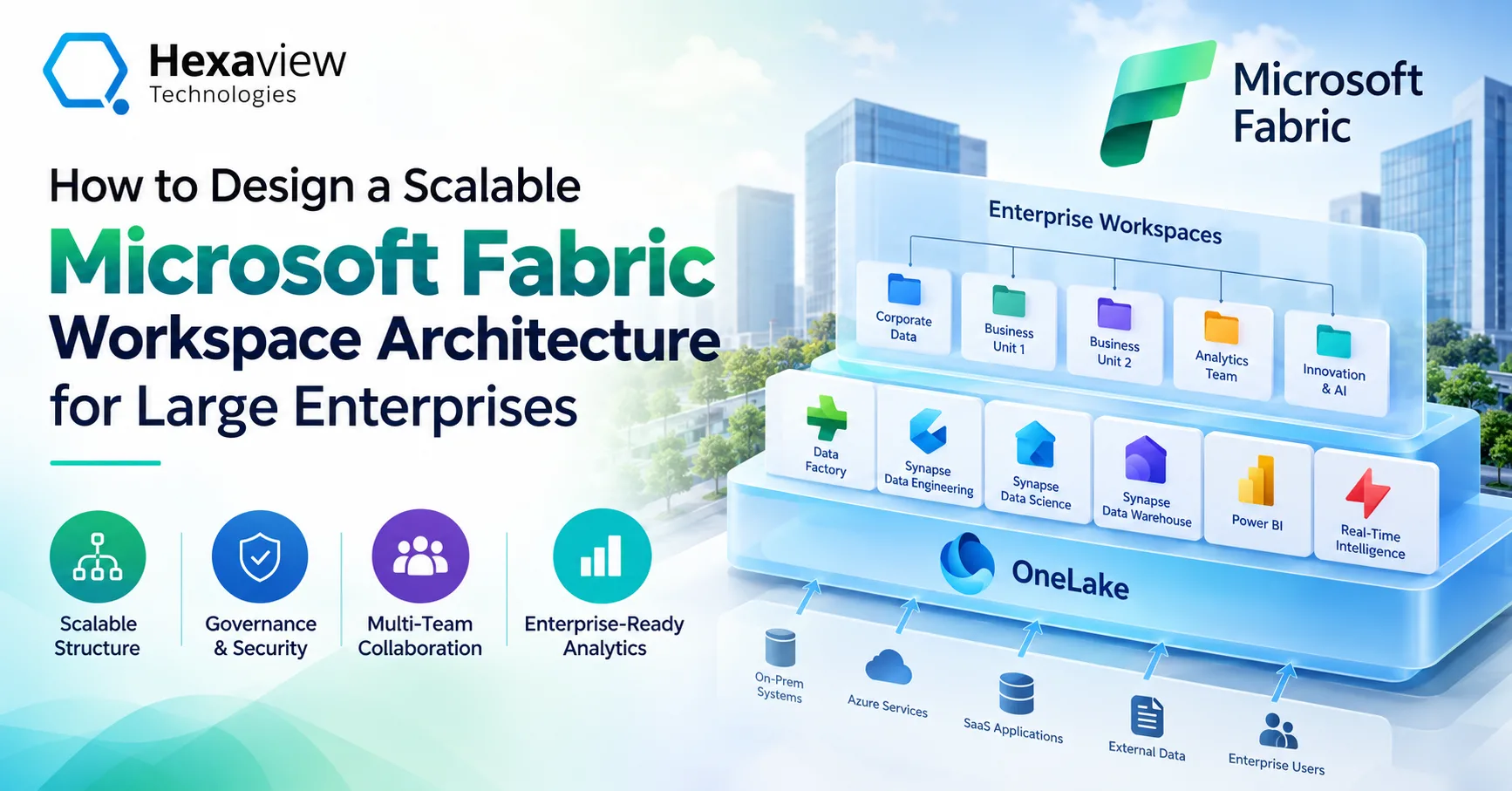
This is what happens when you treat Fabric workspaces like old-school shared network drives. Fabric is not just a storage locker. A workspace in Fabric defines a security boundary, a compute isolation boundary, and a lifecycle management container. If you get the workspace architecture wrong on day one, you will spend the next two years trying to untangle a massive administrative mess.
Stop Putting Everything in One Box
The most fundamental mistake you can make is ignoring the Medallion architecture at the workspace level. We all know the theory of Bronze, Silver, and Gold data layers. Bronze holds the raw junk from source systems. Silver cleans it up. Gold aggregates it for the business.
If you put all three of those layers inside a single workspace, you ruin your security model. You cannot easily restrict a business analyst from poking around in the raw Bronze files if they have access to the workspace to read the Gold semantic models. The platform permissions just are not granular enough at the workspace level to safely mix development personas with consumer personas.
The standard enterprise fix is physical separation. You create a dedicated workspace just for ingestion. Only your core data engineering team gets access to this. They use it to land the raw files and clean them up into Silver tables. Then, you create a completely separate 'Gold' workspace. The engineers use OneLake shortcuts to bridge the data over. Now, you can safely invite your BI developers and business analysts to the Gold workspace. They get to build their reports, and they literally cannot see the messy, unsecured raw data because it lives behind a firewall in a workspace they don't even know exists.
Implementing Domain-Driven Design
Isolating by data layer is just the baseline. When you scale up to a Fortune 500 level, you run into the organizational bottleneck. You cannot have a single central IT team managing every single data pipeline for the entire global company. It slows the business down too much.
You have to move toward a decentralized model, often called a data mesh. In Fabric, this means building workspace domains. The Finance department gets its own cluster of workspaces. The Supply Chain team gets theirs. The Marketing team gets theirs.
This sounds like a recipe for data silos, but OneLake prevents that. Because Fabric separates compute from storage, the Supply Chain team can build their own Lakehouse, process their own inventory data, and own their own computing costs. If the Finance team needs to see that inventory data to calculate quarterly margins, they do not ask IT to build a pipeline. They just drop a OneLake shortcut into their own workspace that points at the Supply Chain's tables.
This architecture delegates the administrative headache. The Finance VP decides who gets access to the Finance workspaces. You stop relying on a single overworked IT administrator to manage thousands of active directory permissions.
The Capacity and Compute Isolation Trap
Workspaces also control how you spend money. Microsoft bills you based on Capacity Units (CUs). You buy an F64 or an F128 capacity, and you assign your workspaces to it. All the compute engines inside that workspace draw power from that specific capacity pool.
If you assign the data engineering workspace and the executive reporting workspace to the same exact capacity, you are asking for trouble. Spark jobs are incredibly greedy. When an engineer kicks off a massive data transformation script at 8:00 AM, Spark will consume every available compute cycle to finish the job as fast as possible. If the CEO opens their Power BI dashboard at 8:01 AM, the Analysis Services engine has no compute power left to render the visuals. The dashboard freezes.
To solve the noisy neighbor problem, large organizations buy multiple smaller capacities instead of one massive one. They buy an F32 dedicated entirely to backend ETL processing, and a separate F32 strictly for front-end Power BI reporting. They assign the workspaces accordingly. If the data engineers write a terrible script that burns up all their compute, their jobs might fail, but the business users won't even notice because their dashboards are running on physically isolated compute.
Tackling the Lifecycle Management Nightmare
Nobody writes perfect code on the first try. You need a safe place to break things. Fabric supports CI/CD through Git integration and deployment pipelines, but those features only work if you actually build the underlying workspace architecture to support them.
You need a Development workspace, a Testing workspace, and a Production workspace for every major project. This multiplies your administrative overhead immediately. If you have five business domains, and each domain has a Bronze, Silver, and Gold layer, and each of those layers needs Dev, Test, and Prod environments... you are suddenly managing forty-five different workspaces.
Trying to configure the Git branches, the Azure DevOps service connections, and the cross-workspace shortcuts for that many environments manually is a guaranteed failure. Someone will click the wrong button and push experimental code directly into a production semantic model.
Navigating the Real-World Deployment
This massive jump in complexity is exactly where most internal data teams throw their hands up. Knowing the theory of a data mesh is very different from actually configuring the Entra ID security groups and Terraform scripts to deploy it automatically.
When the deployment stalls out, IT directors usually hit the market looking for Microsoft Fabric consulting Services to clean up the mess. Outside architects come in, look at the sprawling chaotic single-workspace setups, and start designing an actual governance framework. They map out the active directory groups, define the capacity isolation strategy, and establish the naming conventions so you can actually find your data.
A proper Microsoft Fabric Implementation is basically an exercise in organizational psychology mixed with network security. You have to convince rogue data scientists to stop using personal workspaces. You have to convince legacy SQL developers that they don't need sysadmin rights to the production warehouse anymore. This requires strict deployment discipline.
Because the learning curve for Fabric's Git integration and API automation is so steep, heavy lifting is often outsourced. Firms providing Microsoft Fabric Implementation Services build the automated provisioning engines. Instead of a developer manually clicking 'New Workspace', they fill out a form. A script runs in the background, spins up the Dev, Test, and Prod workspaces, assigns them to the correct capacities, locks down the security roles, and establishes the OneLake shortcuts automatically. That automation is the only way a Fortune 500 company can govern a platform of this size without suffocating innovation.
Stop Building Before You Plan
Fabric makes it dangerously easy to start building before you know what you are doing. The software is designed to remove friction. But friction is sometimes exactly what you need to prevent a massive security breach or a runaway cloud bill.
Before you write a single line of PySpark or build a single DAX measure, you have to draw your workspace boundaries on a whiteboard. Decide where the raw data lives. Decide who pays for the compute. Decide how code moves from development to production. If you get the physical workspace architecture right, the actual data engineering becomes incredibly easy. If you get it wrong, you will spend all your time fighting the platform instead of delivering actual business value.