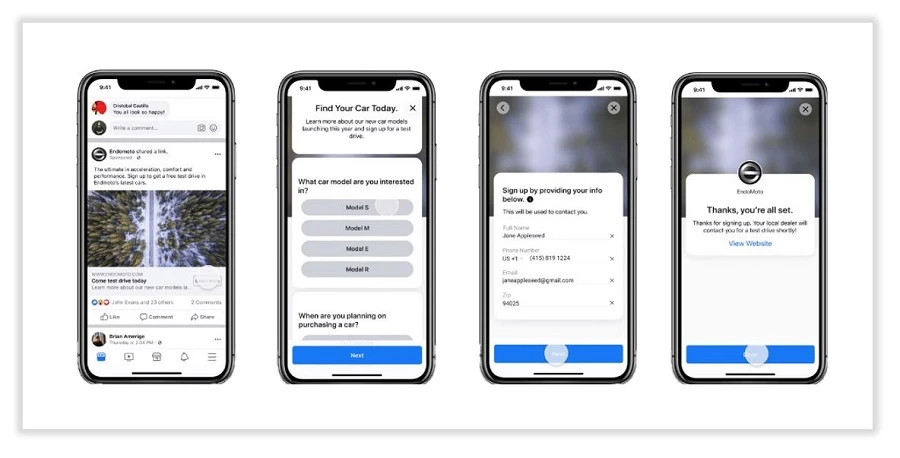
Facebook is the most powerful digital marketing platform, and for businesses looking to reach new clients directly on the site, its Lead Generation Ads are revolutionary. Without requiring users to leave Facebook, the advertisements allow businesses to obtain vital client data, such as names, emails, and phone numbers. This tutorial will walk you through the entire process of creating Facebook Lead Generation Ads that convert well.
Step 1: Recognize Facebook Lead Ad Benefits
Here are some reasons to use Facebook Lead Generation Ads before you start the setup:
Easy User Experience: Users can submit information without ever leaving Facebook.
Pre-Filled Forms: Facebook increases the completion rate by automatically entering information like names and email addresses.
Mobile Optimized: Captures more leads while on the go and operates seamlessly on mobile devices.
CRM Integration: This allows for efficient lead management by connecting with programs like HubSpot, Mailchimp, and Google Sheets.
Step 2: Launch Your Lead Advertising Campaign on Facebook
1. Go to Facebook Ads Manager
Open Facebook Business Manager and log in.
Select Create New Campaign after clicking on Ads Manager.
2. Select the Appropriate Campaign Goal
Make lead generation the goal of your campaign.
Click Continue after giving your campaign a name.
3. Pick the Correct Audience
A successful lead ad requires audience targeting. Use the following tactics:
Custom Audiences: Focus on those who have dealt with your company.
Lookalike Audiences: Focus on users who resemble your current clientele.
Interest-Based Targeting: Find people who exhibit the behaviors, interests, and demographics.
4. Establish Ad Placement and Budget
Based on your objectives, determine your daily or lifetime budget.
Choose between manual and automatic placements, such as Facebook Messenger, Instagram, and Feeds.
Step 3: Make an Interesting Lead Advertisement
1. Choose the Ad Format
You are able to produce:
Ads with just one image are easy and efficient.
Carousel ads: Display several pictures or services.
Video ads are highly captivating and conversion-oriented.
2. Craft Eye-Catching Advertising Copy
Headline: Be succinct and interesting.
Primary Text: Highlight the advantages and the necessity of users' registration.
CTA, or call to action: Make use of CTAs like "Learn More," "Sign Up," or "Get Offer."
3. Create a Lead Form
After selecting Instant Form, select "Create Form."
Choose Higher Intent for serious leads or More Volume for easier sign-ups.
Add your own questions to collect pertinent information.
Go to the policy page on your website to activate the privacy policy.
Step 4: Track and Enhance Your Lead Advertising
Use Facebook Ads Manager to monitor the performance of your ads.
Compare measures like conversion rate, cost per lead, and CTR.
To improve performance, A/B test different headlines, pictures, and calls to action.
Conclusion
One excellent method for producing high-quality leads at a reasonable price is through Facebook Lead Ads. With the help of this detailed guide, businesses can produce customized lead generation advertisements that maximize conversions. Start implementing these tactics now to see the growth of your lead stream!
Do you require professional Facebook Ads management? Reach out to us right now!