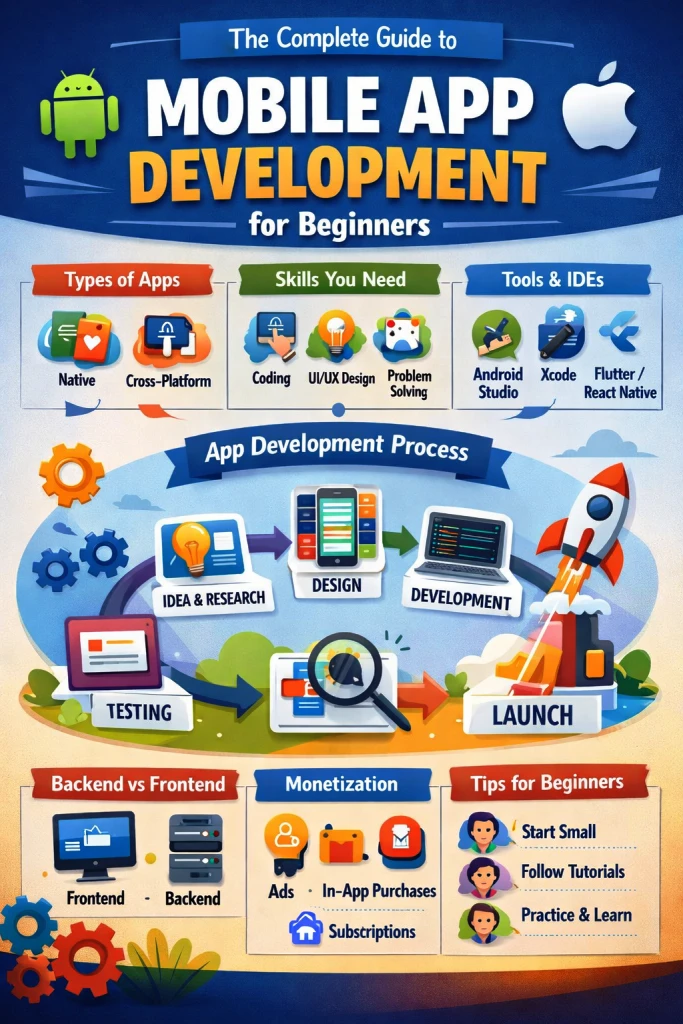
Mobile apps have become an essential part of everyday life - from social networking and banking to fitness tracking and entertainment. If you’ve ever thought about building your own app, you’re not alone. The good news is that mobile app development is more accessible than ever, even for beginners. The complete guide to mobile app development for beginners? This guide will walk you through everything you need to know to get started, from understanding the basics to launching your first app.
1. Understanding Mobile App Development
Mobile app development is the process of creating software applications that run on mobile devices such as smartphones and tablets. Most apps are built for two major platforms:
- Android (primarily supported by Google)
- iOS (developed by Apple)
Developers can either build apps specifically for one platform (native apps) or create apps that work across multiple platforms (cross-platform apps).
2. Types of Mobile Apps
Before you start coding, it’s important to understand the different types of mobile apps.
Native Apps
These apps are built specifically for a single platform using platform-specific languages:
- Android: Kotlin or Java
- iOS: Swift or Objective-C
Native apps usually offer the best performance and user experience because they are optimized for the operating system.
Cross-Platform Apps
These apps are developed once and deployed on multiple platforms. Popular frameworks include:
- React Native (maintained by Meta Platforms)
- Flutter
- Xamarin
Cross-platform development saves time and cost, making it popular for startups and beginners.
Web Apps and Progressive Web Apps (PWAs)
These are essentially websites optimized for mobile devices. They don’t require installation from an app store but may have limited access to device features.
3. Skills You Need to Get Started
You don’t need to know everything before starting, but having a foundation in these areas will help:
Programming Basics
Learn at least one programming language relevant to your target platform:
- Kotlin or Java for Android
- Swift for iOS
- JavaScript or Dart for cross-platform frameworks
UI/UX Design Principles
Good apps are not just functional—they are easy and enjoyable to use. Understanding layout, color theory, typography, and user behavior is essential.
Problem-Solving Skills
Development involves constant troubleshooting. Logical thinking and persistence are key.
4. Tools and Development Environments
You’ll need specialized tools to build mobile apps:
- Android Studio – Official IDE for Android development
- Xcode – Official IDE for iOS development (Mac required)
- Cross-platform tools like Flutter or React Native environments
These tools provide code editors, simulators, debugging tools, and performance analyzers to help you build apps efficiently.
5. The Mobile App Development Process
Creating an app involves several stages. Understanding this workflow helps you stay organized.
1. Idea and Research
Start with a clear problem your app will solve. Research competitors and identify your unique value.
2. Planning
Define:
- Features
- Target audience
- Monetization strategy
- Technical requirements
Create wireframes or sketches to visualize your app structure.
3. Design
Design the user interface (UI) and user experience (UX). Tools like Figma or Adobe XD are commonly used for mockups and prototypes.
4. Development
This is where coding happens. Developers implement features, integrate APIs, and build the backend if needed.
5. Testing
Testing ensures your app works correctly across devices and scenarios. Types of testing include:
- Functional testing
- Performance testing
- Usability testing
- Security testing
6. Deployment
Once testing is complete, you publish your app to app stores such as the Apple App Store and Google Play.
7. Maintenance and Updates
After launch, you’ll need to fix bugs, add features, and improve performance based on user feedback.
6. Backend vs Frontend Development
Mobile apps often consist of two major components:
Frontend (Client Side)
This is what users see and interact with—buttons, screens, animations, and navigation.
Backend (Server Side)
The backend manages:
- Databases
- User authentication
- Cloud storage
- APIs
- Business logic
Beginners often use Backend-as-a-Service (BaaS) platforms like Firebase to avoid building servers from scratch.
7. Choosing Between Native and Cross-Platform
A common beginner question is: Which approach should I choose?
Choose native development if:
- You want maximum performance
- You are targeting one platform only
- Your app requires heavy graphics or hardware integration
Choose cross-platform development if:
- You want faster development
- You have limited budget
- You want to reach both Android and iOS users quickly
For beginners, cross-platform frameworks are often easier to start with.
8. Monetization Strategies
If your goal is to earn money from your app, consider these models:
- Paid apps – Users pay to download
- In-app purchases – Extra features or digital goods
- Subscriptions – Recurring payments
- Advertising – Revenue from ads
- Freemium model – Free with optional upgrades
The best strategy depends on your audience and app type.
9. Common Challenges Beginners Face
Learning mobile development comes with obstacles. Some common ones include:
- Device compatibility issues
- Debugging errors
- Performance optimization
- App store approval requirements
- Managing time and scope
The key is persistence. Every developer faces these challenges.
10. Tips for Beginners
Here are practical tips to accelerate your learning:
- Start with small projects
- Follow tutorials and courses
- Read official documentation
- Join developer communities
- Practice consistently
- Learn version control (Git)
Building real projects is the fastest way to improve your skills.
11. Future Trends in Mobile Development
Mobile technology continues to evolve rapidly. Some trends shaping the future include:
- Artificial intelligence integration
- Augmented reality (AR) apps
- Internet of Things (IoT) connectivity
- 5G-powered applications
- Wearable device integration
- Low-code and no-code platforms
Staying updated with trends helps you remain competitive in the industry.
12. How Long Does It Take to Learn?
The timeline depends on your dedication:
- Basic understanding: 1–2 months
- Building simple apps: 3–6 months
- Professional level: 1–2 years
Consistency matters more than speed.
Conclusion
Mobile app development is an exciting and rewarding field with endless opportunities. While it may seem overwhelming at first, breaking the process into manageable steps makes it achievable—even for beginners. Start with the fundamentals, choose the right tools, build small projects, and gradually increase complexity.
Remember, every successful app started as an idea. With patience, practice, and persistence, you can turn your idea into a real mobile application used by people around the world.