
A good computer should do more than run applications. It should make everyday work easier, support creative ideas, and help people move smoothly between different tasks. For designers, architects, business professionals, and creative teams, choosing the right workstation can make a real difference to their daily productivity.
Traditional desktop computers usually come with separate monitors, keyboards, cables, and other accessories. While they offer flexibility, they can also take up considerable desk space. This is where an all-in-one desktop offers a different approach.
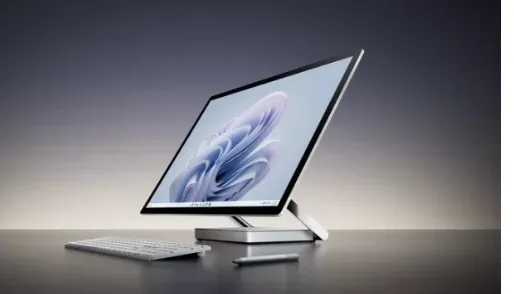
The Microsoft Surface Studio 2+ brings together a large touchscreen, powerful hardware, and an adjustable design in one workstation. It is designed for people who want a combination of computing performance and a more natural way to interact with their work.
Let's explore what makes this desktop interesting and how its features can support different professional requirements.
1. A Large Touchscreen That Changes the Way You Work
One of the most noticeable features is its 28-inch PixelSense touchscreen.
Unlike a conventional desktop monitor, this display allows users to interact directly with on-screen content. You can navigate applications, zoom into images, move objects, and work with supported creative tools using touch.
The screen offers a resolution of 4500 x 3000 pixels, providing detailed visuals for design work, presentations, photographs, and other content.
Its 3:2 aspect ratio also provides additional vertical workspace compared with many standard widescreen displays. This can be useful when working on documents, browsing long webpages, or reviewing designs.
For professionals who spend hours looking at detailed content, display quality and workspace can make everyday tasks more comfortable.
2. An Adjustable Design That Supports Different Working Styles
A workstation should adapt to the way people work.
The Surface Studio 2+ features a Zero Gravity Hinge that allows users to adjust the screen position. This makes it possible to move between a traditional desktop viewing position and a lower, more comfortable working angle.
This flexibility is particularly useful for creative professionals.
For example, a graphic designer can position the display at an angle that makes drawing and editing more natural. An architect can review a design from different positions, while a business professional can return the screen to a conventional desktop position for everyday tasks.
Instead of being limited to one fixed screen position, users can adjust the display according to their activity.
3. Performance for Demanding Professional Tasks
Creative and professional applications often require more computing power than basic everyday software.
This workstation features an 11th Generation Intel Core i7-11370H processor, 32GB DDR4 memory, and a 1TB solid-state drive.
Together, these specifications provide a strong hardware foundation for multitasking, productivity applications, and supported creative workloads.
The NVIDIA GeForce RTX 3060 Laptop GPU with 6GB GDDR6 memory also supports graphics-intensive applications.
This can be useful for professionals working with visual content, photo editing, 3D applications, and graphics software.
However, actual performance depends on the software being used and its system requirements.
4. A Useful Workstation for Designers and Creative Professionals
Creative work often involves more than simply using a mouse and keyboard.
Designers may need to sketch ideas, adjust layouts, review photographs, and make detailed changes to visual content.
The touchscreen provides another way to interact with these tasks.
The device is designed to work with the Surface Pen and supports Microsoft Pen Protocol. It is also compatible with Surface Dial for supported on-screen interactions.
These accessories can make certain creative workflows more convenient.
For example, a designer can use a compatible digital pen to make annotations, sketch concepts, or work with supported drawing applications.
The large display also provides enough room to view detailed projects without constantly switching between windows.
5. Connectivity That Supports a Flexible Workspace
Modern workstations need to connect with different devices and accessories.
The Surface Studio 2+ includes three USB-C ports with USB 4.0 and Thunderbolt 4 support, along with two USB-A 3.1 ports.
It also offers a 3.5mm headphone jack and Gigabit Ethernet connection.
For professionals who use multiple screens, the system supports up to three external 4K UHD displays at 60Hz through compatible connections and configurations.
Wi-Fi 6 and Bluetooth 5.1 provide wireless connectivity for supported networks and accessories.
These options make it easier to connect compatible peripherals and create a workspace that suits different professional needs.
6. Better Support for Meetings and Communication
Professional work frequently involves online meetings, client discussions, and team collaboration.
The built-in 1080p front-facing camera supports video communication, while Windows Hello face authentication provides a convenient sign-in option.
The system also includes dual far-field studio microphones and stereo 2.1 speakers with Dolby Atmos support.
These features can support everyday video meetings, presentations, and communication activities without immediately requiring separate audio and camera equipment.
For professionals working with remote teams or international clients, having these features integrated into the workstation can help keep the desk organised.
7. Security and Software for Professional Use
Security is an important consideration for businesses and professionals handling work-related information.
The workstation includes a TPM 2.0 security processor and Windows Hello face sign-in.
These features support device security and convenient authentication.
It also comes with Windows 11 Pro and preloaded Microsoft 365 applications, providing access to familiar productivity tools, subject to the applicable software licensing and activation requirements.
For organisations, these features can support a more organised desktop computing environment.
8. Who Can Benefit from This All-in-One Desktop?
The combination of touchscreen interaction, adjustable positioning, and dedicated graphics makes this workstation suitable for several professional environments.
Graphic designers: The large touchscreen and compatible pen support can help with visual design, illustrations, and creative projects.
Architects and design professionals: The detailed display can make reviewing drawings, presentations, and visual concepts more convenient.
Business professionals: The large screen supports multitasking, document management, presentations, and video meetings.
Creative studios: Teams working with photography, visual content, and supported graphics applications can benefit from the combination of display quality and computing hardware.
Educational environments: The touchscreen can support demonstrations, visual presentations, and interactive learning activities.
The best fit depends on the software, performance requirements, and working style of each user.
9. What Should You Consider Before Choosing It?
Before selecting any professional workstation, consider how you plan to use it.
Think about the applications you regularly work with, the amount of memory required, your graphics needs, and the accessories you may want to connect.
Also consider the physical size of the 28-inch display and the available desk space.
If your work involves specialised 3D rendering, advanced video production, or newer demanding applications, check the software's hardware requirements before making a decision.
A workstation should match your actual workload rather than simply offer impressive specifications.
Conclusion
The Surface Studio 2+ offers a different approach to desktop computing by combining a high-resolution touchscreen, adjustable display design, dedicated graphics, and powerful hardware in one system.
Its biggest advantage is the way these features work together. Users can interact with content through touch, adjust the screen for different activities, connect compatible accessories, and manage everyday professional tasks from a single workstation.
For designers, creative professionals, and businesses looking for an all-in-one desktop experience, it offers an interesting combination of functionality and flexibility.
Ultimately, the right workstation is one that fits naturally into your workflow and helps turn everyday tasks into a more convenient and productive experience.