
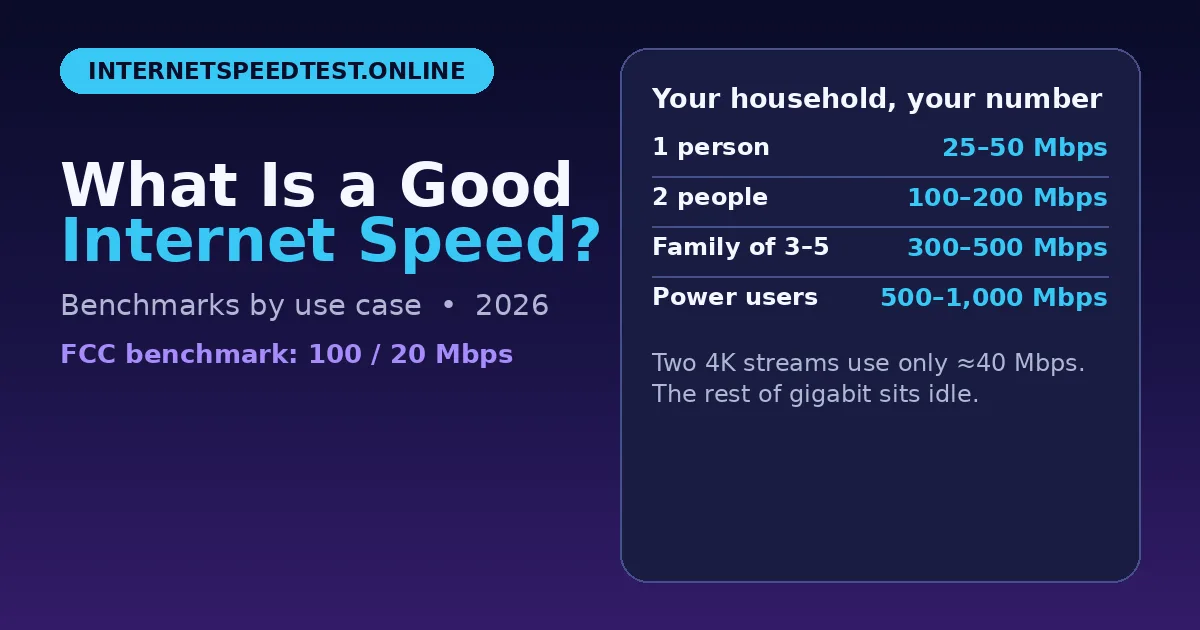
If you have ever asked what is a good internet speed, you already know the answer is not one number. A connection that feels perfect for one person can struggle in a busy household. It depends on how many people are online, what they are doing, and whether your speed is stable when it matters most.
Here is how to work that out, with real benchmarks by use case.
Think of your connection in two parts. Download speed is how fast data reaches you. It controls streaming, browsing, and downloads. Upload speed is how fast you send data out. It matters for video calls, live streaming, and sending large files. Most home plans are much faster on downloads than uploads, so video calls and cloud backups are often the first things to feel slow.
What counts as "good"?
There is no universal answer, but there are useful baselines. A single person browsing, emailing, and watching HD video is usually comfortable on 25 to 50 Mbps. Add 4K streaming, video calls, or online gaming, and that baseline rises quickly.
Your advertised speed is also a maximum, not a promise. Real-world speed changes with Wi-Fi distance, the age of your router, peak-time congestion, and how many devices are active at once. That is why a plan that looks fast on paper can still buffer at 8 p.m. when everyone is home. You can also run a
free internet speed test to check what you are actually getting, rather than what your plan promises.
Speed you need for common activities
Use these figures as a starting point for one activity at a time. If several things happen at once, add them together.
Streaming in HD: 5 to 8 Mbps. Streaming in 4K: 25 Mbps. Video calls: 3 to 8 Mbps. Online gaming: 5 to 10 Mbps. Browsing and social media: 5 to 10 Mbps. Downloading large files: The faster, the better.
Gaming is the most misunderstood case. A game itself does not need huge download speed. A stable 10 to 20 Mbps is often enough for smooth play, as long as latency is low. Ping, measured in milliseconds, matters more than raw speed. A ping under 50 ms feels responsive. Above 100 ms, delay becomes noticeable.
Upload speed is just as important for gaming if you stream your gameplay or talk on voice chat. Aim for at least 10 Mbps upload if you stream regularly. For competitive play, use a wired Ethernet connection where possible. Wi-Fi can add latency and dropouts that no download speed can fix.
Work from home
Working from home puts different demands on your connection than entertainment does. Video meetings need stable upload speed, low latency, and a connection that does not drop.
For one person on video calls, aim for at least 25 Mbps download and 10 Mbps upload. If two people are on calls at the same time, 50 Mbps download and 20 Mbps upload is a safer target. If you regularly share large files, use cloud apps, or back up work, a faster upload speed will save a lot of waiting.
A good router position also matters. If your home office is far from the router, a wired connection or a mesh Wi-Fi system can make more difference than upgrading your plan.
How much speed does a household need?
For a household, add up what happens at the busiest time of day, not the average. A family of four might have one person streaming 4K, one on a video call, one gaming, and one browsing at the same time. That combination can easily need 100 Mbps or more.
Use these household guides as a starting point: 1 to 2 people, light use: 50 to 100 Mbps. 3 to 4 people, mixed use: 100 to 300 Mbps. 5 or more people, heavy use: 300 to 500 Mbps. Larger households with many smart devices: 500 Mbps or more.
These are guides, not rules. If your home uses many smart TVs, security cameras, and connected devices, they all add background traffic, even when no one is actively using them.
Signs your speed is not enough
Buffering during video is the most obvious sign, but there are others. Video calls freezing, games lagging, large downloads taking hours, and pages loading slowly on one device while another works fine can all point to a speed or Wi-Fi problem.
Before you upgrade, check whether the problem is your plan or your setup. Test with a wired connection if you can. Move closer to the router. Restart your router. Close background downloads and cloud backups, then test again. If your speed jumps, your setup was the bottleneck, not your plan.
How to test and improve your speed
Test at different times of day, including the evening peak. Test on more than one device. Compare a wired result with a Wi-Fi result. A large gap between them usually means your Wi-Fi needs attention, not your internet plan.
To improve your connection, place your router centrally and away from thick walls and metal objects. Update your router firmware. Use the 5 GHz band for nearby devices and 2.4 GHz for devices farther away. Consider a mesh system for larger homes. If your wired speed is still far below your plan, contact your provider.
Frequently asked questions
Is 100 Mbps fast?
Yes, for most households. It supports 4K streaming, video calls, and gaming at the same time, as long as your Wi-Fi is stable. If you have many people online at once, 200 Mbps or more gives extra headroom.
Is 50 Mbps enough for working from home?
Usually yes, for one or two people. If you are on video calls all day and share large files, aim for higher upload speed rather than just a higher download number.
Is 300 Mbps overkill?
Not for a busy household. It is more than most single users need, but it helps when many devices, 4K streams, and smart home gadgets share the connection.
What is a good upload speed?
For most homes, 10 to 20 Mbps upload is enough. If you stream, create content, or back up large files, 25 Mbps or more is better.
How can I check if my speed is enough?
Compare your plan with what you actually do online. If streaming buffers, calls freeze, or games lag at peak times, your connection is struggling, even if a single test looks fast. For a deeper breakdown, see this good internet speed guide.
Final thoughts
Good internet speed is not about the biggest number you can buy. It is about having enough stable speed for everyone in your home, at the busiest time, for the things you actually do. Start with the benchmarks above, test your real speed, fix your Wi-Fi if needed, and upgrade only if your wired results still fall short.