In the dynamic environment of modern workplaces, especially within small businesses and entrepreneurial setups, internal role transitions are becoming more common. As businesses scale, reorganize, or adapt to changing demands, transferring employees from one role, department, or location to another often becomes essential. In such cases, having a well-structured Transfer Letter Template is not just good practice but a professional necessity.
At Winslow, we understand the importance of clarity, consistency, and compliance in HR communications. This article serves as a detailed guide for small business owners and self-employed professionals who want to formalize internal transfers with ease and confidence.
What is a Transfer Letter?
A transfer letter is an official document issued by an employer to an employee, indicating a change in their current role, location, department, or reporting manager. While it maintains the core employment contract, it updates specific elements to reflect the new responsibilities or job position.
It plays a critical role in setting clear expectations, avoiding miscommunication, and ensuring a seamless shift for the employee and the company.
Why Small Businesses Need a Transfer Letter Template
For entrepreneurs and small business owners, each team member often handles a variety of tasks. When roles evolve or when someone shifts internally, a Transfer Letter Template helps maintain structure and consistency across these changes. Here's why it's essential:
- Clarity in Communication: A well-drafted letter prevents ambiguity about new roles, locations, or reporting lines.
- Record-Keeping: HR documentation is vital for audits, employee records, and legal purposes.
- Employee Morale and Professionalism: When employees see formal communication for internal changes, it reinforces a sense of stability and structure.
- Operational Efficiency: Templates save time and reduce the effort needed to draft such letters from scratch every time.
Key Components of a Transfer Letter Template
If you're creating or customizing a Transfer Letter Template for your organization, include the following components:
- Date and Reference Number
- Helps with tracking and organization.
- Employee’s Name and Current Position
- Ensures clarity about whom the letter is addressing.
- Details of the New Role or Location
- Includes job title, new department, reporting manager, or new office location.
- Effective Date
- Clearly states when the transfer will take effect.
- Reasons for Transfer
- Optional, but adding a reason like project needs or skill alignment offers context.
- Terms and Conditions
- Mention if compensation, working hours, or responsibilities are changing.
- Contact for Queries
- HR or management contact for further clarifications.
- Authorization and Acceptance Section
- Signatures of both management and the employee to formalize the transition.
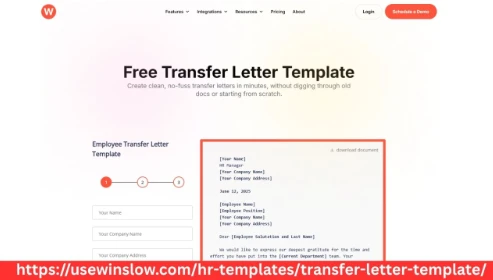
Sample Transfer Letter Template by Winslow
Below is a practical and customizable Transfer Letter Template curated by Winslow, designed especially for small businesses and startups:
[Winslow Letterhead or Company Logo]
Date: [Insert Date]
Reference No.: [Insert Reference No.]
To,
[Employee Name]
[Current Designation]
[Department Name]
[Company Name]
Subject: Transfer to [New Role/Location/Department]
Dear [Employee Name],
We are pleased to inform you that, effective from [Effective Date], you will be transferred from your current role of [Current Role] in the [Current Department] to the position of [New Role] in the [New Department/Location]. You will report to [New Supervisor/Manager].
This transfer is part of our ongoing efforts to align your skills with new business requirements and growth opportunities within Winslow. We believe your experience and commitment will significantly contribute to your new role.
Your compensation and benefits will remain unchanged, except as discussed and agreed. Please find attached the revised job responsibilities for your reference.
We request you to acknowledge this letter and confirm your acceptance of the transfer by signing below.
Should you have any queries, please feel free to reach out to our HR department at [Contact Details].
We appreciate your continued contribution to Winslow and look forward to your success in this new position.
Warm regards,
[Authorized Signatory]
[Designation]
Winslow
Employee Acknowledgment
I hereby acknowledge and accept the transfer as mentioned above.
Signature: ______________________
Name: __________________________
Date: ___________________________
Best Practices for Using a Transfer Letter Template
To ensure your Transfer Letter Template is used effectively:
- Customize Based on Situation: Each transfer may vary—whether it’s due to performance, project need, or internal restructuring. Make sure the content reflects the specific case.
- Use Consistent Formatting: Ensure the template matches other HR documents in terms of style, font, and tone.
- Store Securely: Retain digital and physical copies for both the employee and HR records.
- Ensure Legal Compliance: Verify that the letter aligns with labor laws or employment regulations applicable in your region.
Benefits of Using Winslow’s Transfer Letter Template
When you use a Transfer Letter Template from Winslow, you’re not just accessing a document—you’re tapping into a structured HR workflow designed for small business agility. Here’s what makes Winslow templates stand out:
- Professional Layout: Clean, organized format ready to print or email.
- Editable Formats: Available in Word, PDF, and cloud-based versions.
- Guided Instructions: Tooltips and notes to help you fill out the form correctly.
- Legal-Friendly: Created with general HR and legal standards in mind.
Final Thoughts
Managing internal role shifts doesn’t have to be complicated. With a thoughtfully designed Transfer Letter Template, small business owners and entrepreneurs can streamline transitions while maintaining professionalism and compliance. Whether you’re moving an employee to a new project, department, or office location, formalizing the shift helps align expectations and avoid confusion.
Winslow remains committed to empowering businesses with simple yet powerful HR tools. Use our expertly crafted templates to handle role changes confidently and efficiently.