In today’s hyper-connected world, internet access is no longer a luxury but a necessity. As society migrates further toward digital life—be it for education, communication, government services, commerce, or travel—ensuring equitable access to the online world is paramount. Yet, there remains a significant gap: Not everyone has a computer, let alone reliable internet at home. This is where the Internet Kiosk emerges as a powerful, practical, and cost-efficient solution for public spaces.
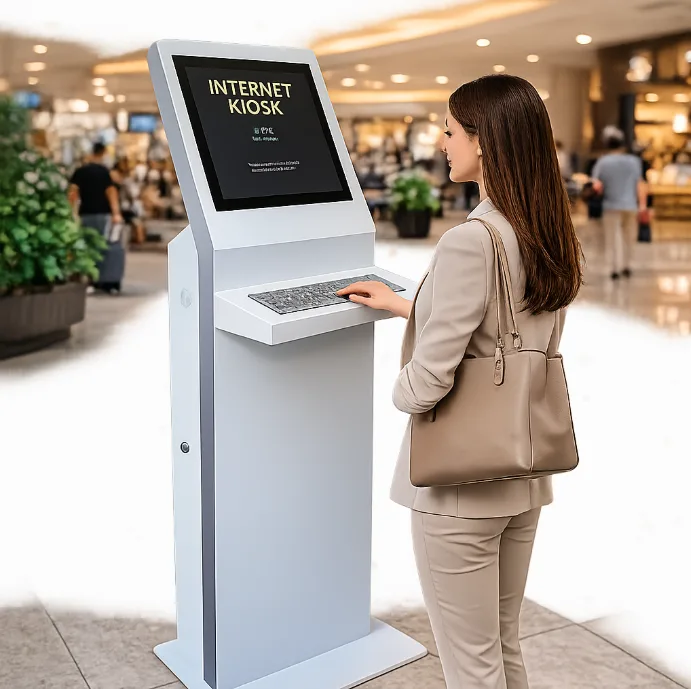
Across airports, libraries, shopping centers, universities, and government buildings, a new generation of kiosks is reshaping the public technology landscape. Notably, the Internet Kiosk with keyboard—a modern, self-contained workstation—delivers more than just web browsing; it empowers visitors with the tools required for meaningful participation in the digital age. At Shenzhen Seelinkin Intelligent Technology Co., Ltd., we are proud to lead the market in intelligent, robust, and secure Internet Kiosk solutions designed for public accessibility.
The Evolution of the Internet Kiosk
From Luxury to Essential Infrastructure
Once considered a futuristic convenience, the Internet Kiosk is now a mainstream fixture in cities and towns worldwide. Their journey began in the late 1990s with basic terminals in airports and hotels, offering slow dial-up access. Back then, their use was limited primarily to travelers needing to check email or print boarding passes. Over the years, broadband, secure payment processing, web services, and user authentication have all progressed. Today’s Internet Kiosk is a sophisticated, networked device—often running on industrial-grade hardware and loaded with features for security, accessibility, and remote management.
With more of life’s milestones—job applications, banking, social connection, government benefits—being online, public spaces have a social duty to provide accessible digital entry points. Even as smartphone penetration grows, there is enduring demand for anonymous, secure, multi-application public workstations.
Why a Public Internet Kiosk Still Matters
Bridging the Digital Divide
Despite great progress, digital inequality remains real. Many people lack devices, especially seniors, travelers, the underbanked, or communities with tight budgets. A public Internet Kiosk provides equalized access for all, removing device or data plan barriers.
Enhanced Functionality Over Phones and Touchscreens
Touchscreens are intuitive for short sessions, but serious tasks—form filling, document editing, government services—are easier with a real keyboard. An Internet Kiosk with a keyboard enables users to:
- Fill in long application forms accurately
- Create or edit resumes and documents with proper formatting
- Send emails or messages with speed and accuracy
- Access government or university portals requiring secure login and data entry
Privacy and Security
Unlike personal smartphones (which can be lost or stolen) or public Wi-Fi (often unsecured), a well-designed Internet Kiosk offers robust data protection, temporary user sessions, automatic logoff, browser sandboxing, and often the physical privacy that standing booths or enclosures afford. Shenzhen Seelinkin’s kiosks, for example, employ automatic clearing of browsing history, strong hardware security, and tamper-proof design.
Accessibility for All
From elderly users who struggle with touchscreens to people with disabilities who require accessible features (tactile keys, large print keyboards, headphones for audio output), the Internet Kiosk with a keyboard is designed for universal usability.
Key Features of Shenzhen Seelinkin’s Internet Kiosk with Keyboard
Rugged, Secure Hardware
A public device must withstand heavy use and potential vandalism. Shenzhen Seelinkin’s Internet Kiosk feature:
- Industrial-grade, spill-resistant keyboards
- Multi-functional touchscreens (with haptics for feedback)
- Anti-tamper steel enclosures
- Optional privacy panels, headphones, and webcam shutters
Flexible Software & Management
Modern kiosks aren’t just web browsers. They offer:
- Customizable user interfaces
- Multi-language support
- Access control (card readers, facial recognition, SMS verification)
- Secure remote update and monitoring
Payment and Revenue Model
Operators can choose to:
- Offer free use (public service, government, or library settings)
- Charge per minute (coin, note, or card acceptors, QR code payment)
- Integrate with printing or scanning services for added value
Content Control and Filtering
Administrators can block inappropriate sites, whitelist essential services, and manage GDPR or local privacy compliance from a remote dashboard.
Top Advantages of an Internet Kiosk with a Keyboard
1. Universal Accessibility and Inclusion
- Empowers individuals without personal devices, including tourists, people in transition, or economically disadvantaged users.
- Certified accessible designs cater to wheelchair users and those with limited vision or dexterity through large, physical keyboards and optional Braille overlays.
2. Productivity Enhancement
- Long sessions (job applications, research, resume writing) are more efficient and accurate with a full keyboard versus an on-screen one.
- Users can easily plug in USB drives, access cloud documents, or print hard copies at integrated printers.
3. Privacy and Anonymity
- Kiosk sessions don’t remain on a user’s personal device.
- Public locations and privacy screens reduce risks of shoulder surfing or data theft.
4. Security and Safety
- Automatic timeouts prevent abandoned sessions from being misused.
- Sandboxed browsers and applications prevent the spread of viruses.
- Sessions can be monitored, and the software can remotely wipe data if misuse is detected.
5. Cost-Efficiency for Operators
- Centralized management and low maintenance.
- Modular components mean simple repairs and upgrades.
- Options to monetize (ads, pay-per-use, additional services).
6. Extending Services in Remote or Temporary Locations
- Flexible, freestanding, or wall-mounted kiosks bring internet access to underserved areas, events, and community gatherings where installing PCs isn’t feasible.
Ideal Locations for Internet Kiosks
Libraries and Community Centers
- Provide free access for patrons, supporting education, research, and government service navigation.
Airports, Bus & Train Stations
- Serve travelers needing quick printing, communication, last-minute bookings, or check-ins.
Government Buildings and Hospitals
- Secure self-service points for filling forms, accessing patient portals, or requesting information.
Universities and Schools
- Overflow access during exam periods or IT lab renovations.
Retail and Shopping Centers
- Augment customer service (wayfinding, accessing digital coupons, or loyalty program signups).
Best Practices for Internet Kiosk Deployment
1. Ergonomic, Accessible Setup
- Counter height, screen angle, keyboard size, and spacing all impact use for people of all ages/abilities.
2. High Visibility and Safety
- Locate kiosks in well-trafficked yet semi-private spots to reduce vandalism without inhibiting confidential use.
3. Regular Maintenance and Software Updates
- Keep software current for security, add new features, and ensure reliable performance.
4. Clear User Instructions
- On-screen tutorials, multi-language menus, and visual cues reduce errors and support first-time users.
5. Support and Feedback Mechanisms
- Allow users to rate their experience and report issues instantly.
How Shenzhen Seelinkin Drives Innovation in Internet Kiosk Solutions
Customization
- Branding, language support, and service integration can be tailored for municipalities, universities, or commercial clients.
Remote Management
- Monitor device status, usage analytics, and health in real time from central dashboards.
Scalability
- From a single kiosk in a rural town to hundreds spread across a national library network, Shenzhen Seelinkin Intelligent Technology Co., Ltd.’s platform supports seamless expansion.
Eco-Friendly Options
- Power-saving features, recycled materials, and energy-efficient components for sustainability.
Future Trends in Internet Kiosks
Biometric Authentication
- Face, fingerprint, or iris scan options to enable secure and personalized access.
Touchless Interfaces
- Gesture controls and voice commands for safer interaction in a post-pandemic world.
Integration with Cloud Services
- Secure, direct links to government and business portals for e-government, e-health, e-learning and more.
Advanced Analytics
- Real-time data on usage patterns to help operators improve service and prioritize upgrades.
The value that an Internet Kiosk with a keyboard adds to public spaces cannot be overstated in our digital era. Whether providing vital access for underserved populations, boosting productivity, enhancing security, or supporting an organization’s service mandate, these devices are vital community assets.
Frequently Asked Questions (FAQ) about Internet Kiosk
1. Q: What is an Internet Kiosk with keyboard?
A: It’s a publicly accessible, networked computer terminal with a physical keyboard (and often, a touchscreen) for secure, productive use in communal spaces.
2. Q: How secure are Internet Kiosks?
A: Shenzhen Seelinkin kiosks employ encrypted sessions, automatic data wiping, anti-malware software, and robust physical security.
3. Q: What operating systems do these Internet Kiosks use?
A: Typically, Seelinkin kiosks run on a custom Linux or Windows-based system, optimized for kiosk mode and remote management.
4. Q: Can I print or scan documents from a kiosk?
A: Yes, many models integrate with printers and scanners for document handling and ID verification.
5. Q: Can the kiosks be customized for specific languages or needs?
A: Absolutely, with multi-language support, branding, and accessibility features available.
6. Q: Who is responsible for maintaining the kiosks?
A: Operators can either manage kiosks directly through Seelinkin’s dashboard or contract Seelinkin for all-inclusive support.
7. Q: How long does installation take?
A: Depending on scale and customization, a basic kiosk can be installed and operational within days.
8. Q: Can these kiosks generate revenue?
A: Yes—via pay-per-use access, advertising, printing fees, or as service hubs for affiliated offerings.
9. Q: Are they compliant with accessibility and privacy regulations?
A: Shenzhen Seelinkin ensures all kiosks meet local and international standards for both accessibility (ADA, etc.) and privacy/GDPR.
10. Q: How do Internet Kiosks handle user privacy?
A: By clearing browsing/session data at logoff, using secure browsers, and never storing user credentials.