
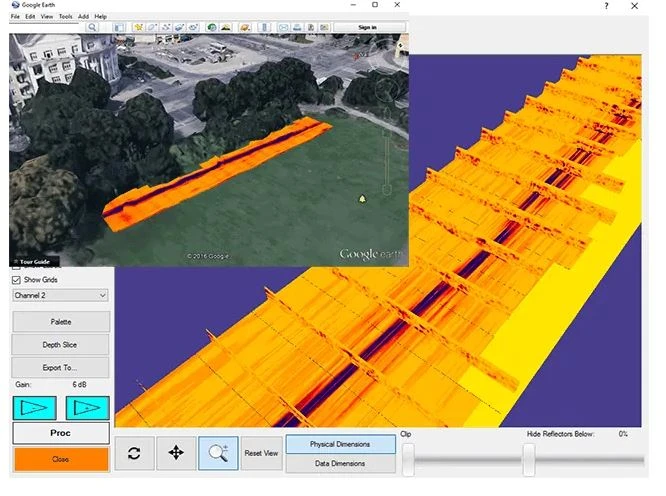
Understanding what lies beneath the Earth’s surface has long been a priority for geologists, engineers, environmental scientists, and construction professionals. From groundwater modeling to foundation design, subsurface data is critical for safety, resource management, and successful planning. With the rise of subsurface geology mapping software, professionals now have advanced digital tools that enable precise, data-driven visualization of underground structures.
This article explores what subsurface mapping software is, how it works, its applications, and what features users should look for when choosing a solution for their geological or engineering needs.
What Is Subsurface Geology Mapping Software?
Subsurface geology mapping software is a specialized tool designed to interpret, visualize, and model underground geological conditions based on field data. It integrates geophysical surveys, borehole logs, soil samples, and sensor inputs to generate 2D or 3D representations of subterranean formations.
These tools help users:
- Analyze soil layers and rock types
- Identify faults, folds, and structural features
- Map aquifers, contamination plumes, or mineral deposits
- Model subsurface properties like porosity and density
- Plan excavation, drilling, or tunneling projects
Unlike traditional paper maps or hand-drawn cross-sections, modern mapping software offers dynamic, interactive, and multi-dimensional insights into complex underground systems.
Key Components of Subsurface Mapping
Mapping what lies underground requires combining different types of data and techniques:
✅ Borehole and Core Log Data
Drill logs provide vertical information about soil and rock layers, including grain size, mineral composition, and moisture content.
✅ Geophysical Survey Data
Techniques such as ground-penetrating radar (GPR), seismic refraction, resistivity, and magnetics contribute broad-area imaging and depth estimates.
✅ GIS and Coordinate Systems
Geographic Information Systems (GIS) ensure accurate geolocation and enable overlaying of surface data with subsurface findings.
✅ Stratigraphic Modeling
Software algorithms interpret geological strata, helping delineate boundaries between layers, faults, and intrusions.
✅ Hydrogeologic Integration
Water table levels, aquifer boundaries, and hydraulic conductivity can be modeled in tandem with geology for environmental and civil applications.
How the Software Works
Subsurface geology mapping software typically follows this workflow:
- Data Import: Input borehole logs, survey readings, geophysical data, and surface maps.
- Data Processing: Algorithms interpolate between data points to create surfaces or volumes.
- Visualization: Users view 2D sections or 3D models showing lithology, formations, or fluid paths.
- Analysis Tools: Built-in functions allow measurements, cross-sections, volume calculations, and simulation modeling.
- Reporting and Export: Models and images can be exported for presentations, permitting, or integration with CAD or BIM systems.
These platforms often feature drag-and-drop interfaces, interactive cross-section tools, customizable color schemes, and time-sequenced modeling for project evolution.
Applications Across Industries
Subsurface mapping software plays a critical role in numerous fields:
🏗️ Construction and Civil Engineering
- Evaluating soil stability for foundations, retaining walls, and tunneling
- Identifying subsurface hazards such as sinkholes or voids
- Planning excavation and trenching work
⛏️ Mining and Mineral Exploration
- Locating ore bodies and estimating reserves
- Guiding drilling operations and resource planning
- Monitoring ground movement or collapse risk
🌍 Environmental Site Assessment
- Mapping contaminated zones, groundwater flow, or buried tanks
- Modeling remediation strategies
- Supporting regulatory compliance and permitting
🚜 Agriculture and Land Use
- Understanding subsurface drainage and soil structure
- Designing irrigation systems or nutrient pathways
🌊 Hydrogeology and Water Resource Management
- Mapping aquifers and recharge zones
- Predicting well yield and groundwater movement
- Evaluating risks of saltwater intrusion
Benefits of Using Subsurface Mapping Software
The shift from paper maps and manual cross-sections to digital tools offers numerous advantages:
✅ Improved Accuracy
Advanced interpolation techniques and high-resolution data integration minimize errors and provide detailed stratigraphic views.
✅ Time Efficiency
Automated data processing and visualization reduce manual labor and speed up project timelines.
✅ Scenario Modeling
Simulations can show how excavation, drilling, or dewatering may impact surrounding ground conditions.
✅ Data Integration
Combines multiple data sources—boreholes, sensors, satellite data, geophysical readings—into one cohesive model.
✅ Enhanced Communication
3D models and visualizations improve collaboration among geologists, engineers, clients, and regulatory agencies.
Features to Look for in Subsurface Mapping Software
When evaluating different software solutions, consider the following features:
- Multi-Data Input Support: Ability to import various file types including LAS, SHP, CSV, and DXF.
- 3D Visualization Tools: Real-time rotation, slicing, zooming, and fly-through capabilities.
- Geostatistical Modeling: Variograms, kriging, and trend analysis tools for predictive modeling.
- Custom Cross-Sections: Generate vertical or horizontal views aligned with project layouts.
- Geologic Rule Constraints: Ability to input user-defined stratigraphy rules for more accurate interpretations.
- Hydrogeological Extensions: Include flow modeling, contaminant transport, or water table simulations.
- Integration with GIS or CAD: Export to design platforms for real-world application.
- User Interface and Learning Curve: Look for intuitive dashboards and robust support resources.
Challenges and Limitations
Despite its capabilities, subsurface geology software comes with challenges:
- Data Gaps: Inaccurate or sparse input data can lead to faulty interpretations.
- High Learning Curve: Some platforms require specialized knowledge or training.
- Cost: Advanced software can be expensive and require licensing fees or subscriptions.
- Complex Ground Conditions: Fractured rock, heterogeneous soils, or variable water tables may reduce modeling accuracy.
To address these limitations, experienced geoscientists often combine software tools with field verification and additional testing.
The Future of Subsurface Mapping
Emerging technologies are expanding the capabilities of subsurface mapping even further:
- AI and Machine Learning: Algorithms that improve interpretation accuracy from historical data.
- Cloud-Based Platforms: Enabling remote access, real-time collaboration, and easier data sharing.
- AR and VR Integration: Providing immersive visualization for planning and presentations.
- Sensor Networks: Continuous ground monitoring feeding into dynamic geological models.
As urban density increases and environmental regulations tighten, the need for accurate, efficient subsurface mapping will only grow.
Conclusion: Seeing Beneath the Surface with Precision
Subsurface geology mapping software represents a major leap forward in how professionals understand and interact with the underground world. Whether it’s for engineering, exploration, or environmental safety, these tools help transform complex field data into actionable insights.
By choosing the right software solution and combining it with solid geological expertise, organizations can make better decisions, avoid costly mistakes, and design more sustainable, efficient projects.