In the world of CRM and cloud computing, data is everything. Whether you're managing customer relationships, tracking sales pipelines, or automating workflows, understanding how data is structured is crucial. This is where Salesforce ERD (Entity Relationship Diagrams) come into play.
If you're planning to enroll in salesforce courses in Pune or looking for practical salesforce classes in Pune, mastering ERDs is a fundamental skill that can set you apart in the job market.
Let’s explore what ERDs are, why they matter, and how they are used in Salesforce.
What is an ERD in Salesforce?
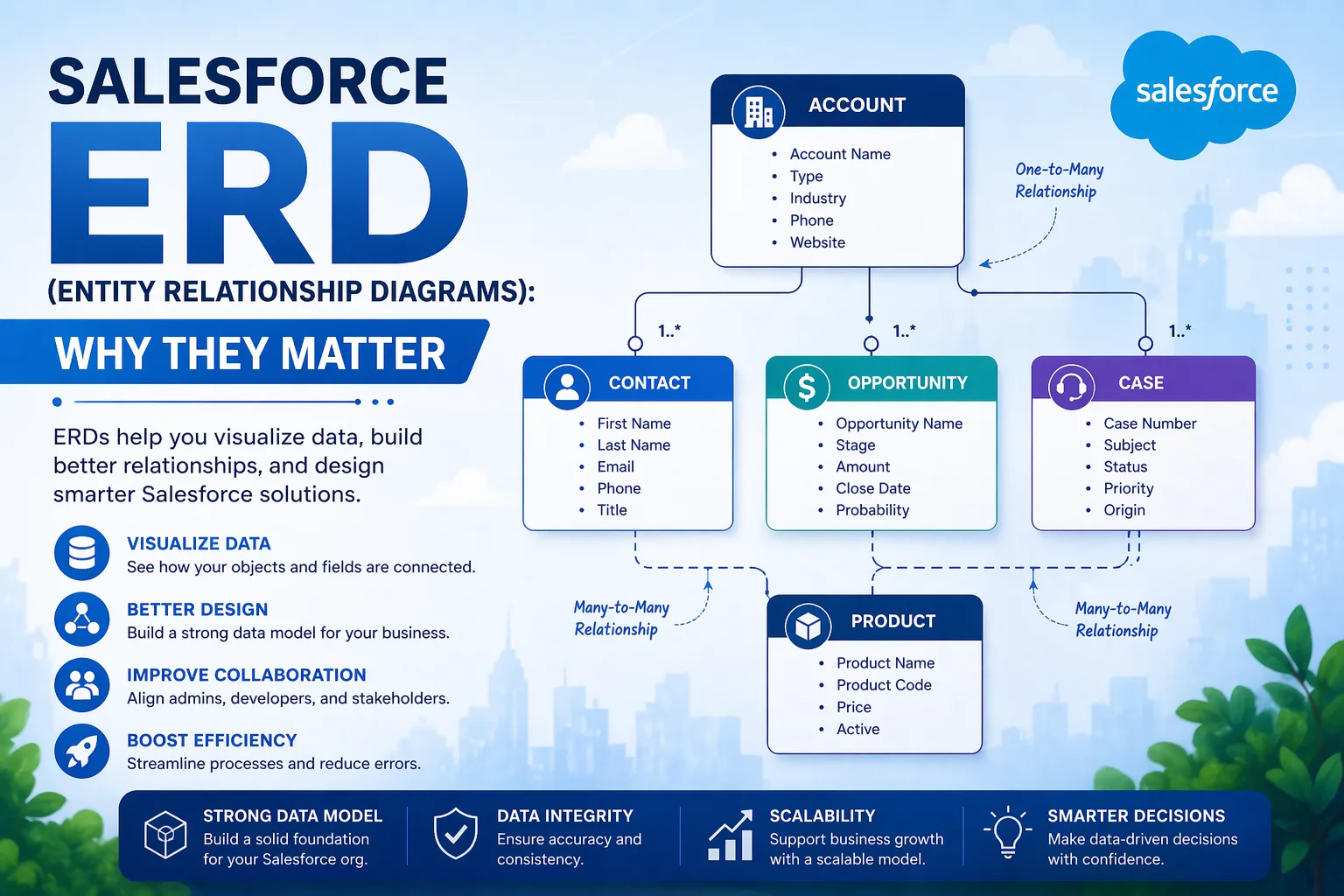
An Entity Relationship Diagram (ERD) is a visual representation of how data is organized within a system. It shows:
- Entities (Objects in Salesforce)
- Attributes (Fields)
- Relationships (Connections between objects)
In Salesforce, ERDs help you understand how standard and custom objects like:
- Accounts
- Contacts
- Opportunities
- Leads
are connected to each other.
Why ERDs Are Important in Salesforce
1. Clear Data Visualization
ERDs provide a clear picture of how data flows within the system. Instead of guessing relationships, you can visually map them.
2. Better Database Design
When creating custom objects, ERDs help ensure proper structure and avoid redundancy.
3. Improved Communication
Developers, admins, and stakeholders can easily understand the system using ERDs.
4. Faster Development
With a clear blueprint, developers can build applications more efficiently.
Key Components of Salesforce ERD
1. Entities (Objects)
These are the main components such as:
- Standard objects (Account, Contact, Lead)
- Custom objects (based on business needs)
2. Attributes (Fields)
Each object contains fields like:
- Name
- Phone number
- Status
3. Relationships
Relationships define how objects are connected. Salesforce supports:
- Lookup Relationship
- Master-Detail Relationship
- Many-to-Many Relationship
Types of Relationships in Salesforce ERD
1. Lookup Relationship
A loose connection between two objects.
Example: A contact linked to an account.
2. Master-Detail Relationship
A strong dependency where:
- Child records depend on parent
- Deleting parent deletes child
3. Many-to-Many Relationship
Created using a junction object.
Example: Students enrolled in multiple courses.
Real-World Example of Salesforce ERD
Imagine a sales system:
- Account → Represents a company
- Contact → Represents people in that company
- Opportunity → Represents deals
Relationships:
- One Account → Many Contacts
- One Account → Many Opportunities
This structure helps businesses track interactions and sales efficiently.
Benefits of Using ERDs in Salesforce
1. Simplifies Complex Data
Large datasets become easier to understand visually.
2. Reduces Errors
Proper planning prevents data duplication and inconsistencies.
3. Enhances Performance
Well-structured data improves system efficiency.
4. Supports Scalability
As your business grows, ERDs help maintain a clean data model.
ERD vs Data Schema in Salesforce
Many beginners confuse ERDs with schema builder. Here’s the difference:
FeatureERDSchema BuilderPurposeConceptual designVisual tool in SalesforceUsagePlanningImplementationFlexibilityHighPlatform-basedBoth are important and often used together.
Tools to Create Salesforce ERDs
To design ERDs, professionals use tools like:
- Salesforce Schema Builder
- Lucidchart
- Draw.io
- Visio
Most salesforce classes in Pune include hands-on practice with these tools.
How ERDs Help Salesforce Professionals
For Administrators
- Manage data efficiently
- Design better workflows
For Developers
- Write optimized code
- Understand object relationships
For Business Analysts
- Translate business requirements into data models
Learning ERDs in Salesforce Training
When you join salesforce courses in Pune, ERDs are usually covered in:
- Data modeling modules
- Real-time projects
- Case studies
Practical exposure helps you:
- Build real-world applications
- Understand business logic
- Prepare for certifications
Common Mistakes to Avoid
Overcomplicating Relationships
Keep the design simple and logical.
Ignoring Data Integrity
Always ensure relationships maintain consistency.
Not Documenting ERDs
Proper documentation is essential for team collaboration.
Career Opportunities After Learning ERDs
Understanding ERDs opens doors to multiple roles:
- Salesforce Administrator
- Salesforce Developer
- CRM Analyst
- Data Architect
With the right salesforce classes in Pune, you can build strong foundational skills and advance quickly in your career.
Future of Data Modeling in Salesforce
With advancements in AI and automation:
- Data models are becoming more dynamic
- Predictive analytics is improving
- Integration with external systems is increasing
ERDs will continue to play a critical role in designing scalable solutions.
Why You Should Learn ERDs Today
In a data-driven world, companies rely heavily on structured data. Without proper data relationships, even the best CRM systems fail.
Learning ERDs helps you:
- Think logically
- Design efficient systems
- Solve real business problems
That’s why top salesforce courses in Pune emphasize this concept as a core skill.
Conclusion
Salesforce ERDs are more than just diagrams—they are the foundation of effective data management. They help professionals visualize, design, and optimize data structures for better performance and scalability.
If you’re serious about building a career in Salesforce, enrolling in professional salesforce classes in Pune is a smart step. With hands-on training and real-world projects, you’ll gain the expertise needed to master ERDs and other critical concepts.
In the end, understanding how data connects is what makes you a true Salesforce expert.