Introduction
Plotter Cutter machines help businesses create accurate designs, stickers, labels, and other custom products. Printing shops, sign makers, and packaging businesses use these machines for different cutting tasks. They follow digital designs and cut materials into selected shapes and sizes. Choosing the right model can improve your daily work and support business growth. Explore the important features before selecting a machine.
What Is a Plotter Cutter and How Does It Work?
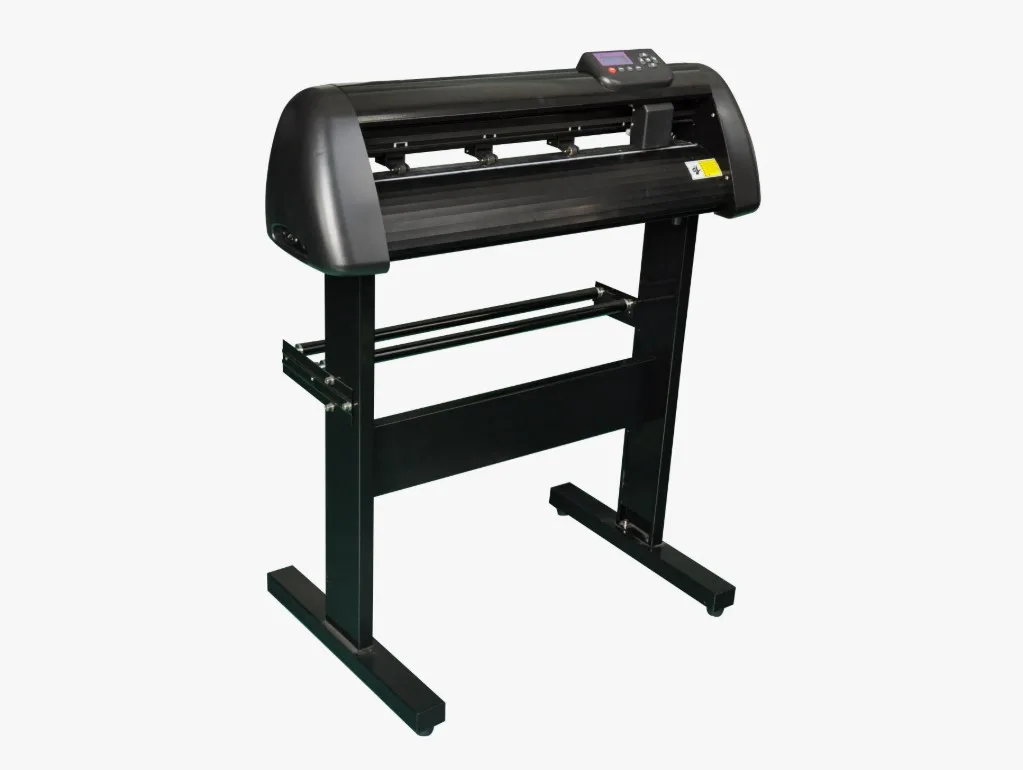
A Plotter Cutter is a machine that cuts designs from materials such as vinyl, paper, and compatible films. It uses a blade to follow paths from a digital design file. The operator prepares the artwork and sends it to the machine through compatible software. The machine then follows the design lines to create the required shape. Learn how this process works before choosing your equipment.
Understanding the Cutting Process
The cutting process starts with a digital design. The operator imports the design into suitable software and adjusts its size. The machine reads the cutting paths and moves its blade across the material. Correct blade depth, pressure, and speed help produce clean results. Test your settings on a small sample before starting a large order.
Common Materials and Uses
Many cutting plotters work with materials used in printing and design businesses. These may include vinyl, sticker sheets, paper, and certain protective films. Different models support different material types and thicknesses. Always check the manufacturer's specifications before using a new material. Choose a machine that supports the products you plan to make.
How to Choose the Best Plotter Cutter for Your Work
Choosing a Plotter Cutter requires more than comparing prices. You should consider cutting width, motor type, speed, accuracy, and software support. Your daily workload also affects the type of machine you need. A small shop may need different features from a busy production unit. Compare available models carefully before making a purchase.
Check the Cutting Width
Cutting width decides how large a design the machine can handle. A narrow machine may suit small stickers and labels. Wider models can support larger graphics and signage projects. Think about the size of your regular orders before choosing a machine. Select a cutting width that matches your production needs.
Understand Motor Types
Many cutting plotters use stepper or servo motors. Both motor types serve cutting tasks, but their performance can differ by model. Servo models may offer useful benefits for certain high-volume or detailed jobs. However, you should compare actual specifications instead of relying only on motor names. Ask for a product demonstration to understand the machine's performance.
Review Software Compatibility
Software plays an important role in the cutting process. It helps users prepare designs, adjust sizes, and send cutting instructions. Check supported file formats and computer requirements before buying. Simple software can also make daily work easier for new operators. Confirm software compatibility with your existing design tools.
Best Creasing Machines Pakistan and Their Role in Production
Best Creasing Machines Pakistan is a useful search term for businesses that need clean folds in paper and card products. Creasing machines create fold lines and help reduce cracks in suitable materials. They serve packaging companies, printing shops, and businesses that produce cards or brochures. Cutting and creasing equipment can support different stages of production. Compare machine functions to find equipment that suits your work.
What Does a Creasing Machine Do?
A creasing machine creates a line that guides a fold. This process helps users fold thicker paper and card more neatly. Businesses often use creasing equipment for packaging, invitations, folders, and printed materials. The right machine depends on material thickness and production volume. Check its working capacity before making a decision.
Cutting and Creasing Have Different Jobs
Cutting and creasing may work together, but they perform different tasks. A cutter removes material along a design path. A creasing tool creates a line for folding without cutting through the material. Some production setups use separate machines for these tasks. Understand your product requirements before choosing the right equipment.
Features to Compare Before Buying
When comparing the Best Creasing Machines Pakistan options, review practical features such as:
- Maximum working width
- Supported paper and card thickness
- Creasing depth and pressure controls
- Manual or automatic operation
- Ease of setup and maintenance
- Available spare parts and technical support
These details help you compare machines based on real production needs. Request full specifications before selecting a model.
Benefits of Using a Plotter Cutter in Business
A Plotter Cutter can help businesses manage custom cutting work with greater control. It follows digital designs and reduces the need for manual shape cutting. Operators can prepare repeat designs and produce similar results across multiple jobs. The actual benefits depend on the machine and correct operation. Explore its applications to understand how it may support your business.
Make Custom Stickers and Labels
Sticker businesses use cutting plotters to create logos, product labels, decorative stickers, and custom shapes. Digital designs allow operators to prepare different sizes for various orders. The machine follows the selected paths and cuts the material. Choose a model that supports your sticker materials and required cutting width.
Support Signage and Vinyl Graphics
Sign makers use vinyl cutters for lettering, shop signs, window graphics, and vehicle designs. These products often need clean edges and accurate shapes. A suitable cutter can help manage both simple and detailed designs. Check material compatibility and tracking performance before choosing a machine.
Improve Repeat Production
Digital cutting can help businesses repeat approved designs without preparing every shape by hand. Operators can save design files and reuse them for future orders. This process can make regular production easier to manage. Keep your artwork organized and test each new material before production.
How to Maintain Your Plotter Cutter for Better Results
Regular care helps keep a Plotter Cutter in good working condition. Dust, worn blades, and incorrect settings can affect cutting quality. A simple maintenance routine can help operators identify problems early. Follow the manufacturer's instructions to protect your equipment and maintain consistent results.
Clean the Machine Regularly
Dust and material pieces can collect around the cutting area and moving parts. Clean the machine according to its maintenance guide. Avoid using unsuitable liquids or tools near sensitive components. Keep the work area clean to support smooth operation.
Check Blades and Cutting Settings
A worn blade may create rough edges or incomplete cuts. Check blade condition when you notice changes in cutting quality. Also review blade depth, pressure, and speed for each material. Use test cuts to find suitable settings before starting a full job.
Follow Safe Operating Practices
Place the machine on a stable surface and use the correct power supply. Keep hands and loose objects away from moving parts during operation. Train operators to load materials and use software correctly. Follow the safety guidance in the product manual.
Conclusion
A Plotter Cutter can support businesses that produce stickers, labels, vinyl graphics, and custom designs. Before buying, compare cutting width, motor type, software, material support, and maintenance needs. Also review the Best Creasing Machines Pakistan options if your business handles folding and packaging work.
SkyCut Pakistan offers cutting plotter solutions for different business applications. Explore available models, compare their features, and ask for the latest product details. Contact SkyCut Pakistan to find equipment that matches your production needs and business goals.