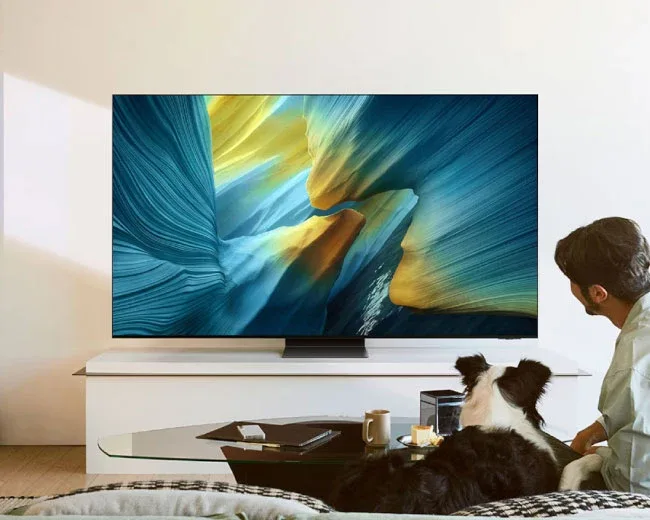
Home entertainment has become much more than simply switching on a television and watching whatever happens to be playing. People now enjoy streaming films, following live sports, watching online videos, playing games, and exploring content from different parts of the world. A television that brings these activities together can make everyday relaxation more convenient and enjoyable.
With improvements in display technology and internet connectivity, modern televisions offer features that were difficult to imagine a few years ago. Viewers can access entertainment applications, connect external devices, adjust picture settings, and enjoy different types of content from a single screen.
A Samsung smart TV offers a range of these modern entertainment possibilities, depending on the model and its specifications. However, choosing the right television requires more than looking at its design or screen size. Understanding its features, practical benefits, and suitability for your room can help you make a decision that provides lasting value.
Bring Different Entertainment Choices Together
One of the most useful features of a modern television is the ability to access online entertainment without relying entirely on external equipment.
Traditional televisions mainly depend on broadcast channels, cable connections, or satellite services. Connected televisions provide additional options by allowing viewers to access supported applications through the internet.
For example, you might want to watch a comedy after dinner, follow a live sporting event on the weekend, or enjoy a documentary during your free time. Online entertainment services make it possible to explore different types of content without changing the television itself.
Samsung uses its Tizen operating system on supported television models. This software provides the main interface for navigating menus, opening applications, and accessing available features.
Think of it as a digital entertainment centre. Instead of keeping several separate devices for different activities, you can manage many viewing options through one screen.
Keep in mind that application availability depends on the model, region, and software version. Some streaming platforms also require individual subscriptions.
Experience More Detail Through Better Picture Quality
Picture quality can completely change the way people enjoy television. Clear images, natural colours, and balanced brightness make films and everyday programmes more comfortable to watch.
Samsung offers several display technologies across its product range. Depending on the series, buyers may find LED, QLED, OLED, and other display options.
Each technology has different characteristics. Some are designed to deliver bright pictures and vibrant colours, while others focus on producing deeper blacks and stronger contrast.
Resolution is another important consideration. Full HD and 4K are common choices, with 4K offering a higher number of picture points than Full HD.
Consider watching a travel programme showing mountains, beaches, and busy city streets. A detailed display can help reveal smaller visual elements, making the scenery more interesting to explore.
However, resolution alone does not determine the complete viewing experience. Brightness, contrast, colour reproduction, and the quality of the original video also play important roles.
For everyday buyers, the best approach is to compare the actual display specifications instead of choosing a television based on one impressive feature.
Find a Screen Size That Suits Your Lifestyle
The size of a television affects both its appearance and viewing comfort. A screen should fit naturally into the room while providing a satisfying experience for everyone watching.
For smaller bedrooms or compact spaces, a modest screen may be sufficient. Larger family rooms can accommodate bigger displays, particularly when viewers sit farther away.
A Samsung 55 inch smart TV may appeal to households looking for a spacious viewing experience for movies, sports, and family entertainment. Its screen size can provide an engaging experience in a suitably sized room without requiring an extremely large television.
Before purchasing, measure the available space and consider the distance between the seating area and the screen.
Also think about where the television will be placed. Wall mounting can create a clean appearance and free up furniture space, while a TV unit may offer additional room for accessories and connected devices.
One useful tip is to check the television's complete dimensions, including its frame and stand, rather than relying only on the advertised screen measurement.
Make Everyday Activities Easier with Smart Controls
Convenience is an important part of a good entertainment experience. A television should allow users to find their favourite content without spending too much time navigating menus.
Modern Samsung models provide different smart functions designed to simplify everyday operation. These may include organised application menus, personalised content suggestions, and convenient settings.
Selected models also support voice-related controls. Depending on the available features, users may be able to search for programmes or perform certain actions through voice commands.
Imagine having several people in your home who enjoy different types of entertainment. One person prefers movies, another follows sports, and someone else enjoys online videos. Easy navigation can help everyone access their preferred content without unnecessary confusion.
The available controls and supported languages vary between models and regions, so checking the product details is worthwhile.
Enjoy Movies with More Comfortable Viewing Settings
Watching a movie at home can be a relaxing experience, especially when the television displays scenes with suitable brightness and natural colours.
Different types of content benefit from different picture settings. A bright animated film, a dark thriller, and a live football match do not necessarily look their best with identical adjustments.
Many modern televisions provide picture presets that help viewers adjust the screen for particular activities.
For example, a movie setting may aim to create a more cinema-like appearance, while a sports setting may adjust the picture for fast-moving scenes.
You can also adjust brightness to suit the lighting in your room. A television used during sunny afternoons may require different settings from one used for evening entertainment.
These small adjustments can make a noticeable difference without requiring advanced technical knowledge.
Give Equal Attention to Audio Quality
A television's sound is just as important as its picture. Clear dialogue helps viewers understand conversations, while balanced audio makes background music and sound effects more enjoyable.
Modern Samsung televisions include built-in speakers, but the audio performance varies between models.
Some models offer additional sound features designed to improve dialogue or create a more immersive experience. Nevertheless, slim television designs can limit the space available for larger speakers.
If you enjoy action movies, music programmes, or gaming, an external soundbar may be worth considering.
A soundbar is a separate speaker system that can provide fuller sound than many built-in television speakers. It is also a convenient option for people who do not want a complicated arrangement of multiple speakers.
Before buying an audio accessory, check whether it is compatible with your television and supports the connections you need.
Connect Your Favourite Devices Easily
A television becomes more versatile when it can connect with other devices around the home.
Depending on the model, Samsung televisions may include HDMI and USB ports, along with wireless connectivity options such as Wi-Fi and Bluetooth.
Each connection has a different purpose:
- HDMI connections: Useful for gaming consoles, media players, and compatible audio equipment.
- USB ports: Allow supported external storage devices to be connected for compatible media playback.
- Wi-Fi: Provides internet access for streaming applications and online services.
- Bluetooth: Helps connect compatible wireless headphones, speakers, and accessories.
For example, someone who enjoys gaming can connect a console to the television using HDMI. A person who prefers watching late-night programmes privately may use compatible wireless headphones.
Before purchasing, consider the devices you already own and check whether the television provides the necessary connections.
Explore Gaming and Sports Features
A television can become a central entertainment screen for more than films and television programmes.
Gaming enthusiasts may use it to enjoy console games, while sports fans can follow live competitions and major events with family and friends.
For gaming, certain specifications deserve attention. Refresh rate, input lag, and supported gaming features can influence how responsive and smooth the experience feels.
Refresh rate describes how frequently the screen updates its picture. A higher supported refresh rate can make movement appear smoother when the content or game supports it.
Input lag refers to the delay between pressing a button on a controller and seeing the corresponding action on the screen. Lower input lag is generally better for responsive gameplay.
Samsung offers gaming-related features on selected models, but not every television provides the same capabilities.
Sports viewers should also consider picture handling and motion performance, particularly when watching fast-moving activities such as football, cricket, or racing.
Understand Energy Consumption Before Buying
A television may be used for several hours every day, making electricity consumption worth considering.
Energy use depends on several factors, including display technology, screen size, brightness, and viewing habits. Two televisions with similar screen sizes can still have different energy requirements.
A few simple habits can help manage consumption:
- Turn off the television when nobody is watching.
- Use comfortable brightness settings instead of keeping the screen unnecessarily bright.
- Explore built-in energy-saving options.
- Avoid leaving connected accessories running when they are not required.
- Review the product's energy information before making a purchase.
It is also useful to check the warranty, software support, and after-sales service arrangements.
A television should remain convenient to use over time, so considering these details can help you avoid unexpected difficulties later.
What Should You Check Before Making Your Purchase?
With so many models available, selecting a television can feel overwhelming. The easiest way to approach the decision is to identify your priorities first.
Here are some important points to review:
Room requirements: Check the available space, seating distance, and preferred installation style.
Display performance: Compare resolution, brightness, contrast, and screen technology.
Smart capabilities: Make sure the television supports the entertainment applications you regularly use.
Audio experience: Consider built-in speakers and the possibility of adding an external sound system.
Connectivity: Review HDMI ports, USB connections, Wi-Fi, and Bluetooth support.
Budget: Compare the features you actually need instead of paying more for functions that may rarely be used.
Warranty and assistance: Understand the warranty conditions and available customer support.
Exploring the television range at Shams Al Sahil can help buyers compare available choices and understand which features are worth considering for their homes.
Taking time to evaluate these details can make the final decision more practical and satisfying.
Frequently Asked Questions (FAQs)
1. What are the main benefits of a Samsung smart television?
It can provide access to supported streaming applications, internet-based entertainment, convenient navigation, and connectivity features. Available functions depend on the model.
2. Can I watch online streaming services on Samsung televisions?
Yes. Supported models provide access to compatible streaming applications through an internet connection. Some services require separate subscriptions.
3. Is a 55-inch television suitable for family entertainment?
A 55-inch screen can be a good option for family viewing, provided the room has enough space and the seating distance is comfortable.
4. Can I connect a soundbar to a Samsung television?
Yes. Compatible soundbars can generally be connected using supported audio connections, such as HDMI ARC or eARC on equipped models.
5. Do Samsung televisions support gaming consoles?
Yes. Compatible consoles can be connected through HDMI. Gaming performance and available features depend on the television's specifications.
Conclusion
A television can play an important role in bringing family entertainment together. Whether you enjoy watching movies, following sports, exploring online videos, or playing games, modern features can make these activities more convenient.
The key is to select a model that matches your everyday requirements. Screen size, picture quality, sound, internet connectivity, and additional features should all be considered before making a purchase.
Instead of choosing a television simply because it has the most impressive specifications, focus on the benefits that matter to you. A well-matched television can make ordinary evenings more entertaining and help create enjoyable viewing moments for the entire household.