
Running flash sales in nopCommerce can often feel overwhelming. You’ve got tight timing, inventory pressure, and the constant stress of setting the perfect promotional price, especially across hundreds of products.
But what if it could be simple?
Picture This:
- 50% off summer sandals at sunrise
- Buy-one-get-one free on party dresses at noon
- Unbeatable bundle deals on electronics at midnight
- Certain products at a fixed price for limited time and customer segment
- More controlled discounts for different customer segments
Flash Sales are powerful, as the name says “It comes and goes in a flash..”, and here’s an easier way to manage flash sales effectively in nopCommerce (and of course all other eCommerce platforms out there may pray we had this feature..).
These short, time-bound offers create urgency, drive traffic, and convert browsers into buyers faster.
This article explains step-by-step how you can effortlessly set up flash sales without writing a single line of code or manually editing product details.
What is Flash Sales?
Flash sales create a sense of urgency and exclusivity, significantly boosting customer interest and sales.
But if we talk about The Problem while setting up flash sales traditionally?
Traditionally, setting up flash sales in nopCommerce means:
- Editing product prices manually
- Juggling multiple discount rules
- Worrying about which discount takes priority
- Hoping it all works without conflicts
Why Is Flash Sale Better Than Traditional Discounts?
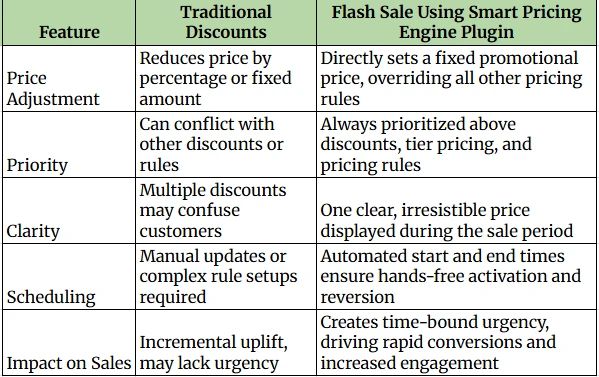
Unlike standard nopCommerce discounts (which reduce prices by % or a fixed amount), the Flash Sale directly overrides the product price, giving customers a clear, irresistible offer, without any confusion.
And the best part? It’s prioritized above all other pricing rules, so your Flash Sale always wins.
The Solution: From Smart Pricing Engine Plugin
With the Smart Pricing Engine plugin, you can now launch Flash Sales without writing a single line of code or manually updating product details.
This plugin introduces a Flash Sale strategy that allows you to:
- Set a fixed promotional price on selected products
- Override existing discounts, tier prices, and pricing rules
- Apply sales to entire products, categories or manufacturers
- Control start and end dates with precision
- Create limited-time urgency and clean pricing on the frontend
With this approach, flash sales become a strategic tool rather than a logistical headache. You get full control, a seamless admin experience, and a front‑end that converts.
Step‑by‑Step Guide to Run Flash Sales
Create a New Discount
Navigate to Admin → Promotions → Discounts in your nopCommerce admin panel and click “Add new”.
Assign Scope
Choose your flash sale’s reach by assigning the discount to specific Products, Categories, or Manufacturers, as needed.
Choose Flash Sale Strategy
Under Pricing strategy type, select Flash Sale. This transforms the discount into a time-limited, fixed-price promotion.
Set Fixed Override Price
Enter the Overridden Price, the exact sale price you want customers to see. This price will override base prices, product/ category/ manufacturer discounts, and tier pricing during the sale window.
Schedule Your Sale
Set Start and End Dates to automate the flash sale’s duration. Once expired, pricing reverts seamlessly. No manual intervention required.
Configure Requirements & Limitations
Use standard nopCommerce discount requirements to target specific customer roles, stores, or usage limits (e.g., only once per customer).
Save and Launch
After saving, the flash sale is active during the scheduled timeframe. It enforces the lowest price for selected items, while also allowing order‑level discounts (like $20 off $500+) to apply on top.
Ready for Your Next Flash Sale?
With the Smart Pricing Engine Plugin by NopAdvance, running flash sales becomes easy, efficient, and stress-free.
Automating the pricing and scheduling tasks allows you to concentrate on effectively promoting your sale and enhancing customer engagement.
Plugin also offers a full-featured 10-day free trial, giving you ample time to explore everything this powerful plugin can do, and discover how easily it can elevate your nopCommerce store.