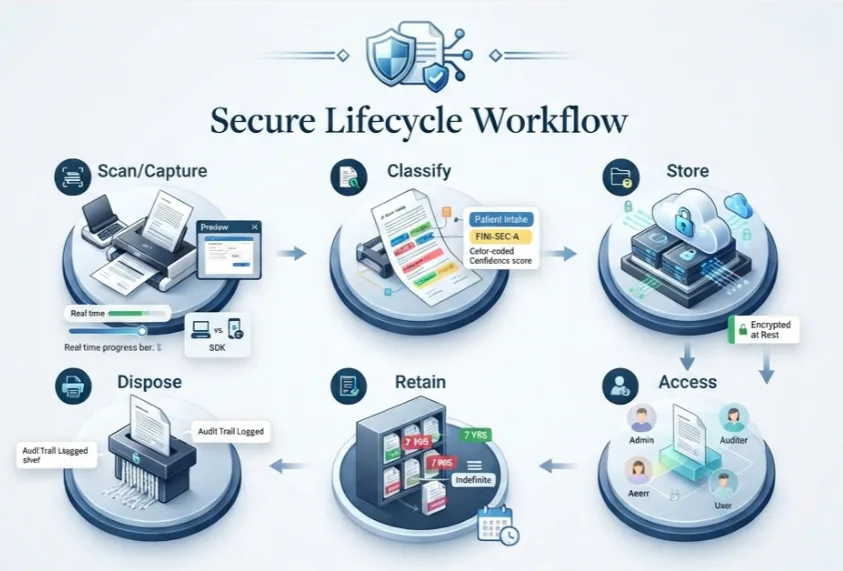
In healthcare, financial services, life sciences, insurance, and the public sector, documents serve as evidence, not just records. For example, a patient intake form, loan application, batch record, or signed contract may need to be presented years later to an auditor, regulator, or court. These documents must remain complete, unaltered, and accessible only to authorized individuals throughout their lifecycle.
Effective document management in regulated industries requires a reliable workflow, not just file storage. The process begins with scanning or uploading and concludes with secure destruction. This guide offers step-by-step instructions for operations, compliance, and IT leaders to build an effective workflow.
Key Takeaways
- Secure document management spans the full lifecycle, from capture to disposal, not just encrypted storage.
- Capture is often the weakest link. Deciding between an online document scanner and a document scanning SDK impacts your security from the outset.
- Automated classification simplifies enforcement of access controls, retention schedules, and audits.
- Role-based access, encryption of data in transit and at rest, and zero trust principles help limit risk if credentials or devices are compromised.
- Immutable audit trails and clear retention policies make your system not just secure, but also audit-ready.
- Workflow automation reduces risky manual steps, but you should log and control every automated action.
Why Document Security Is Different in Regulated Industries
Before designing a workflow, understand why regulated environments are especially challenging. In most businesses, security mistakes are costly. In regulated industries, they can also result in investigations, fines, and required disclosures.
The financial stakes are well documented. The IBM Cost of a Data Breach Report 2026 found that healthcare once again had the highest average breach cost of any industry, at $6.64 million per incident, while the average breach in the United States cost $11.5 million (HIPAA Journal summary).
Regulators require proof that your documents are confidential, accurate, and available when needed. The table below outlines how common frameworks set these expectations.
| Regulation | Primary Industries | Document Management Implications |
| HIPAA Security Rule | Healthcare providers, health plans, and business associates | Safeguards for electronic health information, including access controls, audit controls, and transmission security |
| SEC Rule 17a-4 | Broker-dealers | Electronic records preserved in a non-rewriteable, non-erasable format or with a complete, time-stamped audit trail |
| Sarbanes-Oxley Act (SOX) | Public companies and their auditors | Criminal penalties for destroying or falsifying records; audit workpapers retained for seven years under related SEC rules |
| FDA 21 CFR Part 11 | Pharmaceutical, biotech, and medical device companies | Secure, computer-generated, time-stamped audit trails and controls for electronic signatures |
| GDPR | Organizations processing personal data of individuals in the EU | Data minimization, storage limits, security measures, and 72-hour breach notification where required |
Regulators focus less on your software and more on your ability to demonstrate control over each document at every stage.
Step 1: Map Your Document Lifecycle Before Choosing Tools
Many organizations start with software, but it is more effective to begin with the documents themselves. Mapping the document lifecycle reveals where sensitive information enters, moves, and is most at risk.
For each major document type, trace these stages:
- Capture: how it arrives, whether on paper, by email, or by upload.
- Classification: how it is labeled by type, sensitivity, and owner.
- Storage: where it lives and how it is protected.
- Access and use: who can view, edit, share, or approve it.
- Retention: how long it must be kept and under which rule.
- Disposal: how and when it is securely destroyed.
This process often reveals issues such as scanned files left on shared drives or contracts stored in personal inboxes. Address these problems as a top priority.
Step 2: Secure the Point of Capture
After mapping the lifecycle, focus on the often-overlooked capture stage. Regulated organizations still receive signed forms, ID documents, and medical records on paper. How you digitize these files determines their trustworthiness from the start.
Choosing Between an Online Document Scanner and a Document Scanning SDK
Organizations typically choose between two options. An online document scanner is a browser tool that allows users to scan from a connected scanner or mobile camera with minimal setup. A document scanning SDK is a toolkit for developers to add scanning to applications, providing greater control over image processing and storage.
| Factor | Online Document Scanner | Document Scanning SDK |
| Deployment speed | Fast, with minimal IT effort | Slower, requires development work |
| Control over data flow | Defined largely by the provider | Defined by your own architecture |
| Integration depth | Typically via exports or standard connectors | Embedded directly in existing portals, case systems, or line-of-business apps |
| Customization | Limited to available settings | Extensive, including UI, validation rules, and metadata capture |
| Best fit | Distributed teams and moderate volumes | High-volume or deeply integrated regulated workflows |
Neither option is universally better. The right choice depends on your document volume, integration requirements, and compliance control needs.
Security Features to Require at Capture
Regardless of the method, certain features are essential. Encrypt files during transfer to storage, and verify that no unencrypted copies or temporary files remain on user devices. Image quality controls such as auto-cropping and deskewing are important, as unclear records can cause compliance issues. Capture details like user, time, and source during scanning to initiate the audit trail immediately.
Step 3: Classify and Index Documents Automatically
Once documents are securely captured, they require context. A scanned PDF with a generic file name is difficult to manage because systems cannot apply appropriate rules to unidentified documents.
Optical character recognition (OCR) makes scanned images searchable, allowing rules or AI-assisted tools to identify document types and extract key fields such as account numbers or patient IDs. Those fields then drive sensitivity labels, folder placement, access rights, and retention schedules.
Automation is important because manual tagging cannot scale as your organization grows. Maintain a human review queue for low-confidence results, especially for high-risk documents.
Step 4: Enforce Access Control and Encryption
Classification is effective only if it controls document access. This is where you implement your policy and where many audits are determined.
Implement role-based access control so employees access only the documents necessary for their roles. Add multi-factor authentication, encrypt documents in transit and at rest, and clearly define encryption key management responsibilities.
Apply Zero Trust Principles
Traditional security trusts anyone inside the network. Zero trust, as explained in NIST Special Publication 800-207, does not. It evaluates each access request based on user, device, and context. In practice, this means always verifying users, limiting sharing links, and reviewing permissions when roles change or employees leave.
Step 5: Build Audit Trails and Retention Into the Workflow
Strong access controls protect documents today, but regulators also require proof of past actions. Audit trails and proper retention provide this evidence.
An effective audit trail records who accessed, changed, shared, approved, or deleted each document, and when. Protect logs from tampering and store them separately from the documents. Version control should retain previous versions instead of overwriting them.
Retention is equally important. Match each document type to its applicable rules, automate disposal when the retention period ends, and support legal holds during litigation or investigations. Do not retain documents longer than necessary, as this increases breach risk and may violate privacy laws such as GDPR.
Step 6: Automate Routing and Approvals Without Losing Control
Once governance is established, automating your workflow increases efficiency. Manual actions such as downloading, emailing, or retyping information introduce risk. Automation enhances both security and productivity.
Use workflow automation tools to route documents to the right reviewers based on classification, start approval processes, and send reminders. Electronic signatures can replace printing and rescanning. In the United States, the ESIGN Act generally validates electronic signatures, but FDA-regulated companies must also comply with signature requirements in 21 CFR Part 11.
Automation must always adhere to governance. Each automated step should follow document access rules and log actions in the audit trail.
Common Mistakes to Avoid
Even well-designed plans can encounter problems if common mistakes are overlooked. Identifying these issues early helps prevent additional work later.
- Do not treat compliance as a one-time project. Regulations, systems, and teams change, so schedule regular access reviews and policy updates.
- Do not overlook the capture stage. A secure repository cannot fix documents that were exposed or damaged during scanning.
- Do not allow shadow workflows. If your approved process is too slow, employees will start using email and consumer file-sharing apps instead.
- Do not overlook third parties. Vendors and service providers who handle your documents need the same controls and contracts as your own teams.
- Do not skip user training. Even the best controls are effective only if users understand their importance and how to apply them.
Conclusion
Building a secure document management workflow in a regulated industry requires maintaining control and demonstrating it. You must manage every document from capture to disposal and provide auditors with evidence of that control.
Taking incremental steps is most effective. Map your document lifecycle, secure the capture stage with the appropriate online document scanner or scanning SDK, automate classification, and consistently enforce access, audit, and retention policies. Use workflow automation to reduce manual work while maintaining control.
When implemented effectively, compliance and efficiency go hand in hand. A strong workflow protects sensitive information, reduces administrative work, and enables teams to operate efficiently within regulatory requirements.