How the Best Digital Marketing Company in Jabalpur Uses Canva AI for Presentations and Social Media
From blank page to finished work
Ten years ago, making a decent looking flyer meant finding someone who knew Photoshop, waiting three days, and paying for every small change. Five years ago, drag and drop tools made it possible for anyone to move boxes around. Now you can type what you need and watch a full set of designs appear.
I was chatting last month with a founder who runs what many clients call the best digital marketing company in Jabalpur. She was not talking about hiring a bigger design team. She was talking about how her three-person crew now ships a client’s entire launch kit in an afternoon using Canva’s built-in assistant, Magic Design. No late-night revisions, no back-and-forth with freelancers, just a clear idea turned into usable files.
That shift is why Canva AI matters for marketers who are not designers.
What full design automation actually looks like
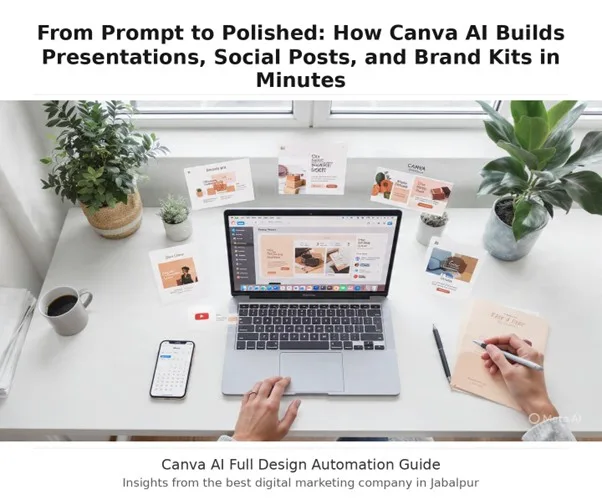
Magic Design is not a template picker. You write a short description, add a photo if you have one, and it returns a collection of complete designs that match your words.
For presentations, you type a topic like “quarterly update for a bakery” and it builds slides with an outline and content already placed, so you start with a story instead of an empty deck. For social and print, the same prompt can produce posters, cards, flyers, invitations, business cards, postcards, documents, and the usual social sizes like Instagram posts and stories, Facebook posts and covers, Pinterest pins, and YouTube thumbnails.
The part that saves the most time is brand application. Once you have a set of designs, you can apply your colors and fonts from your Brand Kit with one click and get a whole suite that looks like it came from the same studio. You can then edit text with Magic Write, resize for other platforms, and export as JPG, PNG, PDF, or PPTX without leaving the tab.
How this changes work for teams that are not design-led
- Ideas move faster. You stop debating layouts and start choosing between finished directions. That alone cuts a two-week cycle to a few hours.
- Consistency becomes automatic. Small businesses often have five different shades of blue across their posts. A one-click brand apply fixes that across presentations, social posts, and one-pagers at the same time.
- Non-designers get confidence. The tool handles spacing, hierarchy, and image choice, so a store manager or intern can produce work that looks professional without guessing.
- Repurposing is built in. A presentation deck can become a LinkedIn carousel, a reel cover, and a printable handout because the starting files share the same structure.
Real work, real results
Take a neighborhood tea shop in Indore that wanted to rebrand before festival season. The owner had a logo file, two brand colors, and photos taken on her phone. She opened Canva, typed “warm, minimal menu and social kit for a chai shop, Diwali offer,” and added three product shots.
In about 20 minutes she had:
- a six-page brand kit with logo usage, colors, and fonts stored for reuse
- a 12-slide pitch deck for wholesale partners, with talking points already drafted
- 18 social posts sized for Instagram, Facebook, and WhatsApp status, all using the same type and color system
She printed the menu the same day and scheduled two weeks of posts using Canva’s content planner. Foot traffic rose, but more importantly, she stopped paying for one-off designs every time a new offer came up.
That is the pattern I see most: the value is not one beautiful post, it is the ability to keep everything looking related when you are moving fast.
A quick walkthrough: making a social post without starting from scratch
- Open Canva and go to the search bar. Choose “Design for me” under Canva AI.
- Type a specific prompt: “Instagram post announcing weekend pottery workshop, earthy tones, include date and location placeholders.”
- Pick a style thumbnail you like, then click to open it.
- Click Brand Kit, apply your colors and fonts. Swap the placeholder photo with your own or generate one with Magic Media if you need a background texture.
- Use Magic Write to tighten the caption on the image, then duplicate the design and resize for Stories and Facebook with one click.
- Export or schedule directly.
The whole flow takes under five minutes once your brand kit is set. You are not designing from zero, you are editing a strong first draft.
Tips to get more from it in your marketing plan
- Write prompts like briefs. Instead of “sale post,” try “Instagram post for monsoon shoe sale, 20 percent off, friendly tone, include space for product photo.” Specific words give you closer first results and less editing.
- Build the brand kit first. Upload your logo, set two primary colors and two fonts, then lock them. Every future design you generate will snap to that system when you apply the kit.
- Create in sets, not singles. Ask for a presentation, then use the same prompt to generate social posts and a one-page flyer. Consistency across formats is what makes a campaign feel planned.
- Keep a prompt library. Save the exact sentences that worked well for product launches, hiring posts, and event invites. Your team can reuse them and get similar quality each time.
- Edit for truth, not just looks. Magic Design will write placeholder copy and choose stock images. Replace generic lines with your actual offer, price, and location. Add a real photo when you can. The design gets you 80 percent there, your details finish it.
- Use the presenter tools. If you generate a deck, add speaker notes with Magic Write and translate if you present to mixed-language audiences. The translate feature covers more than 100 languages and keeps formatting intact.
Where this fits in a sensible workflow
Canva AI does not replace thinking. It replaces the slow setup work that used to eat your day. You still decide the message, the offer, and the timing. The tool gives you a complete starting point for presentations, social posts, and brand assets so you can test ideas quickly and keep your look consistent.
For solo founders, it means you can look polished without hiring. For small teams, it means your marketer can ship a full campaign kit before lunch. For agencies, it means you spend client time on strategy and copy, not on nudging boxes into place.
If you have avoided design because it felt slow or expensive, try starting with one sentence about what you need. Let the tool build the first version, apply your brand, and edit from there. You will end up with work that feels professional, and you will get there in the time it used to take to find the right template.
FAQ
1. What can Canva AI actually generate?
Type a prompt and it builds full presentations with outlines, social posts for Instagram, Facebook, Pinterest, YouTube, plus flyers, posters, business cards, and videos. You can then apply your Brand Kit in one click.
2. Do I need design skills to use it?
No. Magic Design handles layout, spacing, images, and first-draft copy. You just edit the text, swap photos, and apply your colors and fonts.
3. How is this different from templates?
Templates start blank. Canva AI creates a complete set of designs from your words or a photo, already matched to your topic, and then lets you choose among multiple finished designs.
4. Can I keep everything on brand?
Yes. Upload your logo, colors, and fonts to Brand Kit once. Every design you generate can be updated to match instantly, across presentations and social formats.
5. Is the free plan enough?
You get limited Magic Design uses on free, about 10 total across presentations and video. For unlimited use, Brand Kit, one-click resize, and content scheduling, Canva Pro unlocks the full workflow.