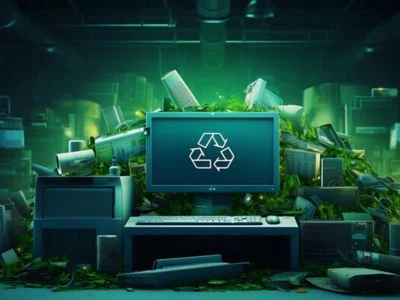
Remember that old computer sitting in your closet? The one that hasn’t been turned on since high school or that bulky desktop from your first job?
Now imagine millions of these machines piling up across the globe. E-waste is one of the fastest-growing waste streams on Earth. But what if that outdated gadget could have a second life? What if that broken laptop could help build a bridge to a greener planet?
Welcome to the world of computer recycling.
In 2025, recycling your old computer is not just a good idea—it’s essential. It’s the difference between a landfill overflowing with toxic metals and a circular economy where materials live on, again and again.
Let’s dive into how computer recycling works and why it matters more than ever today.
Why Is Computer Recycling Important?
Before we get into the process, let’s first understand why this matters in 2025:
- Environmental Protection: Computers contain hazardous materials like lead, mercury, and cadmium. Recycling keeps these toxins out of soil and water.
- Resource Recovery: Metals like gold, copper, and aluminum can be reused to make new products.
- Energy Savings: Recycling metals uses far less energy than mining new ones.
- Data Security: Proper recycling ensures that sensitive personal or corporate data doesn’t fall into the wrong hands.
- Compliance: Many countries have strict e-waste disposal laws in 2025.
The Computer Recycling Process: Step by Step
1. Collection
The journey starts with collection. Old computers are gathered through:
- Drop-off centers
- Retail store take-back programs
- Community e-waste drives
- Business IT equipment collections
Many recycling programs now offer home pickups to make it easier for people to recycle.
2. Sorting and Evaluation
Once collected, computers go to recycling facilities where they are sorted:
- Reusable: Working or repairable computers are set aside for refurbishment.
- Non-reusable: Completely broken or obsolete computers head for dismantling.
Before recycling, certified data destruction is often performed. This includes:
- Hard Drive Wiping using specialized software
- Hard Drive Shredding for physical destruction
3. Manual Dismantling
Technicians manually dismantle computers, separating parts like:
- Hard drives
- Circuit boards
- Cables
- Power supplies
- Plastic casings
- Metal parts
Why manual dismantling? Because it allows maximum recovery of valuable components.
4. Material Separation
After dismantling, the parts go through processes to separate materials by type:
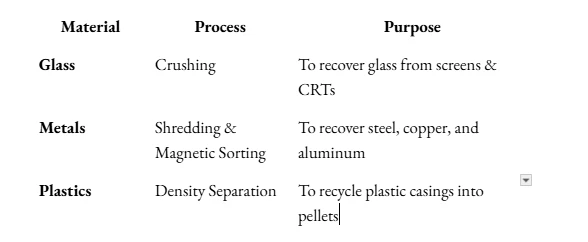
Advanced AI-driven robots in 2025 also help automate sorting for faster and cleaner separation.
5. Recovery of Valuable Materials
Special processes extract precious metals like:
- Gold
- Silver
- Palladium
Printed circuit boards (PCBs) are often sent to smelters or chemical treatment plants for recovery. Many recycling plants in 2025 use eco-friendly solvents for safer recovery.
6. Recycling or Refurbishing
- Recycling: Raw materials go to manufacturers to create new products like smartphones, cars, and even renewable energy components.
- Refurbishing: Working parts or whole computers are refurbished and sold as affordable options for students, small businesses, or communities in need.
What Happens to Data During Computer Recycling?
Data safety is critical. In 2025, professional recyclers follow international standards like:
- NAID (National Association for Information Destruction)
- R2 (Responsible Recycling Standard)
- ISO 27001 (Data Security Management)
These ensure that all sensitive data is wiped, overwritten, or physically destroyed before recycling or reuse.
For individuals, factory resetting devices before recycling is still recommended.
Challenges in Computer Recycling
Even in 2025, computer recycling faces some key challenges:
- Low Consumer Participation: Many people still hoard old gadgets at home.
- E-Waste Exporting: Some countries still illegally export e-waste to developing regions.
- Complex Materials: Modern computers use mixed materials, making separation harder.
- Cost of Recycling: It’s often cheaper to make new products than recycle old ones—unless supported by strong government policies.
Innovations in Computer Recycling (2025)
Technology has advanced the recycling process significantly:
- AI-Powered Sorting Robots: Faster and more accurate than humans at identifying components.
- Urban Mining Facilities: Specialized plants extracting rare earth metals directly from e-waste.
- Circular Design by Manufacturers: Companies are now designing computers with recycling in mind. Fewer screws, modular parts, and biodegradable casings make dismantling easier.
Even 3D printing filaments are now being made from recycled plastics from old computers.
How Can You Recycle Your Computer Responsibly?
Here’s what you can do:
- Backup Your Data: Transfer important files to a secure place.
- Erase Your Hard Drive: Use certified data-wiping software.
- Find Certified Recyclers: Look for certifications like R2 or e-Stewards.
- Donate If Possible: Many schools and NGOs accept refurbished computers.
- Check with Retailers: Many electronics stores offer trade-in or recycling programs.
- Participate in E-Waste Drives: Communities regularly host e-waste collection events.
Conclusion: Turning Old into New
That dusty computer in your storage room is not junk—it’s a collection of valuable materials and future opportunities. Recycling computers in 2025 is not just about reducing waste; it’s about building a circular future, where products live multiple lives.
Next time you decide to throw out a device, remember: It’s not the end of its story—it’s just the next chapter.
So, make the right choice. Recycle. Refurbish. Renew.